Websites

See Our Blogs

Explore insights on SEO, AI, and digital marketing strategies designed to help your business grow, stay visible, and adapt in a constantly evolving online landscape.

Beacon_Icon_resouse

Written by Sabrina Martinez, updated and revised by Sara Jokela 4/3/2025.

Are you afraid that putting pricing on your website could turn people away? Could having transparent pricing on your website hurt your business or decrease conversions? You may feel reserved about listing your prices and turning people away. Or you want to be upfront with them but aren’t sure how you should list your prices in a business directory listing.

Luckily for you, Beacon Media + Marketing founders Adrienne Wilkerson and Jennifer Christensen have the answers. After decades of experience in the marketing industry, they have valuable insight to the best marketing practices that can convert clients.

https://www.buzzsprout.com/1615987?client_source=large_player&iframe=true&referrer=https://www.buzzsprout.com/1615987.js?container_id=buzzsprout-large-player-1615987&player=large

So, should you put pricing on your website? Spoiler: yes, you should! Here’s a guide on if you should list your prices on your website and how you can do it.

Are you interested in the work that Beacon Media + Marketing has done? Learn more about what we can do for you!

Why Should Small Businesses List Their Prices?

List your prices illustration

Yes, website pricing might turn some people away, but then the calls you do get are more likely to be your ideal client. And listing your prices or giving them a range can be extremely beneficial. You can’t overshare the information about your prices. It’s better to be transparent and honest with your customer base. Including your prices in your business listings can enhance visibility and ensure accurate information for potential customers.

When looking for products and services online, many people are looking for the best deal that balances price and quality. People are looking for how much your products or services cost, and they don’t want to search or make a call to find that information.

Some main reasons to list your prices include:

  • Weeding out bad leads

  • Gaining customer trust from the start

  • Providing an answer on price for people already looking

When you list your prices, you’re breaking the barrier to entry by setting proper expectations for your clients. Giving them a price or range sets anticipation of getting your products or services. As long as you don’t lie about your website prices, you’re setting the right standards and gaining the client’s trust.

You may wonder if it’s a good idea to list your prices even if yours is above the average market value. Well, there are a few ways that you can list your prices to convey why your prices are higher and worth the investment, which we’ll get to later in this blog.

Listing your prices will turn away some potential customers. However, some people who expect lower prices may try to bargain with you or fight you on your prices. When you can set an expectation up front, it will mitigate the potential of a customer being upset with your pricing.

Similarly, when you can list your prices on your website, it avoids customers having to call and ask for prices. This can save your employees time, and you’ll get more qualified leads invested in your product or services even with the price expectation. Accurate business data is crucial in this process, as it ensures that all information presented is correct and up-to-date.

What Are the Benefits of Listing Your Prices on Your Website?
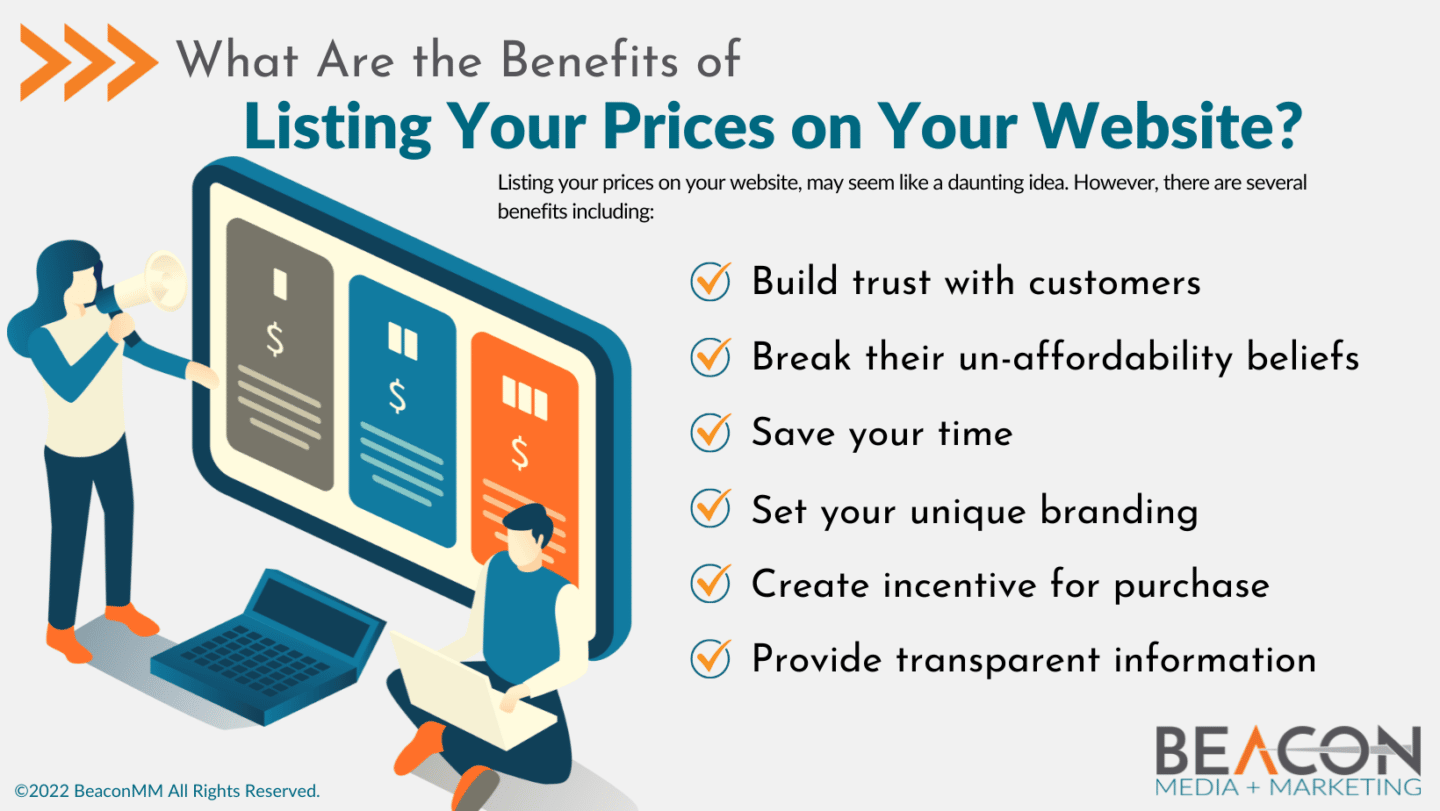
What Are the Benefits of Listing Your Prices on Your Website? Infographic

So, what are the benefits of listing your prices on your website? Before any business decision, you want to weigh the pros and cons to understand how this will impact your profitability. Understanding the local market dynamics is crucial when determining your pricing strategy. The following are some benefits of listing your prices online.

Listing your prices can help build trust with potential customers, as transparency is often appreciated. It also allows you to strategically position your pricing plans against competitors, which can enhance customer acquisition and overall business success.

1. Build Trust

Being upfront with your customers can build trust with them. Providing accurate business hours in your listings can further enhance this trust, as customers will appreciate knowing when they can reach you. They’ll appreciate you being transparent and not wasting their time by making them talk to a sales rep only to find out the price is too high for them or too low, making them feel like the product or service is cheap.

2. Have Unaffordability Beliefs

Some people believe that the cost of your service is too high if the price is not listed. Customers could be turned away because they believe they may be unable to afford it. So, listing your prices, especially if you offer a low monthly fee, can help convert clients.

3. Save Time

As stated previously, listing your prices online can save you time. Providing monthly reports can also enhance transparency and save time by delivering comprehensive data to clients automatically. Instead of having people call your office to ask about pricing, they’ll contact you about ordering your product or service. This allows more time to work on your business and spend less time with people who may not become customers. You may need to speak with them about your products or services if they have questions, but this can help get them more invested in making a purchase.

4. Set Your Branding for Local Businesses

A great thing about listing your prices is that it helps distinguish your brand. Including your business in a business directory can further enhance your branding by showcasing your pricing strategy within a competitive landscape. Are you a low-cost leader, or do your customers pay more for your unique products and services? Whatever you are, you can list your prices and explain why it’s that way, which helps with your branding.

5. Create Incentive

If a customer wants your products or services but can’t afford you, they could be incentivized to budget their money so they can work with you. Understanding the economic factors of the local population, such as median income and wealth status, can help tailor these incentives effectively. They will know exactly how much the product or service is so they can save and benefit from working with you.

6. Provide Information

Many people shop around to see the best price or value of the products and services they’re looking for. Optimizing your listings for local search can significantly enhance your visibility to consumers actively seeking services in their vicinity. Providing your price information helps them understand where you fall within the price range they’ve seen and why you’re listing your pricing at a certain amount compared to your competitors. You can even try gathering information to understand the buyer decision process better and plan your prices and marketing appropriately.

Are you interested in how a marketing agency can help boost your customer conversions? Contact Beacon Media + Marketing to see how we can help you transform your business!

Understanding Your Target Market and Competition

How to List Your Pricing Plans on Your Website Effectively

List prices on your website illustration

So, how do you list your prices in a way that converts customers? Depending on your product or service, you’ll have to list them differently. Especially if your product is unique and you want to explain why your prices may be higher than the average market price.

When managing a directory website, it’s crucial to set listing rates effectively by understanding market competition and adjusting pricing according to traffic levels and the value provided to customers.

Three ways to list your prices are through service pages, educational information, or why you’re unique. These three options can work individually or together to promote your products or services in the best way possible that will convert customers.

1. Service Pages

One of the best ways to help list and sell your products or services is to have a page on your website for the key things your business provides. A service page on your website that reflects your branding and gives in-depth information about that service or product is a great way to get people the information they’re looking for.

Effectively managing your service pages can also enhance your directory listing by creating a sense of exclusivity and providing added value to attract customers.

This is crucial for your paid advertising as the pages you link your advertising needs to be exactly what is listed on the ad. For example, if you are a med spa advertising forehead Botox, when people click on the ad, they should be taken to a service page that reflects that. If it doesn’t, then your ad can be flagged by Facebook or Google for being misleading and will change the effectiveness of the ad.

On your service page, you should provide the basic information that people would be looking for about your product or service. Then you can list your price with an explanation for why it’s priced a certain way. You can have a call-to-action (CTA) at the bottom, taking them to the page where they can access your products or services.

2. Educational Information

A great way to get people to buy your product or service is to educate them about it. If you have a niche service that people don’t typically know about, such as ozone therapy, you can explain what it is and why someone should have it.

Optimizing a Google Business Profile can also be an effective way to enhance local visibility and provide educational information about your services.

A great way to do this is by utilizing a service page on your website or providing blogs that answer people’s questions about it. It’s helpful to give people the information they can trust and become invested in why this could be good for them.

If you use a service page, you can add links or buttons to your blogs that provide more information about products or services your customers would be interested in. Then after adding the educational information, you can give them a CTA button to contact you for purchasing.

3. Why You’re Different

Telling your customers why you’re different from your competitors is one of the most important things you could do for your business. This helps establish a unique brand that reflects a particular group of people that identify with your products and services.

Leveraging local business visibility can further differentiate your business by making it more accessible and relatable to the local community.

In The Beacon Way podcast episode about listing your prices on your website, Adrienne Wilkerson details her buyer experience that got her invested in a unique product. She wanted to get dryer balls and was looking online for them and was going to buy the regular plastic ones until she came across wool ones. Upon further investigation, she discovered why this product was unique and how this identifies with her love for animals.

Telling your story about why your business is unique will help connect you to potential customers. You can explain what makes your business different, why you price your products or services a particular way, and how this can benefit your clients.

Being different from your competitors will help distinguish your brand and your pricing. When you’re upfront about your prices’ why, and how much they cost, your customers will be invested in your company. This will also help keep them as loyal customers.

How Can Beacon Media + Marketing Help You with Your Google Business Profile?

Beacon Media + Marketing is led by marketing experts that can take your business to the next level. If you’re still unsure if listing your prices is the right marketing move for your company or how to do it, we can help. We provide tailored solutions specifically designed for small businesses to address their unique challenges and needs.

We offer many services, including and , that can help bring your website to the next level. How your business is presented online is crucial for customer conversions. Our team knows how important this is, so we can work with you to make sure you’re making the best marketing decisions for your business to thrive, while effectively managing ongoing expenses.

If you’re interested in how we can help you make marketing decisions that will pay off, contact us so we can see exactly what you need to start your journey.

Are you ready to see your business thrive? Schedule your free consultation!
 

If you can use advertising to get people to your behavioral health website, does organic website traffic still matter? Yes! While getting people to your website organically can take more time and effort to do, you’ll reap many long-term benefits. 

Organic website traffic comes from unpaid methods like having an SEO-friendly website, ranking for a blog, clicking on an infographic, watching a posted video, or writing a social media post. This means that people find your website by the content you produce and use that as a way to visit your website. 

Getting people to click on your website page can be difficult. You have to think about a way to show up higher in search results and make your service appear the most appealing when someone searches for behavioral health services online. 

For behavioral health practices, organic content such as can be one of the best ways to reach new people and build you behavioral health marketing strategy. The following is a guide on how to increase organic website traffic for your behavioral health practice and how a marketing agency can help you increase your organic numbers. 

The Benefits of Investing in Building Your Organic Web Traffic 

While a paid ads strategy can be thought of as a short-term, fast method in gaining new leads, organic traffic often takes more time. The foundation of your organic web presence is your website, and an SEO strategy is one of the main ways you can increase traffic. 

If your website or one of your webpages appears at the top of the search engine results page, there is a much greater likelihood it will get clicked on. Very few people take the time to look at anything that doesn’t appear on the first page of the SERP for a Google search. 

Also, if you nail the right keywords in your content, you reach a very specific, targeted audience without paying an ad spend or worrying about behavioral health ad regulations. In fact, while many people do click on Google Ads when searching for a service, some people will skip ad results and go straight to the organic search results. 

If you’re trying to gain new clients, a strong organic website strategy gives your great visibility and is likely to convert visitors into clients. And if you’re worried that organic traffic results will take too long to be effective, you can combine organic web tactics with paid strategies to have the best chance at reaching people. 

Are you interested in what work Beacon Media + Marketing can do for your behavioral health practice? Learn more about what work we’ve done.


1. Understand On-Page SEO

Understanding on-page SEO can be one of the best ways to boost your website to the top of search results. On-page SEO is optimizing individual web pages to rank higher and increase organic traffic. This includes steps like: 

  • Ensuring that you do keyword research to identify the search volume and ranking difficulty for words or phrases you want to rank for
  • Creating engaging content that is relevant to your target audience is searching for 
  • Including click-worthy title tags and meta descriptions 
  • Paying extra attention to headers as they can help you rank for keywords, 
  • Boosting local SEO with location-specific keywords and location pages for multi-clinic practices. 

2. Invest Time in Blogging

Blogging can be one of the best ways to gain organic traffic to your website. You can use blogs to answer people’s questions regarding behavioral health. If you create blogs that answer people’s questions well, they’ll be ranked higher on the search results, and people will be more likely to click on them. 

Investing in long-form, SEO-friendly content can draw in website visitors and direct them to different pages if they’re interested in learning more. You can connect internal links or have CTAs that entice people to learn more about behavioral health and your clinic. You should update content as it becomes outdated or statistics change. 

3. Create an Internal Linking Strategy

An internal linking strategy will help keep people on your website once you get them there. This includes what links you add to your blogs. This kind of strategy means adding links in your blogs that either lead readers to another blog, a service page, or other relevant page on your website. These are different that outbound links, which are hyperlinks to someone else’s website. 

You can also implement an internal linking strategy for your website pages. This includes buttons that will allow them to schedule an appointment with you or link them to your service pages so they can see if you’re the right practice for them. 

4. Have a Backlink Strategy

Similarly, having a backlinking strategy will help get people to your site from other people’s websites. When other websites use your content and link back to your pages, it allows Google to see you as a reliable source and will bump the ranking of your website to the top. 

Since you can’t control if people use your website links, you can create a strategy for backlinking to your website. This can include writing press releases that announce your blog or having social media posts that link to your website. Having multiple outlets for backlinking will grow the popularity of your website and allow more people to reach your page organically. 

5. Ensure Good Website Performance

One of the most important factors of having good organic traffic with a low bounce rate is creating a website that is updated and has enticing content. Your website should be responsive with short load times, as many people will leave the page if it takes too long to load. It should also have an updated design that is appealing to the eye. 

Having good technical SEO will help push your website to the top of the search results. A great website is essential for gaining organic traffic and later leading to client conversions. 

Do you need help creating a website that is beautiful and will convert clients? See how our website design and development service can help you! 

6. Use Social Media

Social media can be an excellent tool for gaining organic traffic. Platforms such as Facebook and Instagram have built-in audiences that will be able to find your content. If you’re providing quality content such as educational videos, it will help spread your posts and gain new followers. 

You should include links to your website, specific pages, or blogs on your social media posts and bios. This will help with backlinking but also allow people to access your website. You can also participate in groups or forums that raise brand awareness and allow more people searching for behavioral health treatment to find you. 

7. Add to Print Materials

A traditional way to gain brand awareness and have people find your services is to add your website to print materials. This can include business cards that you hand out to people. 

You can also create educational pamphlets or cards that include behavioral health information. This will help people learn more, and also, you can direct them to your website to get more information about your services and how you can help them. 

8. Keep Online Listings Updated

One of the best ways to gain organic traffic is to have your behavioral health clinic listed with Google My Business. GMB works to help people find services in their area, so when someone searches “behavioral health clinic near me,” your practice will appear as an option for them. 

You should ensure that your information is up to date. This includes the address, hours, website link, and contact information. It’s important to note that if you don’t have a physical location for your behavioral health practice, you won’t be able to use GMB. 

9. Create Unique Infographics

Infographics are a great way to draw people to your website. They information that people may not know and will entice them to learn more about it. They can include statistics or steps for specific behavioral health treatment. 

They should be beautifully designed using your brand colors and have engaging written content. You can add them to your blogs, and it’ll act as another way for people to get brief information regarding the behavioral health topic with something that draws their eye. They can also be used as social posts that draw people into reading the blogs to read more. 

Infographics can also build organic traffic to your site by showing up in the images section of Google. People often recycle infographics instead of making their own. If someone finds your infographic relevant to what they’re writing about, they might use your infographic and link it back to your blog as a source – giving you a backlink which will boost SEO. 

How Can Outsourcing Your Marketing Help Your Behavioral Health Practice?

Outsourcing your marketing can be a great way to have the benefits of effective marketing without needing to put in the time and effort in it yourself. Behavioral health marketing requires many moving pieces that can take away from the time you’d use to help your clients. Having experts help you with your marketing will ensure that you have high-quality marketing that leads to client conversions. 

Beacon Media + Marketing can help your behavioral health practice thrive. We want you to focus on what you’re passionate about while we take care of your marketing. Our expert team can help you with multiple services such as blogging, social media, paid ads, website design and development, videos, and more. We’ll help you reach your goals while you provide exceptional services to people in your community. 

Are you ready to see how Beacon Media + Marketing can help your behavioral health practice? Schedule your free consultation! 

Originally published by Beacon Media + Marketing. Updated and revised by Jennifer Gracey, Web Content Strategist & Writer on 07/17/23.

As a mental health practice owner, gaining more clients and expanding your practice is a given. Actively and intentionally marketing your clinic is one of the best ways to reach (and connect with) your desired target audience. However, it’s important to know — being specific in your marketing strategy is the secret sauce to finding clients in your area. 

Craft a Solid Marketing Strategy

Crafting your marketing strategy to include local SEO will help you gain brand awareness and connect to those looking for mental health care in the vicinity. This of course, is in addition to what you’re likely already doing with referrals and therapist directory listings. Especially as more and more people field their search for services online. 

To acquire clients effectively, incorporating SEO-optimized content by integrating keywords into your organic and paid materials is a solid strategy. However, creating a cohesive forward looking plan can prove challenging due to the multitude of marketing tools and methods that demand time and financial investment.

So, how does one implement a unified marketing strategy across multiple locations to attract clients to all your clinics? Our comprehensive guide on strategizing local SEO for a multi-location mental health practice will help you answer this question and more.

Are you interested in how Beacon Media + Marketing can help your mental health practice? Learn how we’ve helped other mental health providers and clinics transform their businesses!

Why Include Local SEO In Your Marketing Strategy?

Knowing the significance of keyword optimization and incorporating SEO keywords that effectively communicate your services is just the beginning of attracting new clients online. In fact, one crucial factor you must not overlook is local SEO, a key component of your marketing strategy. By implementing local SEO, you can precisely target individuals searching for “mental health care in my area” and similar terms.

Local SEO revolves around your search intent and optimizing your website to achieve higher rankings on search engine results pages for individuals in your local vicinity in need of your services. Unlike national-level companies or online organizations that focus on broader search terms, a local SEO strategy hones in on location-specific keywords, allowing you to expand your business and attract highly qualified leads. Get ready to elevate your online presence and pave the way for success through engaging and active local SEO practices!

When you search using Google, the search engine collects relevant results by utilizing information about you, including your location. This means Google tailors the results for “near me” and searches related specifically to you (or the individual doing a search for a specific topic.)

To capture a significant search volume in your area, it is crucial for Google to understand the location of your mental health practice. You can ensure Google has this information by using keywords that indicate the services or search terms along with your location. Throughout your website, you can naturally incorporate this particular keyword or its variations, such as labeling headings as “Mental Health Clinic in San Diego.”

By incorporating local SEO into your marketing strategy, you ensure that people in the vicinity of your clinic can easily find it. This approach not only boosts brand awareness but also facilitates the conversion of a larger number of clients.

The Key Elements of a Multi-Location SEO Strategy for Mental Health Practices

Let’s look into how local SEO applies to a mental health practice with multiple locations. If your business operates practices in Los Angeles, Seattle, and Portland, how can you ensure that you rank for important keywords like “therapist near me” in all three locations? Below, we’ll explore key elements of local SEO for multi-location practices.

1. Location Website Pages

Location tracking illustration

Ensure each location has its own dedicated location page. This entails including a “locations” section in the main navigation and creating individual pages for each location you serve. You can also craft distinct pages for each location, providing tailored information about those clinics. By doing so, you actively enhance user experience and facilitate seamless navigation for your visitors.

2. Unique Content

Content illustration

Set up each location with unique content. Avoid creating location pages that are nearly identical but with a different location as the keyword. Google can detect this duplicate content, and your SEO ranking will be negatively impacted.

3. Correct Business Listings

Business Listing illustration

Make sure to accurately and comprehensively fill out all your online business listings, such as your Google Business Profile (formerly Google My Business), Yelp, Yahoo!, Bing, Facebook, etc. To rank on the coveted first page of Google, it’s vital that you actively maintain and regularly update your Google My Business profile.

4. No Virtual Locations

Local SEO with physical location illustration

Avoid including virtual locations you can serve in your Google Business Profile. Your Google Business Profile links directly to Google Maps, meaning you must adhere to the guidelines by utilizing a physical business address. While you can still indicate the area of your virtual mental health practice, tools such as Google Business Profile cannot be utilized. 

5. Follow SEO Best Practices

SEO illustration

Ensure that your marketing strategy incorporates essential SEO best practices such as strategically utilizing keywords in your blog’s header, title tag, and meta description. Additionally, include a well-crafted SEO linking strategy while keeping a cautious eye on avoiding excessive keyword usage. Remember, the algorithm prioritizes blogs that skillfully respond to users’ queries rather than those that excessively stuff keywords. So, aim to create content that best addresses their questions and vaults your blog to the top of search results.

Are you unsure how to follow the best SEO practices? Let our team at Beacon Media + Marketing worry about that!

6. Read Online Reviews

Online Reviews illustration

Pay attention to online reviews of your mental health practice. Consider implementing a referral reward program or asking patients to review your practice online. Peer reviews hold great value, as they provide candid experiences that can attract potential clients. Respond promptly to negative reviews and also consider reporting and removing any dishonest or malevolent reviews.

7. Have a Backlinking Strategy

Backlinking illustration

A well thought-out backlinking strategy can help you acquire local, high-quality links. By incorporating backlinks, you showcase your reliance on various resources like websites, web pages, or web directories for information. Think of backlinks as references, similar to citations, that not only boost your SEO strategy but also create a more engaging online presence.

8. Long-Form Content Strategy

Long Form Content illustration

Implementing a long-form content marketing strategy involves leveraging locally optimized keywords to rank for key terms in blogs. By crafting insightful and informative blog posts, you can effectively utilize this powerful marketing tool to enhance brand awareness and address individuals’ mental health inquiries. Moreover, integrating your clinic locations into these posts ensures that people seeking mental health care will easily find your services. Having a comprehensive library of information readily available establishes trust with potential clients and enables them to make informed decisions.

9. Utilize Social Media

Social Media illustration

Posting on social media can help you reach local users, even if it’s not directly related to SEO. Being active online allows you to connect with a wide audience and provide valuable information, such as educational content and details about your services. It also helps you showcase a personable side of yourself, which can build trust with potential clients. So, go ahead and engage your audience by sharing content on social media platforms!

10. Consider Google Ads

Google Ads illustration

If you’re facing difficulties ranking for keywords organically, why not give Google ads a try? While there are restrictions on the content of your advertisements if you’re not LegitScript certified, they still offer a fantastic opportunity to attract new clients. With Google Ads, you can propel your website to the top of search results, effectively converting potential clients into loyal customers.

How Can Beacon Media + Marketing Help?

After learning these tips, you might feel overwhelmed by the multitude of elements involved in crafting an effective marketing strategy. Managing the marketing efforts for one location alone can be challenging, let alone juggling marketing strategies for multiple locations. If you find yourself unsure of how to achieve your marketing goals independently, it may be time to consider outsourcing your marketing needs.

At Beacon Media + Marketing, we specialize in helping businesses like yours reach their marketing goals by employing a range of comprehensive services. We are dedicated to empowering your mental health practice and enabling you to focus on your real passion. Let us assist your clinics in thriving with our unbeatable marketing services.

Are you ready to see if Beacon Media + Marketing is the right fit to help you manage your multi-location clinic? Schedule a free consultation!

Your website is one of the most important factors to gain new clients. It’s essential to have a website that leaves a good impression, exuberates your brand, and allows potential clients to schedule an appointment with you easily. 

Your website should be the top-ranked result when people search for therapists in their area. And most of all, it should convert visitors into clients with engaging content that drives people to contact you.

 But how do you achieve that? With an SEO-optimized website, you’ll have headers and pages that allow people to learn about your practice and want to meet with you. 

It’s essential to have a fantastic website because while it’s not always first impression of your practice, it’s almost always the last. Whether someone clicks on a social media ad or lands on one of your blogs, most people will end up on your website before they make the decision to call and schedule a session.

 If your current website isn’t getting you the results you want and is making it hard to gain new clients, it’s time to refresh. Here is a guide on ten signs your mental health practice needs a new website. 

Want to know how we can help your mental health practice? Learn how we can help you! 

Why Does Your Mental Health Practice Need an Updated Website?

Nearly everyone tries searching for a mental health therapist online, making it crucial to have an online presence. However, this means that you need to be active on a few valuable platforms such as: 

  • Google My Business
  • Google ads
  • Instagram
  • Facebook
  • LinkedIn

These platforms allow you to be easily accessible to people and rank on the top of searches. It’s important to remember that you should be including your location as a part of your mental health marketing strategy as it will help rank you higher in location searches. 

Many people will take an extended amount of time searching for a therapist that best suits them. When your website is up to date, it gives potential clients the most accurate, up to date information about your practice. 

A modern, well-branded website will show clients that you’re professional and know what you’re doing. An updated site also has several technical benefits, ensuring that everything runs smoothly. 

10 Signs Your Mental Health Website Is Ready For a Refresh

Having a website that isn’t up to date can cause several problems for your clinic. It will make it hard for people to understand the mission and vision behind your practice. Also, potential clients will be turned away if they can’t get the information they need and can’t easily book an appointment. 

Here are ten signs that your mental health website needs a refresh. 

1. Your Website Is Unresponsive

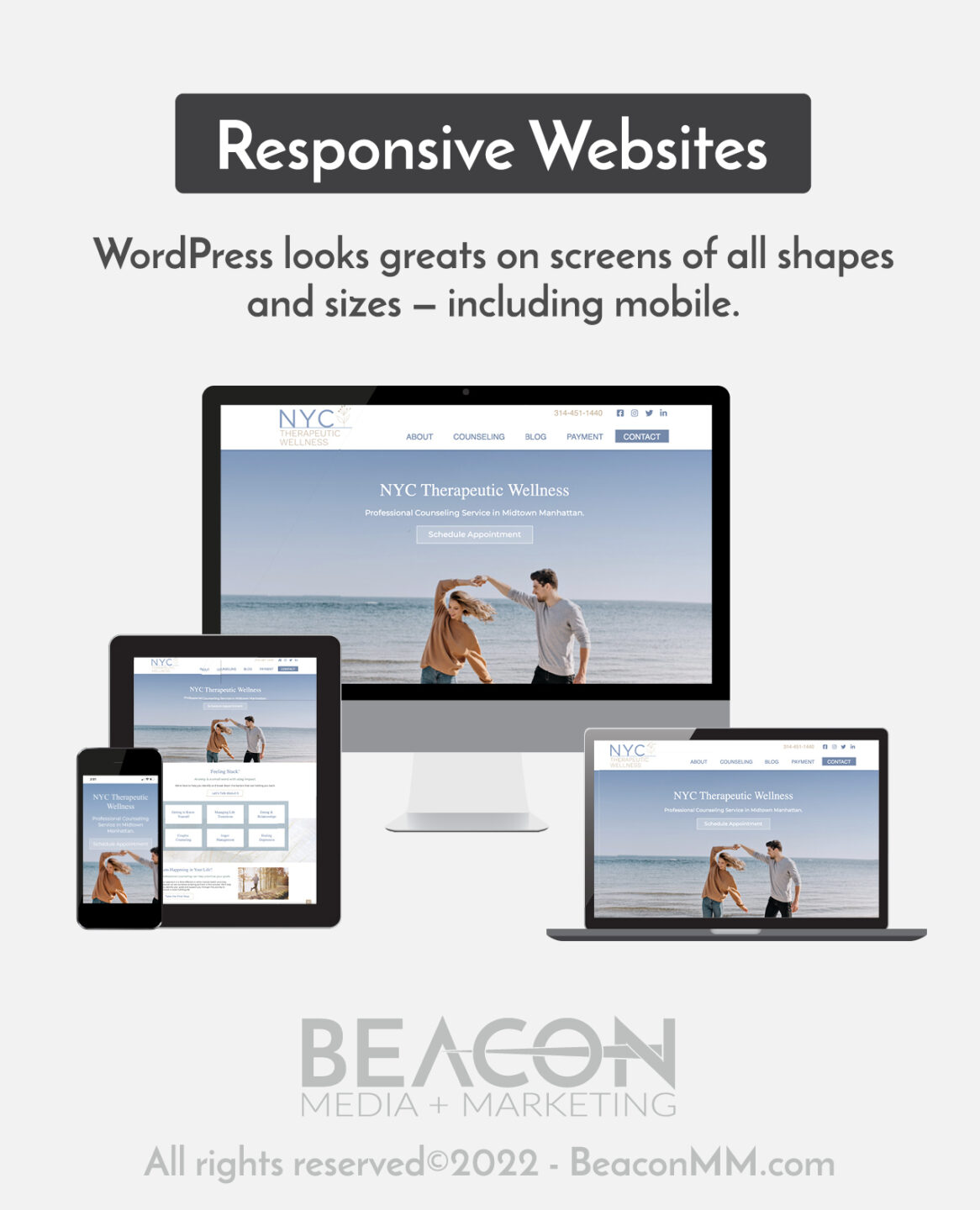
Responsive website graphic

One of the most significant signs that it’s time for a website refresh is when your site is not responsive or mobile-friendly. This is a major turn away for potential clients who are accessing your website on their phones. A responsive site starts with a web design that fits for a variety of screen sizes. This includes elements such as: 

  • Information that loads easily 
  • Large enough font sizes
  • Well-placed buttons and links 
  • A simple, clean design 
  • Limited pop-ups 
  • Easy-to-find information 

2. High Load Times

The load time of your website is a significant factor in if someone will stick around to view your content. In a world where everything is at our fingertips, many have become accustomed to the immediate delivery of their wants. When people wait for long periods, they can get frustrated and leave, leading to high bounce rates. 

With a new website that is designed to function quickly, you’ll be able to create faster load times that won’t turn people away. 

3. High Bounce Rate

Similar to high load times, your bounce rate is a significant indicator of low conversations and issues with your website. Bounce rates can be attributed to several factors. One common factor is having a website that is too cluttered with images, content, or ads, so you should keep in mind the design of your site. 

Another major factor has to do with the content on your page. If there isn’t something that catches their eye and engages them within the first few seconds, they’re likely to leave. Your website should include quality content that gives potential clients all of the information they need and a strong call-to-action (CTA) to keep them on your website longer and turn them into clients. 

4. Poor Content

To further emphasize bounce rates and low conversions, poor content is a significant indicator for when you need a website refresh. Your content is a combination of your titles, available information, weak CTAs, and lack of images, videos, and blogs. 

The content on your website should be engaging, catchy, and represent who you are. When you have these elements together, it creates a great impression on your clients and allows them to feel excited about the decision they’re making about choosing you as their mental healthcare provider. 

Do you need help with a great first impression? Learn more about how we can help! 

5. Poor Navigation

Your website is the center of all the information on you, your practice, and your clinic. If people are struggling to find the pages they need to learn more, they’ll likely leave. 

Your service pages and contact information should be readily available. Your website should have an engaging homepage that lets the potential client know who you are with buttons that allow them to schedule an appointment with you. Having a menu bar that will enable them to access other pages about your services is essential for creating a website with excellent navigation. 

6. Website Is Old or Outdated

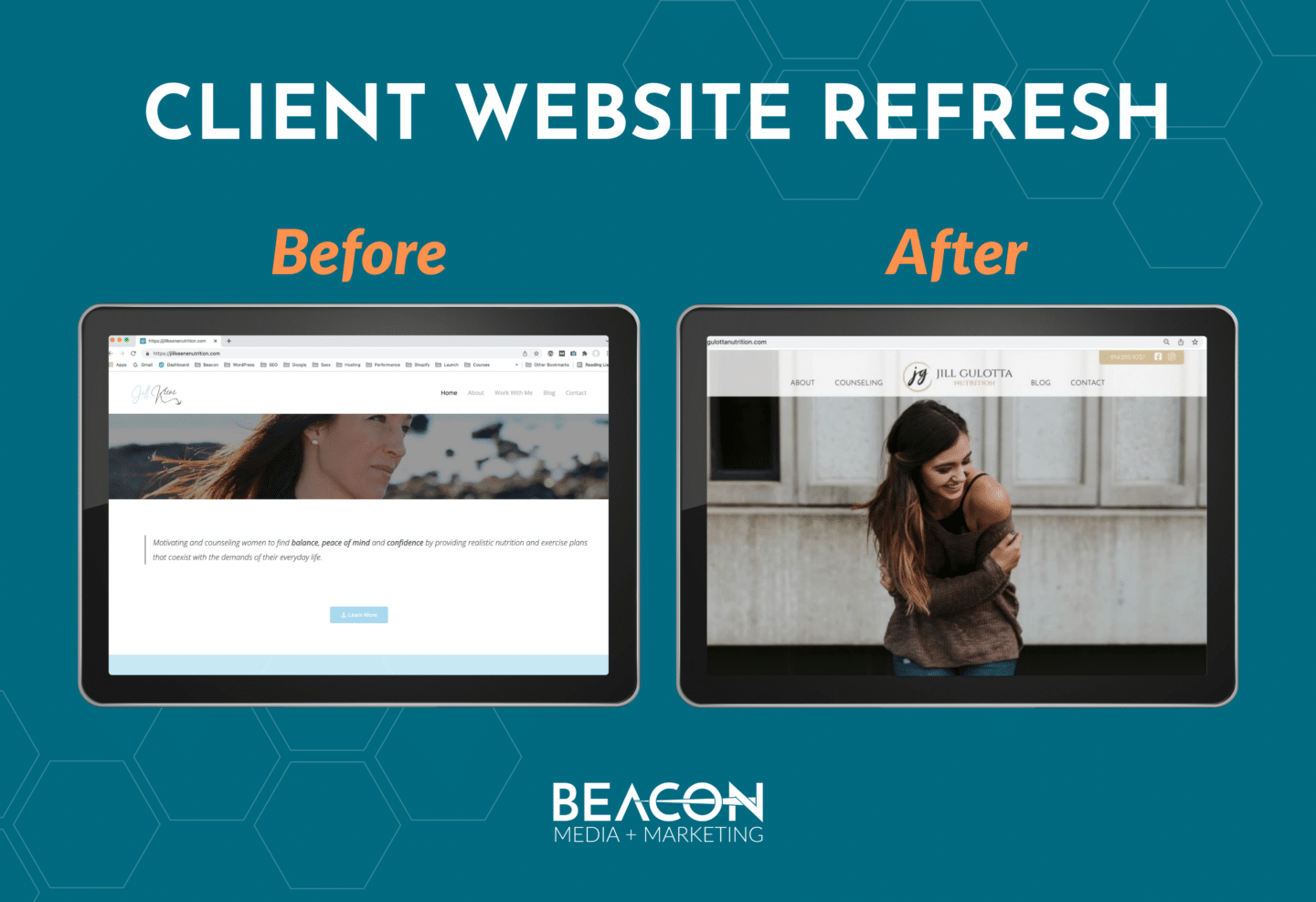
Before and After of client website refresh

Although the content is essential to converting clients, the design of your website is crucial. If your website looks old or doesn’t represent your brand, people will be likely to turn away. Most websites have a lifespan of two years and seven months before people feel as if it’s outdated. 

Having a website redesign will help people feel attracted to your site. When every page is consistent and looks clean and professional, it gives people the feeling that you know what you’re doing. So, if your website looks like it’s from the 2010s, it’s time to refresh. 

7. Rebrand

Moving away from what your website consists of, it must reflect who you are. If you’ve had a rebrand that has changed your practice’s name, color, font, or feel, it’s time to update your website. 

Since your website is usually the first thing that people see for your mental health clinic, it’s essential that you provide them with the appropriate representation of who you are. This will ensure that you avoid any confusion regarding your practice’s name, mission, or feel. 

8. Service Changes

Similar to the rebrand, your website must reflect the current services you provide. If you’ve either added or taken away services, your website needs to reflect that. This will ensure that all your clients know precisely what you can and can’t do for them. 

When you update your services, ensure that you refresh your services pages. You need to make sure the names are all correct and that your service descriptions are informational and clear. These changes can be a constant update that takes place independently, rather than a whole website redesign if needed. 

9. Website Isn’t Ranking

With so many competitors out there, you need to ensure that your website is one of the top-ranked websites when people search for mental healthcare providers in their area. To achieve this, you should ensure that all of your content is SEO-optimized. That’s the best way to help rank your website higher than other clinics. 

Blogging can also be one of the best ways to accomplish this besides your web pages’ content. With blogging, you position your website as a relevant answer to your client’s questions. So not only should your website have a section for blogs, but it should also be constantly updated with blogs that come from your marketing strategy. 

Are you ready to convert more clients through your website? Learn how we can help! 

10. Your Competitors Have Better Websites

If your competitor has a better website than you, they will rank higher on searches and leave you with less of a chance to gain clients. When your website isn’t one of the first available options, it’s a sign that your website is ready to be updated. 

When considering how your website should look and function, one of the best things that you can do is research what your competitors are doing. Looking at their websites allows you to understand what is functioning well on their website and what things may not be doing well. It can help you understand what a potential client may be looking for on your website. 

Why Should You Choose Beacon Media + Marketing For Your Website Update?

If your website falls under those criteria, or you’re ready to get a fresh start, we’re here to help you. At Beacon Media + Marketing, we value your work and want you to be as passionate about it as we are for our work. We want you to look at your brand and website and feel proud of the thing that you’ve built. 

We’re the best option for you because we’ll work with you through the whole process. It’s important to us that we deliver a product that represents who you are and why you do what you do. 

Many of our mental health clients have local SEO-optimized websites designed well and represent the client’s brand. Their website is the gateway to meeting new clients. 

Our clients, like Center for Grief and Trauma Therapy, NYC Therapeutic Wellness, Holistic CFT, and more, have websites that work well for being educational and converting clients. Our goal is to help your practice rank first when people search for mental health therapists in their area, like Center for Grief and Trauma Therapy. 

Let us help you create the website of your dreams. From branding, website design, website maintenance, blogging, ads, and social media, Beacon Media + Marketing can help bring your practice to the top. 

Ready to see how we can refresh your website? Get your free consultation today! 

Originally published by Sabrina Martinez, Content Manager. Updated and revised by Sara Jokela 11/27/2024.

The vast majority begin their search for a therapist online. The first stop most make when researching potential mental health providers is a clinic’s website. This is why having a well-designed website for your business is important, as it can evoke positive emotions, enhance user experience, and create a welcoming digital environment, inspiring mental health for visitors. Listing your practice in a therapist directory alone is inadequate.

Potential clients care about these things:

  • That you’re qualified to help them solve the problem they’re having with their mental health concerns.
  • That your practice is credible, trustworthy and professional.
  • That your clinic is accessible and relatable.
  • That they can connect with you on a personal level.

Your mental health website should:

  • be the last place potential clients land before booking an appointment with you.
  • house all the information they need about your services, specialties, hours, location, testimonials, and therapist staff.

Understanding the Importance of Mental Health Website Design

In the digital age, the design of your mental health website plays a pivotal role in creating a positive and supportive online environment for individuals seeking mental health services. A well-designed mental health website can help establish trust with potential clients, providing them with a sense of comfort and security. This trust is crucial as it encourages individuals to take the first step towards seeking help. Moreover, a thoughtfully designed website can contribute significantly to the overall well-being of those seeking mental health support by offering easy access to valuable resources and information. By prioritizing mental health website design, you ensure that your health website not only looks professional but also effectively serves the needs of your visitors, promoting mental health awareness and care.

The Role of Mental Health Professionals in Website Design

Mental health professionals, including therapists, counselors, and psychologists, play a vital role in the design and development of mental health websites. Their expertise and input are essential in creating a website that accurately reflects their practice, services, and values. By working closely with web designers and developers, mental health professionals can ensure that their website effectively communicates their message, resonates with their target audience, and provides a positive user experience. This collaboration ensures that the website is not only visually appealing but also functional and supportive, meeting the unique needs of those seeking mental health services. By integrating their professional insights into the design process, mental health professionals can create a digital space that truly represents their commitment to mental wellness.

Keeping Your Web Design Up To Date

A question we often ask our clients at Beacon is, “When was the last time you updated your mental health clinic’s website?”

Because of the rate web technologies evolve, refreshing a website every two to three years is considered best practice. If it’s been five years or more since your last website redesign, it’s probably time to begin planning for a total overhaul. Updating your website is crucial to promote mental health awareness, creating a loud and unmissable demand for mental health and sharing it across the web. Ensuring website accessibility is also essential to make your content reachable to everyone.

Do A High-level Key Features Audit

Setting aside time to review your website regularly is a great habit to instill. Along with assessing your site for the items on our Mental Health Website Design Checklist below, you’ll want to ask:

  • Does my site meet current website design trends?
  • Has my clinic experienced any changes that aren’t currently reflected on the site?
  • Is my copywriting easy to read, addressing user questions, and error free?
  • Is it time to hire (or fire) a digital marketing agency to help manage this side of the business?
  • Is my site optimized for mobile devices?

At Beacon Media + Marketing, our website design services will help you represent your practice well and grow your mental health clinic.

Need help reaching mental health clients in your area? Check out our full suite of mental health marketing services.


Step 1: Brainstorm Your Mental Health Website Goals

Before diving into the creative process, re-evaluate your website’s goals. Consider what works or doesn’t work on your current website design. Identify who your ideal client is and evaluate if your current website appeals to them.

Promoting mental health care through your website is crucial. Ensure it provides quality care, support, and an easily navigable, safe, and accessible environment for those in need. Additionally, focus on creating user-friendly navigation to enhance the overall user experience.

Get Your Team’s Perspective

Start brainstorming by involving your mental health team. Schedule time where you can review the website together — make the goal of your meeting to get the whole team’s take on what is (and what isn’t) working.

Taking to team members about this is a huge benefit as each one of them will garner a different aspect of feedback. Your front desk team can flag client scheduling issues or point out difficulties locating new client paperwork. Other therapists on your team can pinpoint missing services, broken links or outdated and irrelevant informational or educational content. Mental health practitioners can provide insights into creating a safe, accessible, and supportive online environment. If you really want to go all out, you may even want to consider inviting a selection of your patients to weigh in on what they love about your website and what they’d like to see done better. Gathering client feedback can provide valuable insights to further improve your website.

Clarify Your Strategies and Brand Message

At Beacon, when kicking off a new web design, we ask clients the following questions:

  • Do you have a plan for growth? Where would you like to see your mental health clinic in 5, 10, or even 20 years?
  • What’s your goal for this website design? How does it fit in with growth plan?
  • When people come to your site, what problem are they trying to solve?
  • Do you have any examples of websites you like? What are they? And what do you like about those sites?
  • Do you have an existing branding package (logo, colors, fonts, and other visual assets) that we can utilize in this design?

The goal of answering these questions? Create a must-have features and objectives roadmap for your new website design to help you stay on track. Positioning your website as an authority in the mental health field is crucial for building trust and capturing your niche while ensuring brand consistency.

Defining Your Target Audience

Defining your target audience is a critical step in creating a mental health website that effectively meets the needs of those seeking mental health services. By understanding the demographics, needs, and preferences of your ideal patient, you can design a website that resonates with them and provides the information and resources they need. This targeted approach ensures that your website speaks directly to the individuals you aim to help, making it easier for them to find the support they are looking for. A well-defined target audience allows you to tailor your content, design, and overall user experience to better serve your visitors, ultimately enhancing the effectiveness of your mental health website.

Identifying Your Ideal Patient

Identifying your ideal patient involves understanding their characteristics, needs, and preferences. This includes factors such as age, location, mental health concerns, and preferred communication methods. By creating a detailed profile of your ideal patient, you can design a website that speaks directly to their needs and provides a positive user experience. This process helps you to focus your efforts on attracting and engaging the right audience, ensuring that your mental health website is a valuable resource for those who need it most. By understanding your ideal patient, you can create a more personalized and effective online presence that supports mental health and wellness.

Step 2: Outline Your Website Design

After discussing the big-picture vision with your team and creating your roadmap, it’s time to talk details.

Specialized web design plays a crucial role in the mental health industry by providing easily navigable, safe, and accessible online environments for people seeking support and direction.

In order to guide the web design process, there are two core documents you should create. You need a site map and a wireframe. These documents help establish the visual hierarchy, ensuring that the most important elements are prominently displayed and easily accessible.

What’s a site map?

A site map is flowchart or bullet point list that outlines the pages you want in your website and indicates where on your navigation menu where they should live.

A site map for a standard five page website can look like this:

  • Home Page
  • About Us
  • Services
  • Service A
  • Service B
  • Service C
  • Blog
  • Contact Us

It includes a home page, an about us page, three main service pages, a blog, and a contact page. From the site map, you can produce a wireframe to outline each page of your website as part of your overall content strategy.

What’s a wireframe?

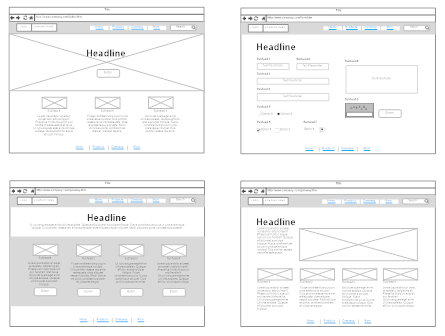
According to Google, a wireframe is a “set of images which display the functional elements of a website or page, typically used for planning a site’s structure and functionality, including the user interface.”

“Wireframe” is basically a detailed draft sketch of how you want your web content organized, what you want it to do, and how you want it to appear.

Here’s an example:

Source: SmartDraw

Guiding Your Project With a Wireframe

For your wireframe to successfully guide your web project, include placement for:

  • headers
  • images
  • content boxes
  • call-to-action buttons
  • form fields

If this is new for you, attempting to wireframe an existing website is good way familiarize yourself with the process. There are many free, online wireframing tools available as well. MockFlow is an excellent example, and allows drag-and-drop with pre-designed elements.

Designing a User-Centric Website

Designing a user-centric website is essential for creating a positive and supportive online environment for individuals seeking mental health services. A user-centric website is designed with the needs and preferences of the user in mind, providing an intuitive and engaging user experience. This approach ensures that visitors can easily navigate your site, find the information they need, and feel supported throughout their journey. By prioritizing user experience in your mental health website design, you create a welcoming and accessible space that encourages individuals to seek the help they need. A user-centric design not only enhances the overall effectiveness of your website but also demonstrates your commitment to providing high-quality mental health care.

Step 3: Write Your Mental Health Content

This is where the content for your mental health website gets written. In your wireframe, locate all the headers and content boxes as these inform you where you intended to include text on each of your web pages.

It is crucial to address mental health issues in your website content to create a welcoming atmosphere and provide support for those struggling with mental illnesses.

To produce attention-grabbing and engaging content for your website design, follow these three steps:

1. Choose & Use SEO Keywords

Keyword research is essential because no one will see your new web design if it doesn’t rank on Google. Because of this, one of the most important parts of writing web content is SEO keyword research and optimization. For websites tailored for mental health organizations, targeting keywords relevant to mental health professionals is crucial.

Identify Keywords

For each of your web pages, identify one or two keywords that reflect the main topic of that page and the key search terms potential clients are looking for to improve search engine rankings.

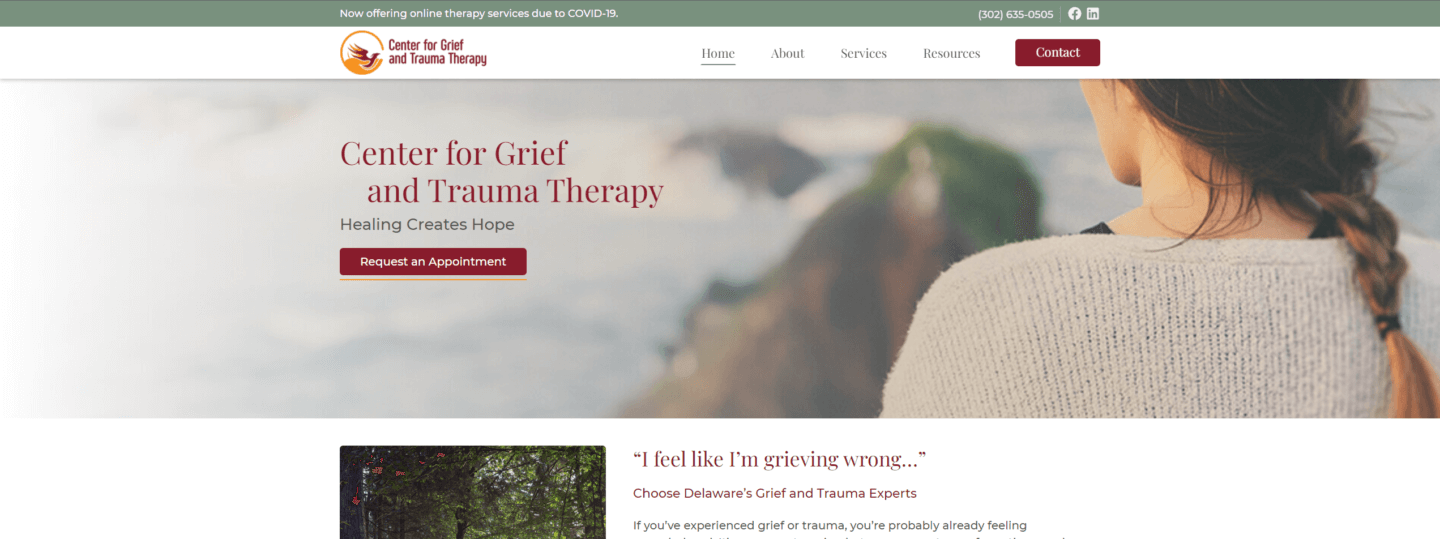
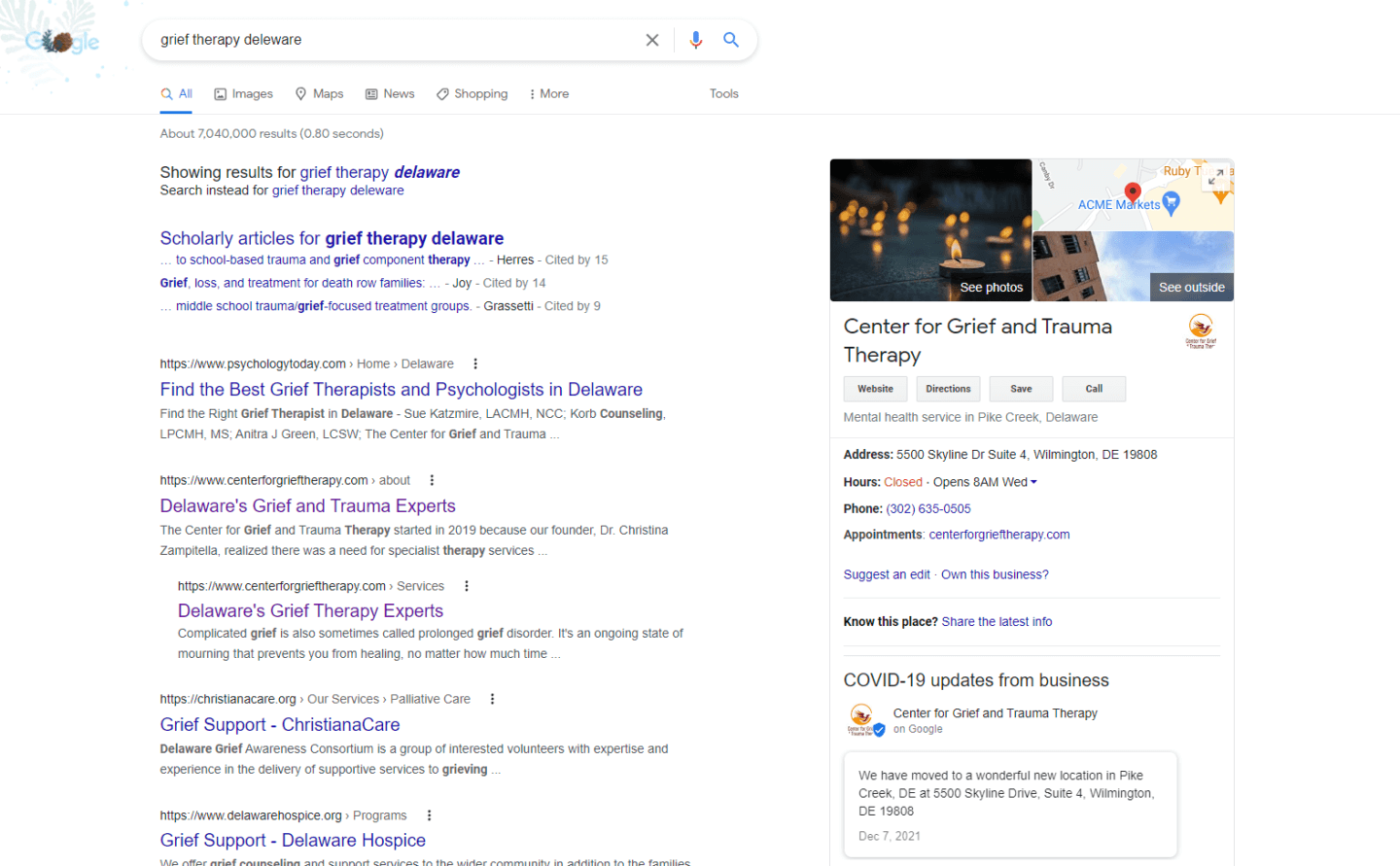
Our client Center for Grief and Trauma Therapy offers grief and trauma therapy in Deleware. On the home page, we targeted the keyword phrase “grief and trauma therapy.” We also included the service location “Delaware” in a header to help boost their local SEO.

If you search “grief therapy Delaware,” this website shows up on the first page of Google.


One element of using keywords is including them in the title of the page and several of the headers. Ideally, your keywords will be dispersed evenly throughout the content.

Use SEO Effectively

SEO is complex, and a lot that goes into researching (and choosing) the best keywords for each page on your mental health website involves on-page SEO.

To help you develop your SEO keyword strategy, here are some of our top tips:

Several of the online tools we use here at Beacon help us identify which keywords people use in their web queries when searching specific topics our client’s industries.

Some of these tools include:

If you utilize SEO keywords effectively, you can show up on the first page of Google for that search term in your area.

2. Write Attention-Grabbing Headlines

People read differently online. Most users skim and read for key information only. They glance at headlines for an overview and to help navigate to where they want to go. For this reason, headline optimization is critical to the website user experience. Using your keywords, write catchy headlines that grab attention and concisely communicate exactly what you want to say.

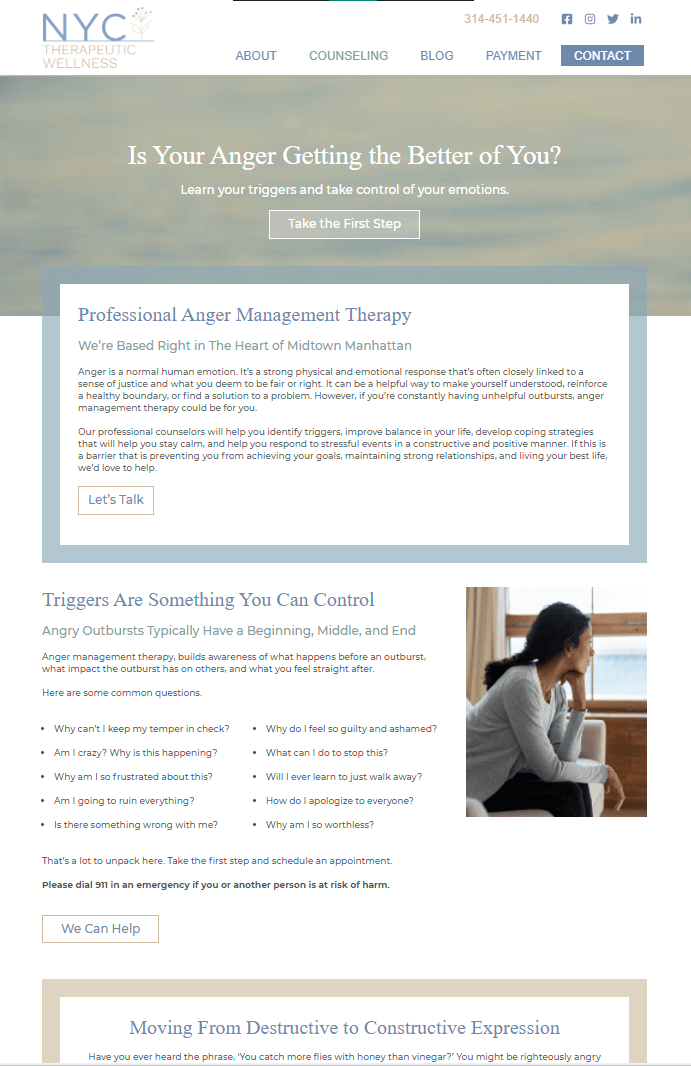
With mental health websites, your goals should be: utilize headers that reach potential clients where they’re at, remove barriers and encourage them to seek help. This screenshot from our client NYC Therapeutic Wellness demonstrates how headers can start a conversation with potential patients, still be SEO friendly and give structure to the page.

3. Create Engaging Content

Think about the kind of website content you enjoy reading. It’s probably easy to read, relatable, and genuinely helpful. Your goal in this phase is to use content marketing to start a conversation with potential clients and help them gain a clear picture of the services you offer.

Creating a welcoming atmosphere for mental wellness is crucial to engage and support your audience effectively.

At Beacon, we’ve learned a lot from our experience developing successful mental health website designs for our clients.

These are some of our most impactful discoveries:

  • Engaging content is short and gets right to the point.
  • Engaging content is written in the second person, addressing the reader directly as “you.”
  • Engaging content is empathetic and speaks to the heart of the matter in the reader’s mind.
  • Engaging content recognized your answer has a need and offers effective solutions to meet this need.
  • Engaging content features the most important information first and is easy to navigate.
  • Engaging content has a clear next step or call-to-action.

Where to highlight the services?

The main service pages of your website should provide comprehensive information about your mental health practice and services, but they should be more service-oriented than educational.

For example, website visitors will want to know how your mental health practice can help with depression and anxiety. However, they’re probably not interested in reading an in-depth description of what depression is.

What to include in the blog?

Your mental health blog is the best spot to provide helpful, educational content to your readers. The main pages on your website should instead focus on your practice, how you help, and how people can make an appointment.

It is crucial to differentiate your practice from other mental health professionals to attract potential clients effectively.

Where to place a call-to-action?

Include a call-to-action (CTA) on each page of your business website to improve your conversion rate. This helps readers take the next step toward becoming patients at your clinic. Buttons that stand out are great ways to draw attention and nudge people towards making an appointment.

Step 4: Develop Your Mental Health Website Design

Once all these pieces are in place — your site map, wireframe, and website content — you have everything you need to seamlessly implement your website design!

Begin by deciding on the website software that you would like to use. We use WordPress at Beacon. WordPress is arguably the best website content management system out there and is very popular.

Although we use a robust version of WordPress that requires knowledge of code and other aspects of web development, there are plenty of simplified packages available for beginners.

Finding the package that best fits your needs will require a bit more research.

During this process, you’ll need to reference your wireframe when considering what you want the end result to look like. You’ll also need it for reference as you determine exactly which features you want to include.

After selecting and launching your package, a customization process begins that includes selecting a website theme and adding your brand information. The theme you choose determines the design of your website. Carefully compare the themes available with the wireframe you created.

Go through the full process of making your theme your own by adding colors, images, and the website content you wrote.

If you get stuck on any part of this, visit WPBeginner to get your questions answered!

Step 5: Launch Your New Mental Health Website!

When you feel comfortable with how everything looks, it’s time schedule your launch date!

Before hitting the final go button and publishing your site, you should go through this website launch checklist:

  • Are all of the links working? Visit each page, click on each link and test them.
  • Does your contact us form work properly? Submit a test entry and make sure they’re working. This is especially important as you don’t want to miss any inbound messages.
  • Does the site display properly? Test your side on the popular browsers (Chrome, Firefox, and Safari) and make sure it looks great across the internet.
  • How does it look on mobile? Loading your website on your smartphone (and tablet if you have one) to ensure it’s mobile optimized and displaying correctly.

To set your new mental health website to live, login to your hosting account and point your domain name to its new location.

Once your new website’s populating at the proper address, you’re good

Put Your Best Face Forward With a New Mental Health Website

If you’ve neglected your mental health website, now is the perfect time for a website redesign. More people are using the internet to look for mental health services, and you need a well designed and professional site to make the best impression.

A well-designed website is crucial for private practice, as it provides specialized therapy services for patients recovering from grief and trauma, ensuring ease of access and a compassionate approach.

At Beacon Media + Marketing we’ve built an impressive portfolio of mental health and wellness websites that our clients loved that also produced measurable results and conversions.

If your mental health website is outdated, we would love to help you achieve a whole new look for your business.

Ready to refresh your mental health website design? Schedule your free consultation!

Originally published by Sabrina Martinez, Content Manager. Updated and revised by Jennifer Gracey, Web Content Strategist & Writer on 06/15/2023

Your website is the digital storefront for your mental health practice. It’s the digital epicenter of the heart and essence of your brand identity and how well people connect with it determines what gets communicated to your audience. It shows potential clients how you can help them solve the problem they’re having, eliminate their pain points, and address what’s important to them. Things like:

  • “What’s wrong with me?”
  • “How can I overcome my mental health challenges?”
  • “Will I ever be okay?”
  • “What do I have to do to feel better?”
  • “Where can I get help for…. this?”

Beautifully Designed Websites Matter

Your website is where about 50% of your potential clients visit before deciding whether or not to engage with your services any further. How your brand looks, sounds, and communicates information to website visitors impacts their decision making process significantly. In fact, you only have 10-15 seconds to convince visitors your website is worth their time and attention. Making an excellent first impression with an eye catching web design is imperative if you want potential clients to stick around long enough to discover what therapy you offer.

Solid Web Design Supports Brand Identity

While you may have your name, your practice or your clinic listed in all the prominent mental health directories, your website is the ultimate digital calling card. Having a strong web design is the foundation of building a solid online reputation.

In addition to being visually appealing, giving your existing and future clients a great user experience on your website serves multiple purposes. A well planned and mental health website design:

  • establishes trustworthiness, credibility and expertise in your niche.
  • sets expectations for the level of service, quality and professionalism your potential clients should anticipate from you.
  • educates and informs your audience.
  • tells your audience how (and where) to connect with you both on and offline.
  • visually signals to potential clients they’re the right clientele for your services
  • encourages website visitors to take the next step in their mental health journey by connecting with you.
  • creates brand awareness, fosters brand identity and brand recognition.
  • displays your services and treatment programs.
  • serves as the focal point for all your supporting digital marketing efforts.

Helping Therapists and Patients Connect

As a mental health provider, you know what you do is important. You also know there are countless individuals out there who desperately need your services. However, for them, taking the first step toward getting help is really hard. Nearly 1 in 4 adults and 1 in 6 children have a mental illness, but approximately 50% of people struggling with mental health issues don’t receive the treatment they need.

So how does one build a website that breaks down barriers and builds trust with potential clients online? At Beacon Media + Marketing, making beautiful, yet patient experience centered, UX-friendly mental health websites is a passion of ours. As we’ve supported online marketing efforts in the mental health industry over the years, we’ve discovered a few core principles every therapist website design needs to in order to convert a website visitor into a potential client.

Examples of Beautiful Website Designs

Want to see some beautiful examples of professional mental health websites? These are three of our favorite web designs that not only look attractive but have produced real results for each of our clients.

Tired of cookie-cutter, run of the mill therapist websites? Us too! Click here to learn about our mental health marketing and web design services.

1. Center for Grief and Trauma Therapy

Center for Grief and Trauma Website Preview

Website Design Highlights:

  • Strong call-to-actions on every page
  • Clear steps for getting started
  • Compassionate, compelling language
  • Strong brand and calming imagery
  • Detailed therapist bios and video

The Center for Grief and Trauma Therapy is a private practice out of Delaware and they specialize in treating people who are healing from grief and trauma. Our client had a vision for an easy to navigate WordPress website that wouldn’t overwhelm people. We accomplished this by having CTAs or call-to-actions on every page of the site and by making the contact button bright and easy to see in the header. We clearly outlined the patient process in four simple steps. Those steps were then neatly laid out on both the home page and services page.

A mental health website requires clear messaging, it must also authentically speak to what website visitors are feeling at that moment. When someone is struggling, decision making capacity and bravery (or courage) are often in short supply. This internal barrier can make seeking help from professional mental health providers hard. Capturing the right cadence and tone of voice will encourage someone to push beyond their dis-ease, take that next step, and reach out.

For the Center for Grief and Trauma Therapy, we knew we needed an excellent way to connect with potential patients. We needed to create a relatable and compassionate website that someone could visit, identify with and recognize, “That’s my loss.”

Experiencing loss or living through a traumatic event is often difficult to talk about. And many struggle putting into words how intrusive and profound their grief and trauma truly is. We wanted website visitors to feel seen, known and safe. To establish this practice as a judgment-free zone, we utilized phrases like:

  • “I feel like I’m grieving wrong.”
  • “I don’t know where to start.”
  • “I don’t know how I’m going to get through this.”
  • “I’m not sure I need therapy.”
  • “I feel like I’m totally stuck.”

Establish Yourself as a Credible Business

We also established the therapists at the Center for Grief and Trauma Therapy as experts in their unique field. With a specific niche in the mental health field, we established a strong brand with this website. The mental health website design incorporated the client’s original logo colors: a burgandy red and warm marigold yellow-orange. We also added in an earthy sage green to infuse the color scheme with a calming element. To enhance and build relatable dimensions to the visual aspects of this site, we placed images of nature throughout, to emphasize growth, serenity and calm.

Here at Beacon, we know building trust and credibility is a must in the mental health field. To facilitate this end, we give website visitors an opportunity learn about the therapists they may encounter. The home page features a friendly video of Christina Zampitella, owner of Center for Grief and Trauma Therapy. Additionally, created in-depth bios that highlighted each therapist’s story, a personal quote, their specialties, and relevant credentials. 

Want to capture your mental health niche with an incredible website that establishes you as an expert in your area? We can help!

2. NYC Therapeutic and Wellness

NYC Therapeutic Wellness Website Preview

Website design highlights:

  • Eye-catching header image
  • Calming shades of blue
  • Conversational, relatable messaging
  • Strong, frequent call-to-actions
  • Easy-to-find information
  • User-friendly contact form

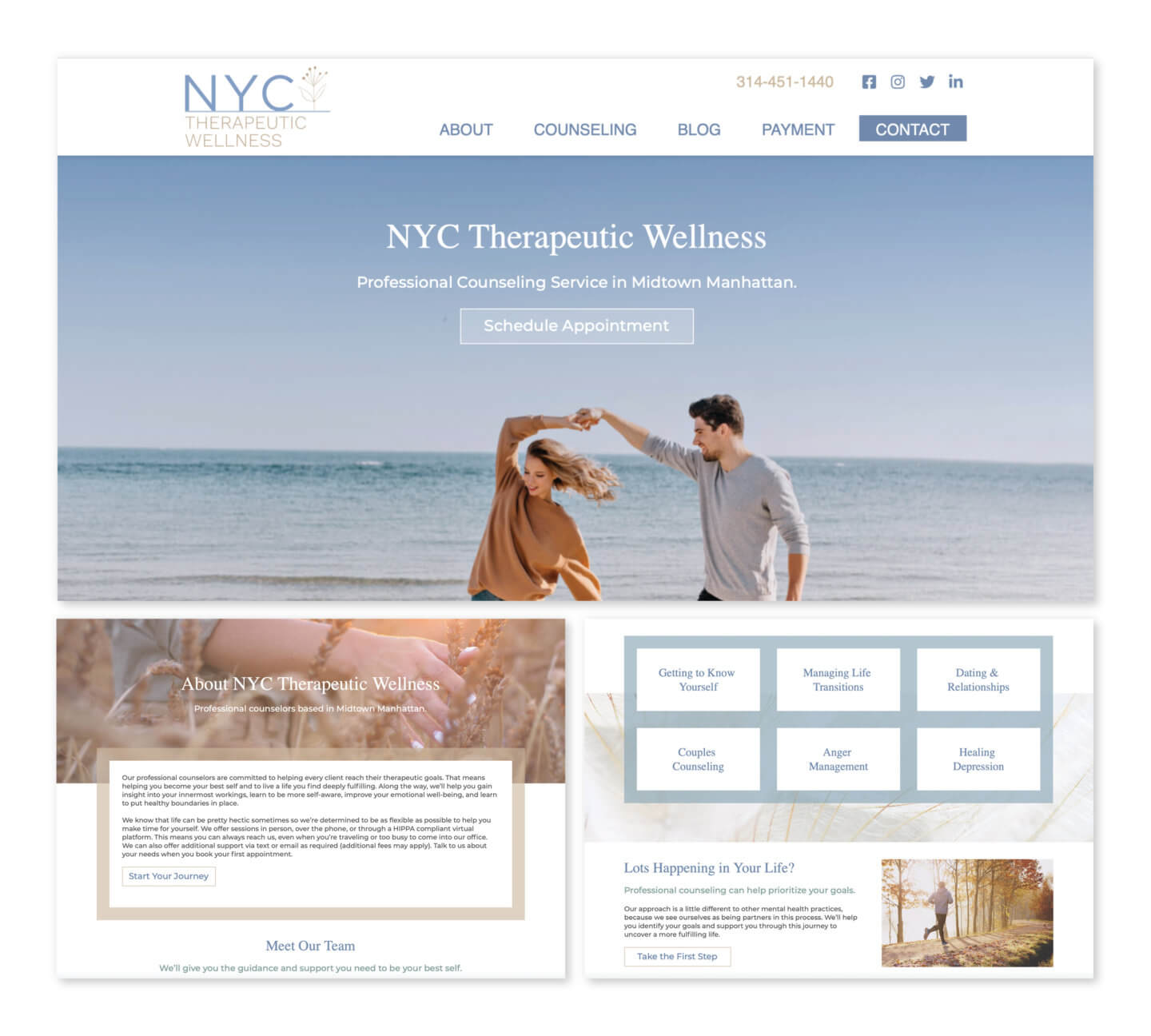
The first web design element you may notice when opening the NYC Therapeutic Wellness website is the calming shade of blue used throughout. In general, blue is a great choice for a mental health practice that specializes in treating anxiety. The header image ties perfectly into the logo and brand colors for this client by displaying a wide, open blue sky and a happy couple in neutral colors at the seaside.

Coming in Strong with A Bold Promise

At the top of the home page is a strong promise: “We’re here to help you identify and break down the barriers that are holding you back.” We kept this concept in mind during our design ideation and build process and were intentional about removing barriers to access.

We knew our target audience for this site was going through a tough patch and needed help navigating the unfamiliar terrain. However, as mentioned in the first example, taking that first step is hard. If finding information or scheduling a first appointment is difficult, it’s easy for distraction, disinterest, frustration, anxiety, or doubt to creep in and cause a potential client to leave your site without ever reaching out. 

That’s why we made it as easy as possible for someone visiting the NYC Therapeutic Wellness website to find what they’re looking for. Each page contains multiple call-to-actions guiding people to schedule an appointment or take the first step. Additionally, we placed a grid at the top of the page listing out the practice’s counseling specialties.

The contact button is always strategically located at the top of the header, making it easy to click to the contact page and send an appointment request at any time. And the contact page itself makes the process of booking an appointment simple with options to: select a counselor, indicate one’s preferred appointment day and time, and write a short message.

Want a website that removes all barriers for access and fuels practice growth? Share your website goals with us.

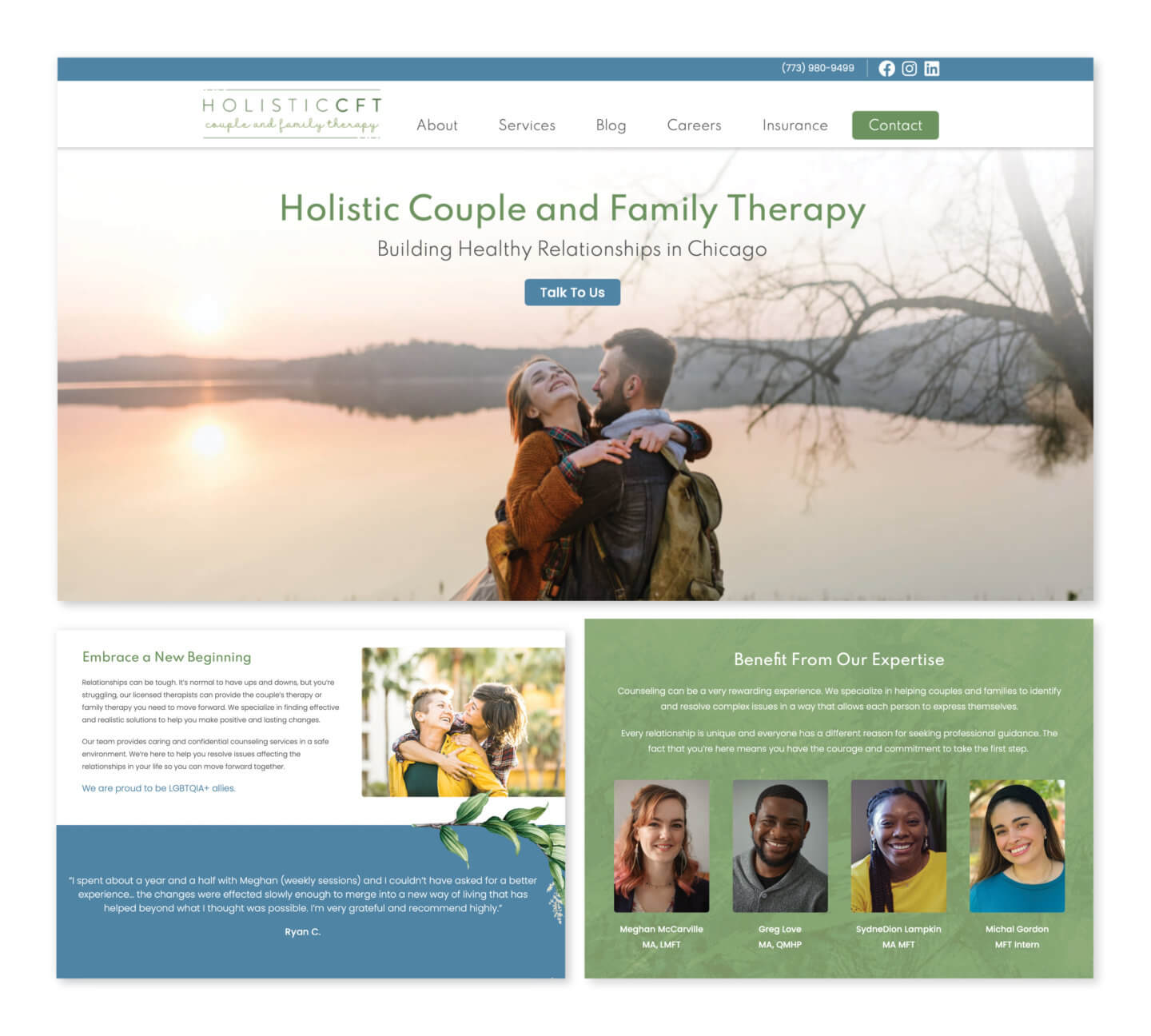
3. Holistic CFT

Holistic CFT Website Preview

Website design highlights:

  • Inclusive imagery and messaging
  • Easy-to-find services
  • Multiple call-to-actions
  • Calming color palette
  • Insurance tab in the main-navigation

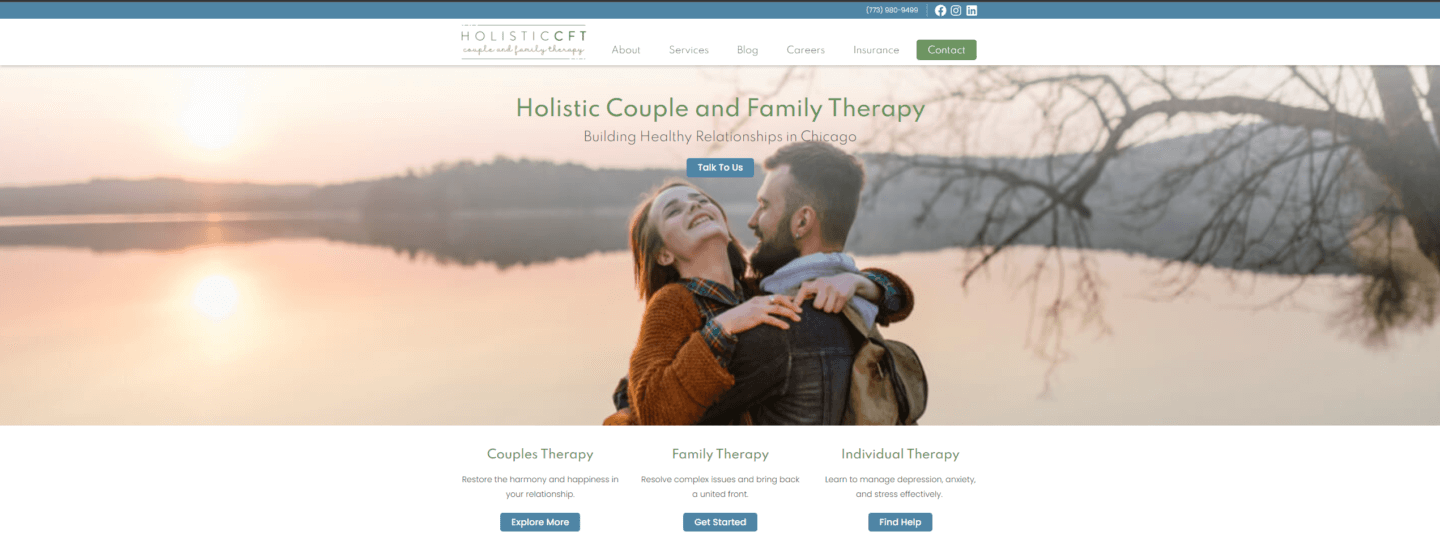
Based out of Chicago, Holistic Couples and Family Therapy is a private therapy practice and their specialty is relationship counseling for individuals of all backgrounds. To capture the inclusiveness of Holistic CFT on their website, we used diverse images — including images of LGBTQIA+ couples and families. We also chose images showcasing couples across a wide age range and multiple ethnicities (including bi-racial couples.)

Emphasizing Inclusiveness and Making Visitors Feel Welcomed

Our goal was for couples and families from every background, including “non-traditional” couples, to see images on the website they could personally identify with. As well as non-verbally communicate that Holistic CFT is a safe, judgment-free place. We understand feeling different or unwelcome is a major barrier for people seeking mental health services, so we were intentional about sending a strong “everyone is accepted” message. And to eliminate any doubt, we added to the home page, “We are proud to be LGBTQIA+ allies.”   

Insurance coverage also is a deciding factor for patients when selecting their mental health provider. As Holistic CFT accepts most major insurance plans, we made this information easy for new patients to find by including an Insurance option in the main navigation area of the site. On the insurance page we made sure to list the insurance plans Holistic CFT accepts and include direct links to each provider’s page to help patients quickly check if they’re covered.

Want a website that captures the heart of your mental health practice and helps you stand out from other mental health professionals in your area? Tell us about your business.

Bring Your Mental Health Website Design and Patient Experience Goals to Life

Is your current mental health website design unattractive, disorganized, difficult to navigate or poorly functioning? Do you want a unique site that appeals to prospective clients, removes all barriers to entry and beautifully displays the amazing work you do? Beacon Media + Marketing can create a modern, user-friendly mental health website design that fits your vision.

If you’re ready to bring in new clients with a mental health website that converts, let’s talk. Start a conversation with us for more inspiration and to get started.

The most important part in developing a website is the overall user experience (UX). User experience is defined as the way in which the user is interacting with the product or in this case a website. This could entail the page path the user takes to get to what they are looking for or how much time they are spending browsing or reading a certain page. It is all about the journey they embark on. 

Developing a website could seem very overwhelming since there are so many moving parts that need to take place before a launch – but trust us, it’s not as stressful as you may assume. With the uprise in technology over the years, website hosting platforms have become more advanced and efficient, meaning there are tons of website templates to choose from if you aren’t sure where to begin. 

It’s all about utilizing your resources. Beacon Media + Marketing is a digital marketing company equipped with ample knowledge and a plethora of helpful resources to help your business grow, scale, and thrive. As marketing wizards and gurus, we want to help your website come to life while also giving users an exceptional experience, which is why we are going to go into detail about five easy user experience wins when developing a website. 

Looking to take your website up a notch? Book a free consultation. 

1. Page Speed & Loading Time  

First things first, in order to increase user experience (UX), you will want to make sure your website is loading at a quick pace. most people do not like waiting and spending time on a page that takes more than five seconds to load. 

If your website is taking longer than usual, this may result in frustration from the user, causing them to become uninterested and close out of your website immediately. That is exactly what we do not want to happen. Instead, you want to make sure your page speed is always working properly, especially for mobile users. Mobile users expect things to load on their devices as quickly as possible. 

Page speed also plays a key role in how well your SEO performs. User experience is vital.  Google’s announced back in 2010, that they would be including page speed as one of the ranking factors for their search index. Hence, another reason to ensure your website is loading in a timely manner. After all, a slow site will result in no conversions. 

You can manage staying on top of page speed by: 

  • Optimizing images
  • Reducing redirects
  • Clearing your browser’s cache
  • Improving server response time 
  • Mitigating CSS files, HTML, and JavaScript 

2. Responsive Design 

Making sure that your website’s layout is completely functional and accessible can also make or a break a user’s experience. Responsive design refers to how your website looks or functions on different screens such as on a desktop compared to a laptop, tablet, or mobile device. 

For example, let’s say everything on your website looks amazing and everything is formatted just the way you envisioned. But what about how the mobile version or tablet version is performing? Many people fail to check how their website is functioning on all platforms because we think that just because it looks perfect on a desktop computer, it might not look the same when it’s shrunken down on a mobile device. When the formatting on a mobile device isn’t functioning properly, users entering through a phone browser may not have the same happy experience other users are having on a desktop. 

Lesson learned: double check – better yet – TRIPLE check all browsing platforms are fully up and running the way they should be daily. Website updates often occur, but sometimes they can mess up the layout. 

3. UI Patterns 

UI patterns help reduce the risk of error and are defined as design patterns. These build interfaces that have the same look and feel as other websites and help assist with navigation and patterns. In short, do not try and attempt to reinvent the wheel with design. Instead, look to other resources. Never feel bad about using tools that are there to be used. 

After all, they are there for a reason. Certain layouts make it easier for people to navigate a website, such as the usual linked logo in the top left corner of a website, a horizontal navigation, and your typical contact details in the footer. These features help websites maintain some consistency – in the sense that they use the same layouts that  users are used to seeing and navigating.  

Using layouts that people are experienced with will only boost the user experience. If you decide against UI design patterns and take it upon yourself to create an unconventional design, you run the risk of your users not knowing how to properly use your website. This can leave  them confused, frustrated, and less likely to return for a second time. 

4. There’s More to Just the Homepage 

In order for your users to have an exceptional experience, you must look beyond the homepage. Yes, the homepage is the first thing users will see as soon as they enter your website, but you want to make sure all other pages and posts are laid out the exact same way to keep the experience going. 

Many of us tend to get hung up on the homepage. Once the homepage is perfected and looks pretty, people tend to look past the rest of the website. If you want your website to have a strong presence, spend your energy and focus on the entire website rather than a small chunk. We promise this will bring more engaged users to your website and more business to your door. 

5. SEO and CTA’s 

Lastly, if you want your users to have the experience of a lifetime, you want to make sure that: 

  1. The targeted users are actually finding your website through Google, which indicates how well your website is ranking in terms of SEO 
  2. You are encouraging a second click wherever you see fit 

Both are extremely necessary if you want your users to enjoy their overall experience while browsing your website. SEO (Search Engine Optimization) is what helps boost your ranking and positioning on where you sit on Google. The goal is to essentially rank in positions 1-10 on the first page on Google so people can easily locate you based on the keyword research you have put in. When you know what people are searching for, it will only be 10x easier for people to find you. 

Calls-to-action are a very powerful tool to use because this will encourage the user to continue browsing and clicking around your website. Incorporating CTAs keeps the user engaged. For example, throughout some webpages and blog posts, you will see words that are hyperlinked to different pages. Let’s say you want to learn more about a specific topic. By clicking the hyperlink, this will take you to a different page which will then encourage the user to keep reading. 

Sharpen Your UX Experience with Beacon Media + Marketing 

If you’re ready to explore the possibilities of what different user experiences can look like, Beacon Media + Marketing offers web development services. Want a fast, secure, reliable, and efficient website? We can help you out. 

Give your users the experience they deserve. Get in touch with us! 

At Beacon Media + Marketing we design, develop, and host websites for many businesses and non-profits.

Our clients are spread as far and wide as Alaska, California, Illinois, Minnesota, New York, Delaware, West Virginia, Florida, and Washington, with many others in between. We’ve been in this game since 2012 and we like to think we’ve got it down to an art-form. Our team include an in-house website copywriter, website designer, and website developer, which means we function as a one-stop shop for all of your website development needs.

Are you an Anchorage business in the market for a new website? We’d love to help.

What Do The Best Websites in Alaska Look Like?

Want to check out our work? Here are some Alaskan websites we’re really proud to have developed:

What’s the best website development company in Anchorage, Alaska? Beacon Media + Marketing, of course.

Discover the cost of website design and what to consider before getting a new website.

Other Alaskan Website Design Companies We Like

However, we spend a lot of time learning about best practices, including new trends and tactics, In this line of work we spend a lot of time online learning best practices, getting inspiration and admiring the competition’s work.

We’ve never been ones to shy away from good honest competition. We also want to do what we can to lift others in our industry, so here are five of the other most highly regarded website design companies in the Anchorage area:

  1. Sundog Media has been around since 1996 and has a strong reputation for high quality work. They design, host and manage websites. Their focus is on WordPress websites and feature a 100% satisfaction guarantee.
  2. Thrively Digital focuses on small to medium sized businesses and does a lot of work with tourism companies. Their websites are responsive and they do not limit their sites to just WordPress.
  3. Red Carrot Design offers website design, development, and support. They also focus on WordPress designs and offer a high level of creativity and uniqueness to their designs.

So there are three other companies to consider when looking for website quotes. No matter who you go with, we hope the experience is a positive one and you get the website that is going to help your company succeed and grow.

Need a new website? Schedule a free consultation today.

When it comes to developing a website or creating a content strategy, SEO should always be top of mind. You may have amazing services to offer and a great message to get across, but no one will ever know if your content is not easily visible on search engines.

There are many important aspects of an SEO strategy that start with your website, like developing a responsive website and performing adequate keyword research for blogs. However, we know several insider secrets to boosting your site’s SEO and gaining credibility on Google through building backlinks.

While the typical process of getting backlinks can make you feel like a spammer or contestant in a popularity contest, there is more than one way to earn backlinks to your site. For instance, a solid content distribution strategy recycles your content, allowing you to reach your audience in more way than one while linking to back to your site.

Want the full scoop? Then keep reading because we’re about to deep dive into how backlinks can help supercharge your SEO and unveil Beacon Media + Marketing’s newest content distribution package.  

Want to jump ahead and see what a content distribution strategy can do for your company? Schedule a free consultation.

What Are Backlinks and Why Are They Important?

In short, a backlink is a link from one website to another. For example, someone may link to another website if they are trying to cite a statistic or information they pulled from another source. People may also link to a page on another website if it is relevant or provides more context on a topic they are discussing or expanding on in a blog. These are different than local links, which are links you place on your content that direct readers to other pages on your site.

Backlinks, or inbound links, to your website are one of the most important factors for SEO. When someone links to your website, Google and other search engines consider this as an endorsement for your company. They are saying a page on your site has valuable, credible content that is worth looking at. For Google, this translates to your website having authority, relevance, and trust, which are the three pillars of SEO.

Having your link on other websites also gives your target audience more exposure to your content. While they may start out on another blog post, if they see a backlink to your website, they may click on it and engage with your brand that way.

How To Earn High-Quality Backlinks

Where a backlink to your site exists matters. Google not only judges the quantity of inbound links to your site but it also considers their quality. There are several factors search engines consider when determining if a backlink is high quality.

  • Website authority: If a website that Google already identifies as having authority and credibility links to your site, this will have a more positive impact toward your SEO. On the other hand, low-quality backlinks from sites that Google deems uncredible can actually hurt your SEO.
  • Page traffic: How many people visit the page the link your website is featured on also affects how Google judges the backlink’s quality.
  • Relevancy: Google favors backlinks that are on a website with content relevant to the topic it links to. For example, if your blog post on the future of microwave ovens is featured on a page or website that talks about new technology trends or kitchen appliances, it improves the quality of the backlink.

Now that you know what backlinks are and how important they are for your website’s overall SEO, the big question is how do you get other websites to link to your content? While adding the right keywords and making sure you use SEO-friendly headers are easy enough to implement on your own website, you can’t force anyone else to vouch for you on theirs. Here are a few secrets we’ll let you in on.

1. Write Quality, SEO-Friendly Content

If you want people to link back to your website content, the first step should always be to create content that is worth linking to. If your blogs or web pages are poorly designed, dull, or irrelevant to the audience you’re trying to reach, chances are no one will want to send their website visitors your way.

While people are always looking for new tricks to put their website on the fast lane to the top of the search engine results page, the main focus when creating content should always be to create a top-quality piece worth reading. With literally billions of pages on the internet, you need to make your content stand out.

Fortunately, Google has made several core changes to its algorithm to help keep high-quality, relevant content at the top of the SERP while penalizing pages that have little value to offer. For example, pages with low word counts, keyword stuffing, and duplicate content are all unlikely to be valued by Google or anyone who reads them.

By putting time and effort into writing unique, relevant content your audience will enjoy, people are more likely to use as a source in their own work. By following basic SEO guidelines, you can ensure your website is high up on the SERP, making it easy for people to find and link to your content.

2. Reach Out for Backlinks

Another tactic you can use to gain more backlinks is reaching out directly to other website owners. It can be difficult to do this without coming off as spammy, but there are a few tactics you can try to get your content on a relevant page or site:

  • If someone mentions your brand without linking to your website, reach out to the author and ask them to credit you with a backlink.
  • Reach out to journalists and bloggers who have linked to your old content when you create new work.
  • Add images, infographics, and free tools that others can link to in their own content.
  • Get featured on directories that are highly used or relevant to your content.
  • Find pages that have broken links and suggest a link from your website to replace it.
  • Ask people you know personally, like colleagues and business partners, to link to your site.

3. Use Content Distribution to Your Advantage

If your content strategy starts and ends with a blog post, you’re missing out on a major opportunity. With a digital content distribution plan, you can take a single piece of content and use it in more way than one, expanding your reach and gaining quality backlinks.

Our new content distribution package at Beacon Media + Marketing does exactly  that. The process starts with us writing a high-quality blog for your website that is relevant to your company and your target audience. We put substantial research into every blog we write, making sure it follows best SEO practices and is engaging to anyone who visits your site.

From here, we recycle this blog to create and distribute new pieces of content that all link back to your site including:

  • A video that is featured on the Beacon Media New YouTube channel
  • A press release that is distributed through hundreds of news outlets
  • A blog summary that is featured on the Beacon Media News website
  • Social media posts that link to different assets we create

Not only do these unique pieces of content give your audience more than one way to engage with your brand, but they also all link back your website, helping you earn high-quality backlinks with every blog we write.

Want To Team Up and Take Your SEO to the Next Level?

Developing an SEO strategy that gets your content noticed takes a lot of legwork. Whether you need help developing a website that is functional and appealing, establishing an SEO strategy that gets you noticed, or creating high-ranking content that is engaging and recyclable, we can help.

Ready to watch your business grow, scale, and thrive? Schedule your free consultation now.

Written by Kym Van Arsdale, updated by Sara Jokela 1/2/25

Hosting refers to a service that allows your website to be stored and maintained. It’s an important decision for every company, so we asked our developer to answer your FAQs about web hosting and domain hosting.

Do you need quality hosting for your website?  Check out our website hosting packages.

Understanding Web Hosting

Web hosting is a service that allows individuals and organizations to host their websites on the internet. Essentially, it involves storing your website’s files on a physical server, which is then connected to the internet, making your site accessible to users worldwide. Web hosting providers offer various types of hosting services, each catering to different needs and budgets.

For instance, shared hosting is a popular and cost-effective option where multiple websites share the same server resources. On the other hand, VPS hosting provides a more isolated environment by partitioning a physical server into virtual servers, offering better performance and security.

Managed hosting takes the hassle out of server management by handling all the technical aspects for you, making it ideal for those who prefer a hands-off approach. Cloud hosting leverages multiple servers to ensure high availability and scalability, making it a robust solution for growing websites.

Choosing the right type of hosting depends on your website’s specific needs, such as traffic volume, security requirements, and budget. Understanding these options can help you make an informed decision and ensure your website runs smoothly.

What Exactly Am I Paying For When I Sign Up for Hosting Services?

When you pay a monthly fee for website hosting, you’re paying to use space on a website server where your website’s files and software are stored. Some hosting packages also offer a free domain, which can be a great incentive for new website owners. This space is available online at all times.

It’s important to remember that hosting is different than domain registration. You must always be sure to keep both your hosting services and domain registration active for your website to be live.

Are There Other Web Hosting Services I Need Besides Server Space?

There are a number of items that should be included in your website maintenance plan as part of comprehensive hosting solutions. To keep your website safe, secure and relevant, be sure the following list of items are covered:

  • Software Updates: Website software must be updated on a regular basis to take advantage of new features and to patch security vulnerabilities. When you’re running a Content Management System (CMS) such as WordPress, this includes updating WordPress itself, along with themes and plugins installed on the website. Updates are typically very easy to run, but there are occasions when an update may break a website. It’s important to have the expertise to fix these issues.
  • Security: No-one wants their site to be hacked! It’s estimated that on average 30,000 new websites are hacked every day. In addition to regular software updates, websites need to be firewall protected, the code should be free of vulnerabilities, and site should be monitored regularly for malware and any other anomalies.
  • Back-Ups: There are a number of things that can take down or mess up a website: hacks, malware, unexpected errors in updates, editing mistakes, and more. Make sure you have a good backup system and a simple way to restore back-up files in case the worst happens.
  • Performance: Google has found that 53% of mobile website visitors will leave if a web page doesn’t load within three seconds. Your website needs to be fast! Websites also need to be useful and attractive. All those images, videos, animations, and code can add up to a lot of files for users to download. You need a fast server and caching software to deliver the best experience. (Not sure what that means? Check out these helpful web terms.)
  • Up-Time Monitoring: Is your site up? How do you know? You can’t check it all the time. That’s why your website should be constantly monitored to catch service outages so you can get it back up and running as soon as possible.
  • SSL Certificates: SSL certificates encrypt website data as it is downloaded and uploaded to your website service. If you have a certificate and it’s valid, you’ll see the lock icon next to your website address in the browser. If you don’t, you’ll either have a broken lock or you may get an error that won’t allow your site to load at all. SSL certificates must be installed correctly and renewed on a regular basis. This is something a developer can help you do.
  • Software Licensing: Many high quality themes and plugins for website require a licensing fee. If your license is not up to date, you won’t be able to install key updates.
  • Updates and Edits: Don’t let your website get out of date! As things change in your business, your website needs to be offering potential customers the most current information. Updating and adding content to your site can also help your search engine rankings, as Google rewards high-quality and up to date web content. Small updates are often simple to make but if you want your website to look its best, it can help to have a pro perform website edits on a regular basis.

Is your website being properly taken care of? We can keep your website happy and healthy!

Key Features to Consider

When selecting a web hosting service, several key features can significantly impact your website’s performance and reliability. Here are some crucial aspects to consider:

  • Storage Space: This refers to the amount of space available to store your website files and data. Ensure the hosting plan offers sufficient storage to accommodate your current and future needs.
  • Bandwidth: Bandwidth determines the amount of data that can be transferred between your website and its users. Higher bandwidth is essential for websites with heavy traffic to ensure smooth performance.
  • Server Type: The type of server used to host your website, such as shared, VPS, or dedicated, can affect your site’s speed, security, and scalability.
  • Operating System: The server’s operating system, whether Windows or Linux, can influence the compatibility and functionality of your website.
  • Control Panel: A user-friendly control panel, like cPanel or Plesk, simplifies website management tasks, making it easier to handle updates, backups, and other administrative functions.
  • Security Features: Look for hosting providers that offer robust security features, such as SSL certificates, firewalls, and regular malware scanning, to protect your website from threats.
  • Customer Support: Reliable customer support is crucial. Opt for providers that offer 24/7 support, live chat, and a comprehensive knowledge base to assist you whenever needed.

By considering these features, you can select a web hosting service that meets your website’s requirements and ensures a seamless online experience.

How do I Choose the Best Hosting Plan for My Needs?

Choosing the best hosting plan for your needs involves evaluating several factors to ensure your website performs optimally. Here’s a step-by-step guide to help you make the right choice:

  1. Determine Your Website Type: Different websites have varying hosting needs. For example, a WordPress website may benefit from managed WordPress hosting, which is optimized for WordPress performance and security.
  2. Assess Your Traffic Needs: Estimate the amount of traffic you expect. High-traffic websites require hosting plans with more bandwidth and storage space to handle the load without slowing down.
  3. Consider Your Budget: Hosting plans come in a wide range of prices. Determine your budget and find a plan that offers the best value for your money without compromising on essential features.
  4. Research Hosting Providers: Look into different hosting providers and compare their features, pricing, and customer support. Consider factors like uptime guarantees, server locations, and additional services offered.
  5. Read Reviews: Customer reviews can provide valuable insights into a hosting provider’s reliability and performance. Look for feedback on uptime, support responsiveness, and overall satisfaction.

By following these steps, you can choose a hosting plan that aligns with your website’s needs and ensures a smooth and reliable online presence.

How do I chose the best hosting plan for my needs?

There are a number of considerations when choosing a web hosting provider and a hosting plan.

Most hosts have packages with different limits for the number of websites you can host, the amount of disk space you can use, and the amount of bandwidth your website can use. Disk space is the total amount of storage your website files will take up on the server. This includes the website code, database, images, and videos.

Bandwidth is the number of bytes required to transfer your site to all visitors. When a user looks at your website in a browser, they actually download the website files and the browser bundles them together into a web page. If your website has a lot of users viewing the content, you may run out of bandwidth quickly.

In addition to these limits, hosting companies offer different types of web hosting. Some common offerings are shared web hosting, dedicated hosting, and VPS hosting.

Shared Web Hosting Services

Shared web hosting is when a website is hosted on the same server as many other websites. Some providers even offer free web hosting as part of their shared hosting plans, making it an attractive option for budget-conscious users. This is a very common and inexpensive solution, but can be risky.

Many website hosts thousands of sites on the same server. If the server load is not balanced well, other websites can effect your website’s performance and security. There is also very limited access provided to shared servers.

Dedicated Web Hosting Services

Dedicated hosting provides the entire server for just your website. For those looking for advanced hosting options, platforms like Google Cloud offer dedicated hosting with high reliability and global data centers. This can be very expensive and is only necessary for extremely large websites with a lot of traffic.

Virtual Private Server Hosting

Virtual Private Servers (VPS) provide clients with a dedicated server to host websites, offering better security and configuration access. The server itself runs many different websites but software is used to divide the server up, which allows the user to have configuration access and better security.

There are also different management software tools, technical support, and caching and backup services provided by hosting companies. Choosing a plan should depend on the size and traffic of your website and your expertise in configuring and managing the server and website.

Don’t know where to start? Let our experts create the best hosting plan for your website.

Web Hosting Costs and Pricing

Web hosting costs can vary widely depending on the type of hosting and the provider. Here’s a general overview of the typical pricing ranges for different hosting options:

  • Shared Hosting: $2-10 per month. This is the most affordable option, ideal for small websites and blogs with moderate traffic.
  • VPS Hosting: $10-50 per month. VPS hosting offers better performance and security, making it suitable for growing websites with higher traffic.
  • Managed Hosting: $20-100 per month. Managed hosting takes care of all the technical aspects, providing a hassle-free experience for website owners.
  • Cloud Hosting: $50-200 per month. Cloud hosting offers high scalability and reliability, perfect for websites that experience fluctuating traffic.
  • Dedicated Hosting: $100-500 per month. Dedicated hosting provides an entire server for your website, offering maximum performance and security for large, high-traffic sites.

These are general pricing ranges, and actual costs may vary based on the provider and specific plan features. It’s essential to compare different options and choose a plan that fits your budget and meets your website’s needs.

Security and Support

Security and support are critical aspects of web hosting that can significantly impact your website’s performance and reliability. Here are some essential security features to look for:

  • SSL Certificates: SSL certificates encrypt data transmitted between your website and its users, ensuring secure communication and protecting sensitive information.
  • Firewalls: Firewalls help block unauthorized access to your website, providing an additional layer of security against potential threats.
  • Malware Scanning: Regular malware scanning detects and removes malicious software, safeguarding your website from security breaches.
  • Regular Backups: Ensure your hosting provider offers regular backups to protect your website data. In case of a security breach or data loss, you can quickly restore your site to its previous state.

In terms of support, reliable customer service is crucial for addressing any issues that may arise. Look for hosting providers that offer:

  • 24/7 Support: Round-the-clock support ensures that help is available whenever you need it.
  • Live Chat: Instant support through live chat can quickly resolve issues and answer questions.
  • Phone Support: An additional channel for support, providing direct communication with support representatives.
  • Knowledge Base: A comprehensive knowledge base offers resources for troubleshooting and resolving common issues on your own.

By prioritizing security and support, you can ensure your website remains safe, secure, and well-maintained, providing a positive experience for your users.

Don’t know where to start? Let our experts create the best hosting plan for your website.

Web terms can sometimes feel like speaking a different language, especially if you’re new to the world of websites. What do they actually mean? How do you ask for what you need? What is going on?

We asked our developer to dive into everything you need to know to effectively communicate with your website team. Here’s a handy guide to explain the important lingo that will get you started.

Need a new website? Schedule a free consultation today.

Essential Web Terms Explained

If you read no further, make sure you learn these terms. This will help you with the basics of setting up and running a website, so you can be sure your developer has access to all the necessary information.

Front End

The front end of a website is anything a user sees or interacts with on a site. This includes the website’s content, design, and code that is run by the browser.

Back End

The back end of a website involves anything behind the scenes. This includes the server, the database, and code that is run on the server.

Domain

The domain is your website’s URL, beaconmm.com for example. To use a domain, you have to register for it at a domain registrar like GoDaddy, NameCheap, Network Solutions, etc. You must pay a fee to keep the domain active. If you let your domain registration lapse, your website and any email addresses you have associated with that domain will go down.  Keeping your domain payment information active is very important!

There are multiple Domain Name System (DNS) records associated with a domain including what website is loaded when the domain is used in a browser and what email server can use the domain to receive and send emails. Your developer will need to access your registration to update these records correctly.

URL

A URL is the address of a webpage. The acronym stands for Uniform Resource Locator. It includes the domain name and specific page names. An example is https://www.beaconmm.com/about/ which will load the About Us page of this website.  If a page name is not given, a website will load the home page.

Host

Every website needs to live on a web server. A web server is simply a big computer that is always on, which ensures your website can be available at all times. It stores the software and files that run your website. Your website host is the company that runs and maintains the web server. Website hosts vary widely in services and quality. They tend to charge a monthly fee for the use of their servers. Many marketing companies will resell hosting services along with maintenance and monitoring services to keep your website updated and running well.

CMS

A Content Management System (CMS) is a piece of software that loads websites dynamically. It allows users to manage and edit websites with a user-friendly interface that does not require code.  There are many different types of CMS, but one of the most popular is WordPress, which powers about 40% of all websites on the Internet.  Due to its popularity, WordPress is an excellent choice as it is well vetted, regularly updated, and there are many developers familiar with it.

Login Credentials

Most websites (including WordPress!) have an administrative area that users can log into to make website edits. You can usually go to a page on your website that will ask for an email address or username and password to access this area. If you work with a marketing company, this is something you’ll need to have ready to give them right at the start.

Need help with your website?  Learn more about our website development process.

Common Web Terms That Will Also Be Helpful

Here are a few terms you’ll often hear from your website developer as you navigate the process of building a website.

Header

The header of your website is the very top portion. It often includes your logo – linked to the home page – and the main navigation of your website.

Navigation or Nav Bar

The navigation bar of your website is up at the top and includes links to most important pages of your website. It’s a good idea to use common names for pages such as About, Services, Resources, and Contact so users can easily navigate through your website and confidently know how to find information.

Footer

The footer is the very bottom section of the website. It usually includes basic contact information, another navigation menu, the copyright of your website, a link to your website’s privacy policy, and a credit to the creator of your site.

Sidebar

A sidebar is a repeated piece of content to the left or right of the main content of the website. Traditional sidebars often included the main menu of a website, but modern websites don’t commonly use sidebars everywhere, as full width web pages have become more popular. Sidebars are most often used now for blogs and can include search functionality, a list of blog categories, advertisements, or other widgets.

Widgets

Widgets are small blocks of code on web pages. This is kind of a catch-all term but can include such functionality as an email signup form, a feed from Facebook, a search form, a reservation calendar, or a chatbot. Widgets are most often inserted in the footer or sidebar of a web page and repeated throughout the website.

Slider/Hero

Most website pages – especially the home page – has a slider or “hero” section right underneath the header. This includes a large photograph, some important introductory text, and a call to action that helps people find what they need straight away. If the page has a slider, it simply means that several images will be displayed in a slideshow.

Landing Page

A landing page is a standalone web page with a very specific purpose. Typically, it’s where an online ad or email newsletter will link, so a user can make a purchase or sign up for a service. Landing pages often do not include a navigation bar or links to other web pages, as those can distract a user from the goal of the page.

CTA

A call to action (CTA) is text that prompts users to take specific action. Most often, the text is linked to an online form for the user to submit. The text can also link to a product for the user to purchase or phone number for them to call.

Conversion

In marketing terms, a conversion is when a user completes a CTA. When creating a website, you’ll want to ask yourself what you want that site to accomplish. Do you want to sell a user something right then? Do you want to gather an email address for a future sales funnel? Do you want the user to book a reservation or make an appointment? If you succeed, that’s a conversion. It means your marketing plan is working, because this is what’s going to help grow your business.

Favicon

Have you ever noticed that tiny icon on tabs in your browser? That’s a favicon or a shortcut icon. If your user has multiple tabs and windows open – and who doesn’t? – a custom favicon can help them find your website again if they’ve clicked over to something else. A lot of sites don’t have custom icons but yours should!

Responsive Design

A website that has been created with responsive design adapts to different sized screens. This has become incredibly important as more and more devices now load websites. You may have a user load your website on a big screen television, a desktop computer, an iPad in portrait or landscape mode, a Kindle Fire, or any number of different kinds of mobile phones. Your website needs to perform well and provide the same information to all of these devices. Furthermore, Google has indexing mobile devices first, which means it primarily uses the mobile version of your site for ranking. Poor mobile views can actually hurt your search engine performance!

Want a website that actually improves your business? Learn how our web development service can help.

Technical Web Terms (For The Nerds Among Us)

The following terms are more technical in nature, but it can help to be familiar with them to make sure your developer is covering all the bases.

Bugs

Bugs are any issues where a website is not doing what it is supposed to do: something might look wrong, a link might not go to the right spot, an error message may come up. The most common bugs on website include browser compatibility problems, responsive design issues, and broken links. There is a lot that goes into creating a website and bugs are quite common. If you encounter errors on your website, don’t hesitate to let your developer know so they can be fixed as soon as possible. Taking screenshots and specifically detailing the issue is an important part of reporting bugs.

Browser Compatibility

Did you know that the same website can vary on different browsers? That’s because browsers like Google Chrome, Microsoft Edge, Safari, and Opera all render code differently! Your website developer should be performing cross browser testing to be sure your website works well across multiple platforms. If you encounter a bug, your developer may ask you what browser and version you are using. It is possible that he or she isn’t seeing that bug at all on their computer! The website https://www.whatsmybrowser.org/ is a helpful tool to let your developer know where you are seeing the problem.

Cache

Modern websites are big with large images and a lot of functionality. To maintain high download speeds, developers utilize both browser and server caching. Caching is when parts of a website – code, images, videos, etc – are saved to be viewed again. If you’ve visited a website many times, it is likely that your browser has saved several key parts of that website on your computer. If your developer makes a major change to your website and you have not cleared your browser cache, you might not be able to see that change or the website may render oddly with new and old parts. When viewing changes on your site, make sure to clear out your browser cache (Ctrl + F5 or Command + R on a Mac should do it) or you can use a browser’s incognito mode to make sure you are seeing the latest version of the site.

Alt Text

Alt text is a description of the images on your website. Every image should have an alt text attribute, describing the image. There are two reasons to use alt tags. First, alt tags help with the accessibility of your site. If someone is vision impaired, they rely on alt tags to let them know what the images are on your website. Second, alt tags can also help Google and other search engines as they cannot “see” images. The use of good alt tag descriptions with keywords can improve your search engine optimization.

Title & Meta Description Tags

When you Google a search term and are reading results, you’ll notice that there are titles and descriptions of each website. Google can pull this information from your website, but your results will be much better if your website specifically tells Google what the titles and descriptions should be. Every page of your website should have a specific, unique title and meta description of the proper length.

Plugins

If you are using a CMS, there is probably an option to add plugins to your website. Plugins are small pieces of code that add functionality. There are thousands of plugins in the WordPress repository, but not all of them are high quality. A poor plugin can cause security vulnerabilities and severe performance issues on your website. It’s important to not just pick a plugin randomly. Always make sure your developer is properly vetting any plugins in use on your website, making sure they are updated and maintained by reputable organizations.

Redirects

When removing a page from your website, it’s a good idea to create a redirect on the server so the page’s URL won’t result in a 404 Not Found Error. These errors are annoying for users and can be damaging to search engine results. This is especially important when creating a new website. Make sure your developer is either using the same URLs your old website used or creating redirects to the new URLs, so your search engine results don’t drop dramatically when the new website is launched.

Tracking Codes, Tags, & Pixels

Google, Facebook, Hubspot – there are all sorts of tools to track your website’s performance and user behavior. In order for all these tools to work, they need their code installed on your website. This code includes HTML and small pieces of JavaScript code, usually put in the header or footer of the website. While these tools are important and helpful, they can sometimes hurt the performance of your website or cause errors when combined with other pieces of code. Always make sure your developer is checking your website for scripting errors, installing these tools in the correct way, and being careful with the number and combination of codes used.

XML Sitemaps

You’ve heard of HTML but what is XML? XML is a markup language similar to HTML but specifically designed to store and transport data. It can be helpful to search engines if your website includes an XML Sitemap – basically a listing of all the pages and posts on your site encoded in XML so it can easily be read by search engines. This tells search engines what information is available on your website and helps them to crawl through the site faster and more efficiently.

If there are significant changes to your website’s structure and content, you can even submit a sitemap to Google or another search engine to let them know things have change. This helps significantly with search engine optimization. There are many SEO plugins that will create XML Sitemaps of your website.

Need a developer that knows all the technical items? Check out our website development services!

Do You Need a New Website?

Website design and development is one of our specialities! We have experts on staff familiar with all of these terms and more who have been working in the industry for years.

Our website dream team can help your business. Schedule a free consultation.

There’s a big difference between good copywriting and bad copywriting. A huge difference. A massive difference. A monumental difference. But it’s about more than just choosing the right words for the job, it’s about connecting with your audience and persuading them to act.

In this guide, we tell you everything that you need to know about copywriting – what it is, why it matters, and why you should consider outsourcing it for your company.

Want to talk about copywriting? Schedule a free consultation today.

What is copywriting, anyway?

Copywriting is any words related to your brand: your tagline, website copy, sales brochures, social media content, press releases, and everything else that uses text. It’s very common, when you’re starting out, to write everything yourself. But if you want to make your words work (and by work…we mean sell) then it’s time to think about getting a professional copywriter.

Also, copywriters have nothing to do with copyright law, despite the fact it sounds the same.

What does a copywriter do?

Copywriters write words that promote your business and persuade your customers to buy your products or services. It broadly falls into two different categories:

  1. Developing the creative parts of a brand (like packaging and advertising campaigns).
  2. Creating ‘sales’ related collateral (like emails, website copy, and blog posts).

Copywriters are also very skilled at content marketing, which is integral to helping your brand presence grow online. This includes SEO (Search Engine Optimization) to ensure customers can find you when they need your products or services through platforms like Google.

How can a copywriter help your business?

Wherever there are words, copywriters can help. This includes:

  • Writing the copy for a company’s website
  • Content marketing like blog posts and articles
  • Crafting paid advertising copy
  • Coming up with creative headlines for an advertising campaign that’s going to run on billboards or in magazines
  • Crafting social media content for channels like Facebook, Instagram, Twitter, and more
  • Writing a company’s in-house magazine, newsletter, or intranet content
  • Email marketing (promotional emails to your customers)
  • Packaging copy (if you’re a business with tangible products)
  • Crafting landing pages that convert
  • Video scripts to tell your brand story

Marketing for the first time? Here are the top digital marketing trends for 2021.

Why should I use professional copywriting services?

While anyone can write, not everyone is a writer. Anyone can nail two pieces of wood together, but not everyone can build a house. See what we’re saying? Your brand is just as precious as your house, so it’s important to find someone you can trust to do the job well. Here’s why:

  • Readers only read 20% of the content on the page (which means that 20% better be working hard)
  • Nearly 75% of readers pay attention to spelling and grammar (meaning there’s no room for mistakes)
  • Eight out of 10 people will read a headline, but only two people will go on to read the rest (which means your headlines need to do some serious heavy lifting)

It’s reasons like this that explain why getting a professional copywriter is so important if you want to grow your company. Is your website working hard enough? Are your emails actually persuading anyone to buy anything? Is your social media marketing getting results?

When you use a professional copywriter, you can trust that your brand is not just producing words – it’s producing words that actually work. This is essential to growing your business.

How can copywriting grow your brand?

Companies are as unique as their owners. They all have a different tone and style. Professional copywriters can adapt their writing to fit the personality of your brand and to suit the needs of your audience. By doing this, they create content that persuades your audience to act. That action could be straight to purchase, booking a sales call, or requesting more information.

Not only can copywriters help your brand grow your bottom line, but they can also help you increase your brand awareness and brand equity (how many people recognize your brand). They do this by creating memorable content that is shareable and relatable to your audience.

What are some common copywriting mistakes we see?

  1. Not bothering with audience personas. If you want to connect with your audience you’ve got to know who they are and what they want.
  2. It’s full of spelling and grammar mistakes. Sloppy mistakes like this show your audience that you don’t care. So why should they?
  3. Getting the voice wrong. Every brand has (or should have) its own unique voice and way of writing. Every word needs to match that brand voice (seriously…like, imagine if Red Bull started to sound like an insurance firm!)
  4. You’re being too verbose. Don’t use 50 words if you can say it in 10. One of the hardest things in the world is keeping it simple, but simplicity is often the key when it comes to good copy.
  5. You’re writing for yourself and not your audience. You need to lead with the benefit to your audience at all times, not the benefit to your company.
  6. There’s no clear call to action. What do you actually want your audience to do? Make it clear what people should do to take the next step.
  7. Forgetting SEO. When it comes to getting your business found, you need to make good friends with Google. And that means writing highly searchable content that follows the rules of SEO.
  8. Trying to say too much at once. We get it, your brand is great. But you can’t say everything about it all at once. Write with a singular and explicitly clear purpose.
  9. Not considering readability. Our brains like to scan content quickly to make decisions on whether it’s useful, so it’s essential to avoid huge blocks of text.
  10. Relying on adjectives, not proof. You need to be able to back up what’s said, not just keep throwing in superfluous adjectives about how great your company are.
  11. Not telling your story well enough. We have a functional and emotional side of our brain. When we buy something, both sides are helping us choose where to spend our dollars. Your brand’s story is an important emotional trigger, but are you telling it right?
  12. Not having a clear purpose. Why are you even writing something in the first place? Every piece of content – and every word within it – should have a clear purpose. Don’t just write something for the sake of it. No-one benefits from shouting into the void.
  13. Articulating your special offers wrong. Special offers are a great way to increase sales but they need to be positioned in the right way that don’t devalue your brand.
  14. Missing opportunities. There are opportunities everywhere to use words to sell – your website, your transactional emails, your signage (and plenty more).

Want some examples of copywriting that converts?

Frank Body

This beauty brand oozes personality. From the packaging to the website and everything in-between, it’s intrinsically Frank every time. But it’s not just quirky – every word drives action.

  • Clearly shows the products and their fun tone of voice and product descriptions.
  • A fun ‘10% off’ call to action encouraging people to sign up for the newsletters.
  • ‘Shop My Kits’ calls to action makes it clear what the reader needs to do next.

Tasters Club

This whisky club has nailed simplicity. Check out this beautiful home page:

  • A single headline says exactly who this company is and what it offers.
  • The two very clear calls to action are worded in a way that’s super inviting – driving people straight to the content they need.

Nike

Okay, okay, we’re putting in the big guns here. Copywriting is more than just content marketing and social media. It can also become intrinsic to your brand. Nike’s tagline ‘Just do it’ is one of the world’s most iconic copywriting examples. It’s globally recognized and is just as powerful as the brand name itself. Want something this good for your brand? Get a copywriter. Just do it.

  • What can we say? It’s a thing of beauty.

Patagonia

If you’re an eCommerce site, your product descriptions are one of the most important things you’ll ever write. They need to rank for Google, provide practical information for your audience, and give shoppers the warm-and-fuzzies that make them want to buy, all at once.

We love how Patagonia has written theirs. Although it’s just a product listing, it manages to reinforce the company’s key messaging around sustainability and make the shopper feel good.

  • Short, concise product descriptions that fuses the functional with the emotional (functional = technical details like what it does and the weight; emotional = environmental information, which pulls on the emotive tendencies of readers).
  • Expandable sections for ‘Features’ allow more functional information and ‘View Impact’ which delves into the environmental impact of the product.

Ready to work with a copywriter?

If you’ve been persuaded by the power of words, we’d love to hear from you. Schedule a free consultation.