Websites

Chart The Waters

Explore insights on SEO, AI, and digital marketing strategies designed to help your business grow, stay visible, and adapt in a constantly evolving online landscape.
Beacon_Icon_resouse

Web terms can sometimes feel like speaking a different language, especially if you’re new to the world of websites. What do they actually mean? How do you ask for what you need? What is going on?

We asked our developer to dive into everything you need to know to effectively communicate with your website team. Here’s a handy guide to explain the important lingo that will get you started.

Need a new website? Schedule a free consultation today.

Essential Web Terms Explained

If you read no further, make sure you learn these terms. This will help you with the basics of setting up and running a website, so you can be sure your developer has access to all the necessary information.

Front End

The front end of a website is anything a user sees or interacts with on a site. This includes the website’s content, design, and code that is run by the browser.

Back End

The back end of a website involves anything behind the scenes. This includes the server, the database, and code that is run on the server.

Domain

The domain is your website’s URL, beaconmm.com for example. To use a domain, you have to register for it at a domain registrar like GoDaddy, NameCheap, Network Solutions, etc. You must pay a fee to keep the domain active. If you let your domain registration lapse, your website and any email addresses you have associated with that domain will go down.  Keeping your domain payment information active is very important!

There are multiple Domain Name System (DNS) records associated with a domain including what website is loaded when the domain is used in a browser and what email server can use the domain to receive and send emails. Your developer will need to access your registration to update these records correctly.

URL

A URL is the address of a webpage. The acronym stands for Uniform Resource Locator. It includes the domain name and specific page names. An example is https://www.beaconmm.com/about/ which will load the About Us page of this website.  If a page name is not given, a website will load the home page.

Host

Every website needs to live on a web server. A web server is simply a big computer that is always on, which ensures your website can be available at all times. It stores the software and files that run your website. Your website host is the company that runs and maintains the web server. Website hosts vary widely in services and quality. They tend to charge a monthly fee for the use of their servers. Many marketing companies will resell hosting services along with maintenance and monitoring services to keep your website updated and running well.

CMS

A Content Management System (CMS) is a piece of software that loads websites dynamically. It allows users to manage and edit websites with a user-friendly interface that does not require code.  There are many different types of CMS, but one of the most popular is WordPress, which powers about 40% of all websites on the Internet.  Due to its popularity, WordPress is an excellent choice as it is well vetted, regularly updated, and there are many developers familiar with it.

Login Credentials

Most websites (including WordPress!) have an administrative area that users can log into to make website edits. You can usually go to a page on your website that will ask for an email address or username and password to access this area. If you work with a marketing company, this is something you’ll need to have ready to give them right at the start.

Need help with your website?  Learn more about our website development process.

Common Web Terms That Will Also Be Helpful

Here are a few terms you’ll often hear from your website developer as you navigate the process of building a website.

Header

The header of your website is the very top portion. It often includes your logo – linked to the home page – and the main navigation of your website.

Navigation or Nav Bar

The navigation bar of your website is up at the top and includes links to most important pages of your website. It’s a good idea to use common names for pages such as About, Services, Resources, and Contact so users can easily navigate through your website and confidently know how to find information.

Footer

The footer is the very bottom section of the website. It usually includes basic contact information, another navigation menu, the copyright of your website, a link to your website’s privacy policy, and a credit to the creator of your site.

Sidebar

A sidebar is a repeated piece of content to the left or right of the main content of the website. Traditional sidebars often included the main menu of a website, but modern websites don’t commonly use sidebars everywhere, as full width web pages have become more popular. Sidebars are most often used now for blogs and can include search functionality, a list of blog categories, advertisements, or other widgets.

Widgets

Widgets are small blocks of code on web pages. This is kind of a catch-all term but can include such functionality as an email signup form, a feed from Facebook, a search form, a reservation calendar, or a chatbot. Widgets are most often inserted in the footer or sidebar of a web page and repeated throughout the website.

Slider/Hero

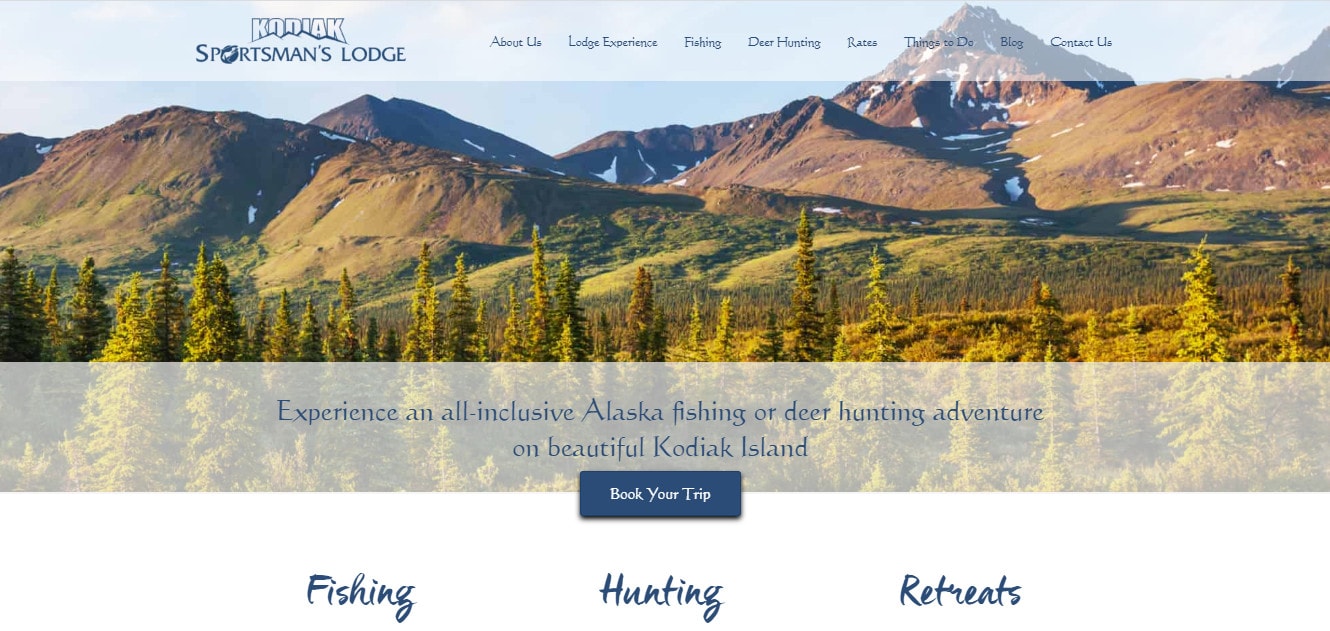
Most website pages – especially the home page – has a slider or “hero” section right underneath the header. This includes a large photograph, some important introductory text, and a call to action that helps people find what they need straight away. If the page has a slider, it simply means that several images will be displayed in a slideshow.

Landing Page

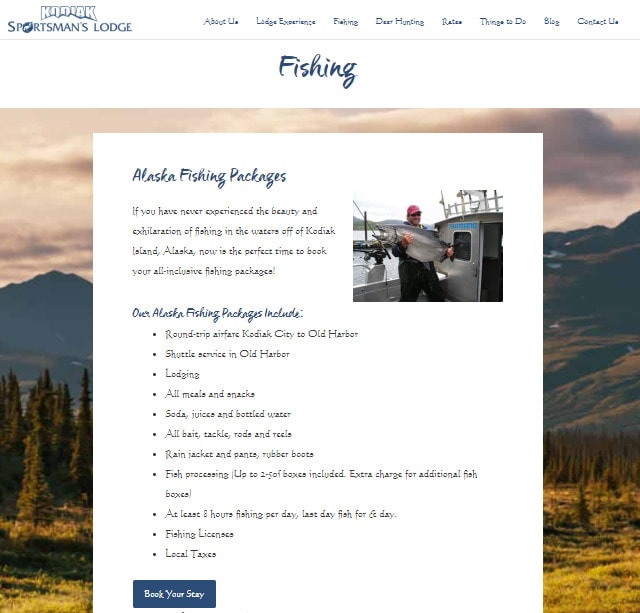
A landing page is a standalone web page with a very specific purpose. Typically, it’s where an online ad or email newsletter will link, so a user can make a purchase or sign up for a service. Landing pages often do not include a navigation bar or links to other web pages, as those can distract a user from the goal of the page.

CTA

A call to action (CTA) is text that prompts users to take specific action. Most often, the text is linked to an online form for the user to submit. The text can also link to a product for the user to purchase or phone number for them to call.

Conversion

In marketing terms, a conversion is when a user completes a CTA. When creating a website, you’ll want to ask yourself what you want that site to accomplish. Do you want to sell a user something right then? Do you want to gather an email address for a future sales funnel? Do you want the user to book a reservation or make an appointment? If you succeed, that’s a conversion. It means your marketing plan is working, because this is what’s going to help grow your business.

Favicon

Have you ever noticed that tiny icon on tabs in your browser? That’s a favicon or a shortcut icon. If your user has multiple tabs and windows open – and who doesn’t? – a custom favicon can help them find your website again if they’ve clicked over to something else. A lot of sites don’t have custom icons but yours should!

Responsive Design

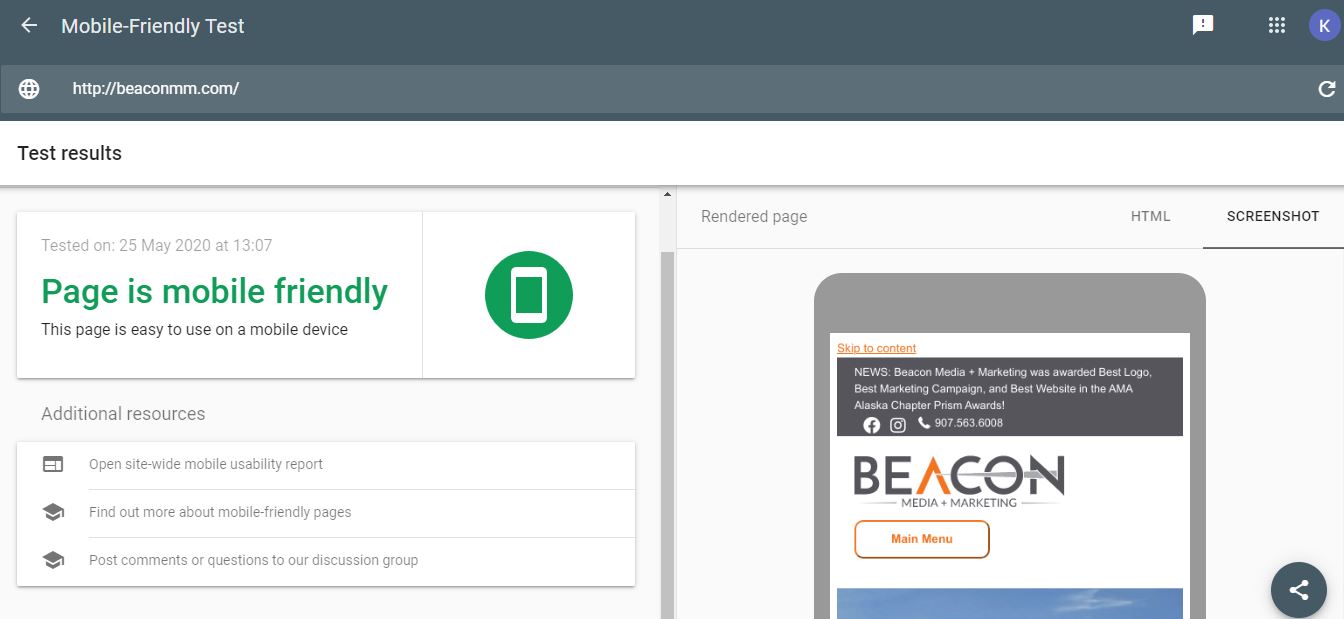
A website that has been created with responsive design adapts to different sized screens. This has become incredibly important as more and more devices now load websites. You may have a user load your website on a big screen television, a desktop computer, an iPad in portrait or landscape mode, a Kindle Fire, or any number of different kinds of mobile phones. Your website needs to perform well and provide the same information to all of these devices. Furthermore, Google has indexing mobile devices first, which means it primarily uses the mobile version of your site for ranking. Poor mobile views can actually hurt your search engine performance!

Want a website that actually improves your business? Learn how our web development service can help.

Technical Web Terms (For The Nerds Among Us)

The following terms are more technical in nature, but it can help to be familiar with them to make sure your developer is covering all the bases.

Bugs

Bugs are any issues where a website is not doing what it is supposed to do: something might look wrong, a link might not go to the right spot, an error message may come up. The most common bugs on website include browser compatibility problems, responsive design issues, and broken links. There is a lot that goes into creating a website and bugs are quite common. If you encounter errors on your website, don’t hesitate to let your developer know so they can be fixed as soon as possible. Taking screenshots and specifically detailing the issue is an important part of reporting bugs.

Browser Compatibility

Did you know that the same website can vary on different browsers? That’s because browsers like Google Chrome, Microsoft Edge, Safari, and Opera all render code differently! Your website developer should be performing cross browser testing to be sure your website works well across multiple platforms. If you encounter a bug, your developer may ask you what browser and version you are using. It is possible that he or she isn’t seeing that bug at all on their computer! The website https://www.whatsmybrowser.org/ is a helpful tool to let your developer know where you are seeing the problem.

Cache

Modern websites are big with large images and a lot of functionality. To maintain high download speeds, developers utilize both browser and server caching. Caching is when parts of a website – code, images, videos, etc – are saved to be viewed again. If you’ve visited a website many times, it is likely that your browser has saved several key parts of that website on your computer. If your developer makes a major change to your website and you have not cleared your browser cache, you might not be able to see that change or the website may render oddly with new and old parts. When viewing changes on your site, make sure to clear out your browser cache (Ctrl + F5 or Command + R on a Mac should do it) or you can use a browser’s incognito mode to make sure you are seeing the latest version of the site.

Alt Text

Alt text is a description of the images on your website. Every image should have an alt text attribute, describing the image. There are two reasons to use alt tags. First, alt tags help with the accessibility of your site. If someone is vision impaired, they rely on alt tags to let them know what the images are on your website. Second, alt tags can also help Google and other search engines as they cannot “see” images. The use of good alt tag descriptions with keywords can improve your search engine optimization.

Title & Meta Description Tags

When you Google a search term and are reading results, you’ll notice that there are titles and descriptions of each website. Google can pull this information from your website, but your results will be much better if your website specifically tells Google what the titles and descriptions should be. Every page of your website should have a specific, unique title and meta description of the proper length.

Plugins

If you are using a CMS, there is probably an option to add plugins to your website. Plugins are small pieces of code that add functionality. There are thousands of plugins in the WordPress repository, but not all of them are high quality. A poor plugin can cause security vulnerabilities and severe performance issues on your website. It’s important to not just pick a plugin randomly. Always make sure your developer is properly vetting any plugins in use on your website, making sure they are updated and maintained by reputable organizations.

Redirects

When removing a page from your website, it’s a good idea to create a redirect on the server so the page’s URL won’t result in a 404 Not Found Error. These errors are annoying for users and can be damaging to search engine results. This is especially important when creating a new website. Make sure your developer is either using the same URLs your old website used or creating redirects to the new URLs, so your search engine results don’t drop dramatically when the new website is launched.

Tracking Codes, Tags, & Pixels

Google, Facebook, Hubspot – there are all sorts of tools to track your website’s performance and user behavior. In order for all these tools to work, they need their code installed on your website. This code includes HTML and small pieces of JavaScript code, usually put in the header or footer of the website. While these tools are important and helpful, they can sometimes hurt the performance of your website or cause errors when combined with other pieces of code. Always make sure your developer is checking your website for scripting errors, installing these tools in the correct way, and being careful with the number and combination of codes used.

XML Sitemaps

You’ve heard of HTML but what is XML? XML is a markup language similar to HTML but specifically designed to store and transport data. It can be helpful to search engines if your website includes an XML Sitemap – basically a listing of all the pages and posts on your site encoded in XML so it can easily be read by search engines. This tells search engines what information is available on your website and helps them to crawl through the site faster and more efficiently.

If there are significant changes to your website’s structure and content, you can even submit a sitemap to Google or another search engine to let them know things have change. This helps significantly with search engine optimization. There are many SEO plugins that will create XML Sitemaps of your website.

Need a developer that knows all the technical items? Check out our website development services!

Do You Need a New Website?

Website design and development is one of our specialities! We have experts on staff familiar with all of these terms and more who have been working in the industry for years.

Our website dream team can help your business. Schedule a free consultation.

There’s a big difference between good copywriting and bad copywriting. A huge difference. A massive difference. A monumental difference. But it’s about more than just choosing the right words for the job, it’s about connecting with your audience and persuading them to act.

In this guide, we tell you everything that you need to know about copywriting – what it is, why it matters, and why you should consider outsourcing it for your company.

Want to talk about copywriting? Schedule a free consultation today.

What is copywriting, anyway?

Copywriting is any words related to your brand: your tagline, website copy, sales brochures, social media content, press releases, and everything else that uses text. It’s very common, when you’re starting out, to write everything yourself. But if you want to make your words work (and by work…we mean sell) then it’s time to think about getting a professional copywriter.

Also, copywriters have nothing to do with copyright law, despite the fact it sounds the same.

What does a copywriter do?

Copywriters write words that promote your business and persuade your customers to buy your products or services. It broadly falls into two different categories:

  1. Developing the creative parts of a brand (like packaging and advertising campaigns).
  2. Creating ‘sales’ related collateral (like emails, website copy, and blog posts).

Copywriters are also very skilled at content marketing, which is integral to helping your brand presence grow online. This includes SEO (Search Engine Optimization) to ensure customers can find you when they need your products or services through platforms like Google.

How can a copywriter help your business?

Wherever there are words, copywriters can help. This includes:

  • Writing the copy for a company’s website
  • Content marketing like blog posts and articles
  • Crafting paid advertising copy
  • Coming up with creative headlines for an advertising campaign that’s going to run on billboards or in magazines
  • Crafting social media content for channels like Facebook, Instagram, Twitter, and more
  • Writing a company’s in-house magazine, newsletter, or intranet content
  • Email marketing (promotional emails to your customers)
  • Packaging copy (if you’re a business with tangible products)
  • Crafting landing pages that convert
  • Video scripts to tell your brand story

Marketing for the first time? Here are the top digital marketing trends for 2021.

Why should I use professional copywriting services?

While anyone can write, not everyone is a writer. Anyone can nail two pieces of wood together, but not everyone can build a house. See what we’re saying? Your brand is just as precious as your house, so it’s important to find someone you can trust to do the job well. Here’s why:

  • Readers only read 20% of the content on the page (which means that 20% better be working hard)
  • Nearly 75% of readers pay attention to spelling and grammar (meaning there’s no room for mistakes)
  • Eight out of 10 people will read a headline, but only two people will go on to read the rest (which means your headlines need to do some serious heavy lifting)

It’s reasons like this that explain why getting a professional copywriter is so important if you want to grow your company. Is your website working hard enough? Are your emails actually persuading anyone to buy anything? Is your social media marketing getting results?

When you use a professional copywriter, you can trust that your brand is not just producing words – it’s producing words that actually work. This is essential to growing your business.

How can copywriting grow your brand?

Companies are as unique as their owners. They all have a different tone and style. Professional copywriters can adapt their writing to fit the personality of your brand and to suit the needs of your audience. By doing this, they create content that persuades your audience to act. That action could be straight to purchase, booking a sales call, or requesting more information.

Not only can copywriters help your brand grow your bottom line, but they can also help you increase your brand awareness and brand equity (how many people recognize your brand). They do this by creating memorable content that is shareable and relatable to your audience.

What are some common copywriting mistakes we see?

  1. Not bothering with audience personas. If you want to connect with your audience you’ve got to know who they are and what they want.
  2. It’s full of spelling and grammar mistakes. Sloppy mistakes like this show your audience that you don’t care. So why should they?
  3. Getting the voice wrong. Every brand has (or should have) its own unique voice and way of writing. Every word needs to match that brand voice (seriously…like, imagine if Red Bull started to sound like an insurance firm!)
  4. You’re being too verbose. Don’t use 50 words if you can say it in 10. One of the hardest things in the world is keeping it simple, but simplicity is often the key when it comes to good copy.
  5. You’re writing for yourself and not your audience. You need to lead with the benefit to your audience at all times, not the benefit to your company.
  6. There’s no clear call to action. What do you actually want your audience to do? Make it clear what people should do to take the next step.
  7. Forgetting SEO. When it comes to getting your business found, you need to make good friends with Google. And that means writing highly searchable content that follows the rules of SEO.
  8. Trying to say too much at once. We get it, your brand is great. But you can’t say everything about it all at once. Write with a singular and explicitly clear purpose.
  9. Not considering readability. Our brains like to scan content quickly to make decisions on whether it’s useful, so it’s essential to avoid huge blocks of text.
  10. Relying on adjectives, not proof. You need to be able to back up what’s said, not just keep throwing in superfluous adjectives about how great your company are.
  11. Not telling your story well enough. We have a functional and emotional side of our brain. When we buy something, both sides are helping us choose where to spend our dollars. Your brand’s story is an important emotional trigger, but are you telling it right?
  12. Not having a clear purpose. Why are you even writing something in the first place? Every piece of content – and every word within it – should have a clear purpose. Don’t just write something for the sake of it. No-one benefits from shouting into the void.
  13. Articulating your special offers wrong. Special offers are a great way to increase sales but they need to be positioned in the right way that don’t devalue your brand.
  14. Missing opportunities. There are opportunities everywhere to use words to sell – your website, your transactional emails, your signage (and plenty more).

Want some examples of copywriting that converts?

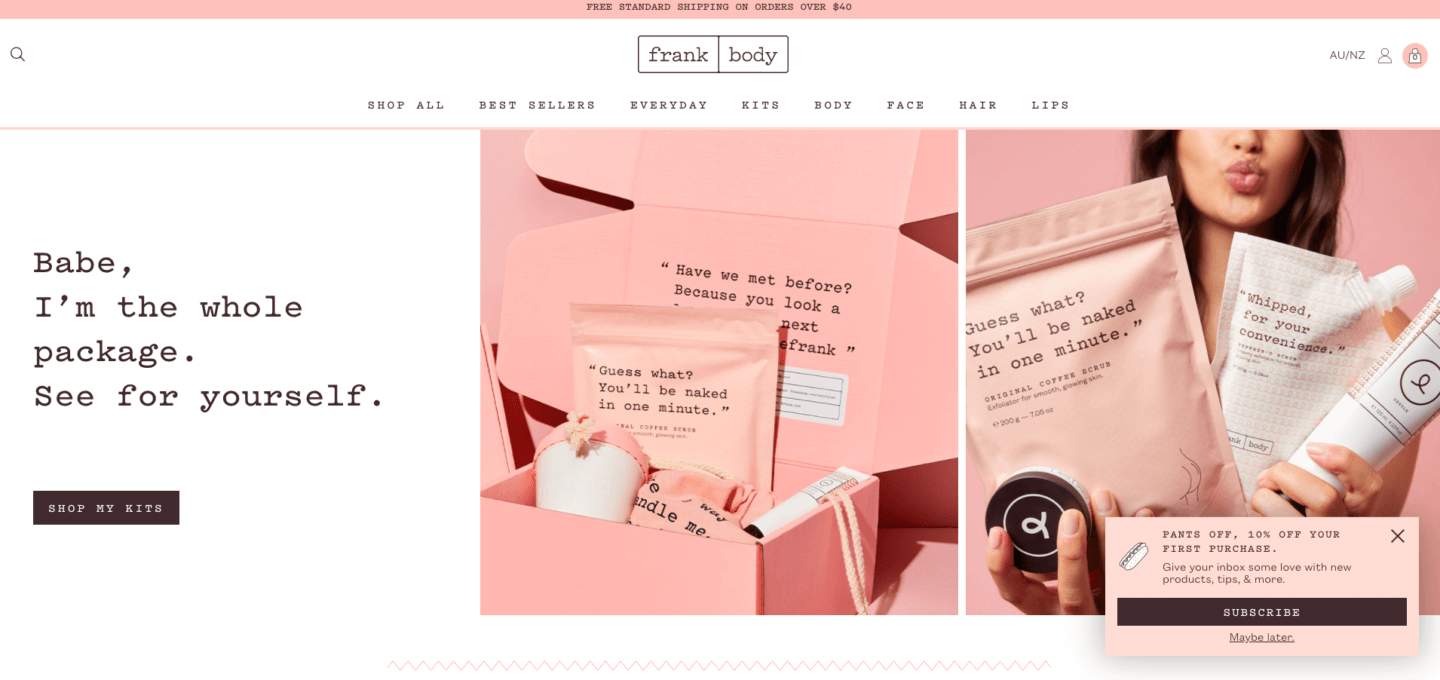
Frank Body

This beauty brand oozes personality. From the packaging to the website and everything in-between, it’s intrinsically Frank every time. But it’s not just quirky – every word drives action.

  • Clearly shows the products and their fun tone of voice and product descriptions.
  • A fun ‘10% off’ call to action encouraging people to sign up for the newsletters.
  • ‘Shop My Kits’ calls to action makes it clear what the reader needs to do next.

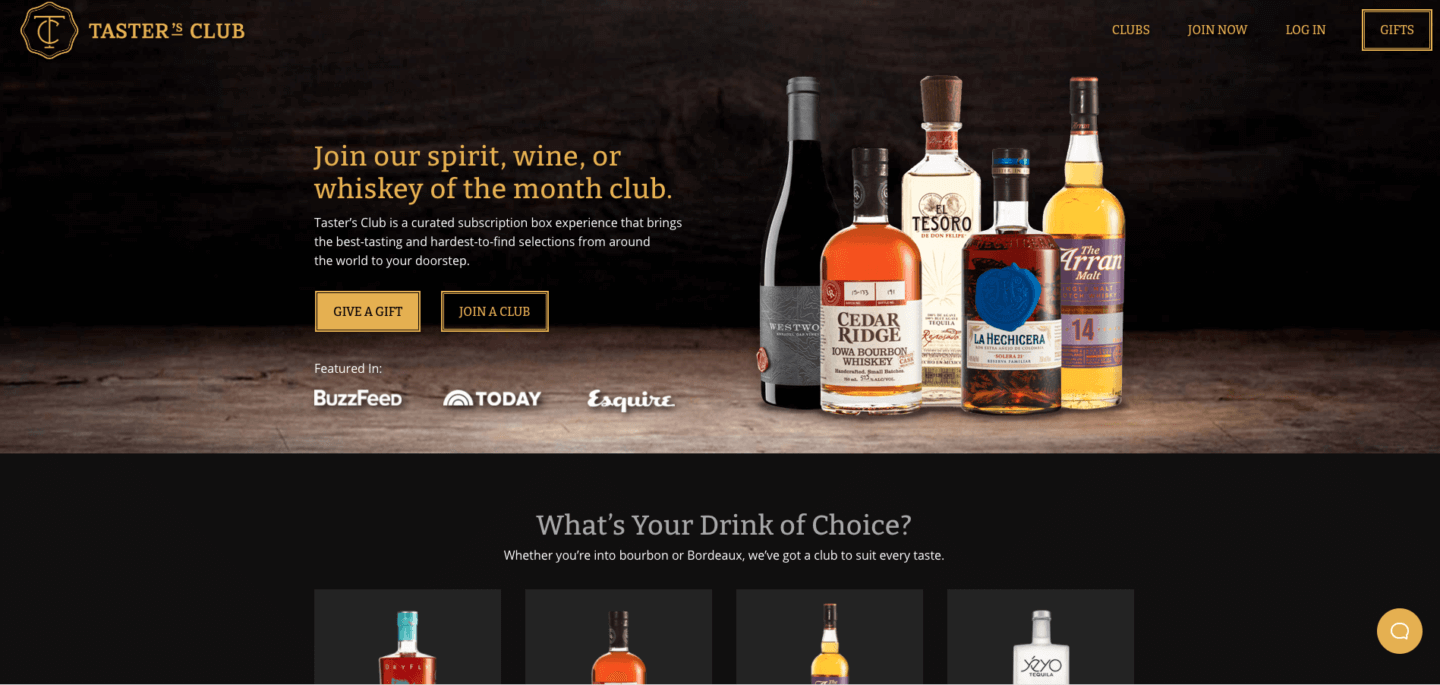
Tasters Club

This whisky club has nailed simplicity. Check out this beautiful home page:

  • A single headline says exactly who this company is and what it offers.
  • The two very clear calls to action are worded in a way that’s super inviting – driving people straight to the content they need.

Nike

Okay, okay, we’re putting in the big guns here. Copywriting is more than just content marketing and social media. It can also become intrinsic to your brand. Nike’s tagline ‘Just do it’ is one of the world’s most iconic copywriting examples. It’s globally recognized and is just as powerful as the brand name itself. Want something this good for your brand? Get a copywriter. Just do it.

  • What can we say? It’s a thing of beauty.

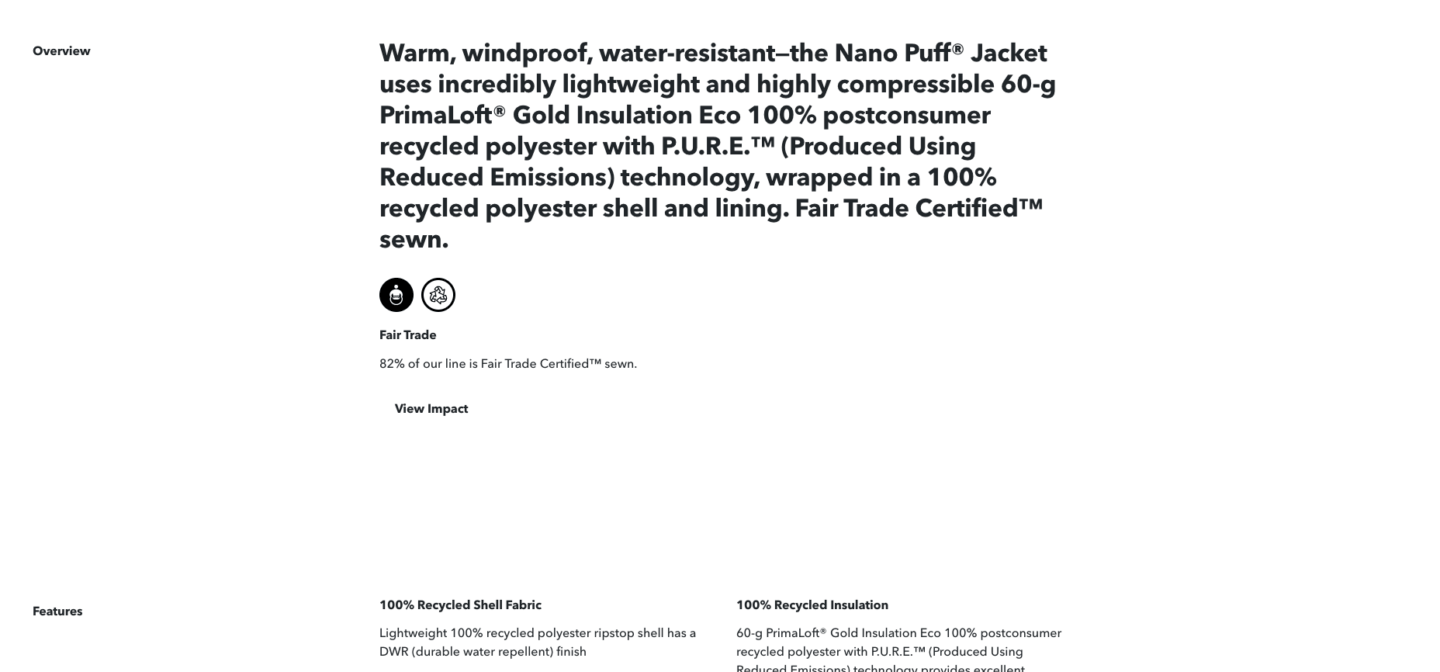
Patagonia

If you’re an eCommerce site, your product descriptions are one of the most important things you’ll ever write. They need to rank for Google, provide practical information for your audience, and give shoppers the warm-and-fuzzies that make them want to buy, all at once.

We love how Patagonia has written theirs. Although it’s just a product listing, it manages to reinforce the company’s key messaging around sustainability and make the shopper feel good.

  • Short, concise product descriptions that fuses the functional with the emotional (functional = technical details like what it does and the weight; emotional = environmental information, which pulls on the emotive tendencies of readers).
  • Expandable sections for ‘Features’ allow more functional information and ‘View Impact’ which delves into the environmental impact of the product.

Ready to work with a copywriter?

If you’ve been persuaded by the power of words, we’d love to hear from you. Schedule a free consultation.
This year is all about growth. Who’s with us? So much has been written about 2020, and all of the lessons we learned, but I think we can all agree that for the most part, it felt like collectively pushing water uphill. (Hello, by the way! My name is Kirrily and I’m the Content Manager here at Beacon Media + Marketing.) In the words of Taylor Swift, we decided to, “shake it off.” And like every ‘90s teen movie ever, we decided to kick off the new year with… wait for it… a makeover.

That’s right, we’ve just launched a shiny new website! As a digital marketing agency, having a great website is like a hairdresser having great hair or a car salesman driving the latest model. It’s not just a piece of digital real estate where our clients can find out about our services, get to know us, and talk business. We want to make a great first impression and show you what we can do!

If you can’t already tell, we’re extremely proud of our efforts and the changes it symbolizes for our business. In this blog, we’re going to talk you through the process of redesigning a website and explain some key digital marketing strategies we used to stand out and generate leads.

Already convinced? We’re excited to meet you. Contact us today.

How Do You Create a New Website?

The first step in creating a stunning new website is to hire a marketing agency. As you can see, we know what we’re doing! We’re here to make the process as easy and stress-free as possible for you. There are lots of great benefits to choosing us – bear with me while I go ahead and boast about (ahem, list) them:

  • We utilize the full power of our team to brainstorm ideas based on your objectives
  • Our copywriter can help you create memorable messaging and sharp content
  • Our graphic designer can strengthen your brand and make your site a visual standout
  • Our developer can save you hours on coding, making your site incredibly easy to use
  • We offer hosting to ensure your site is always up to date, backed up, and secure

Our process depends on whether you’re starting from scratch or updating an existing website. If you’re starting from scratch, we’ll meet with you to talk about products/services, your company culture, your vision/mission/values, and your current marketing funnel, before getting to work.

We already had a website in place, so we looked through it as a team to decide what could stay, what needed to go, and what we wanted to change. We wanted the website to have a fresh look and feel to represent our optimism for the future, we wanted it to focus on our passion for American small business and highlight our new “Grow, Scale & Thrive” key messaging, and we wanted to reorganize the structure to make it easier for people to use. Importantly, we also wanted it to have very clear calls to action (CTAs) to make it easy for people to take the next step.

Once we agreed on a brief, our leadership team worked closely with our creative “Dream Team” (consisting of our copywriter, graphic designer, and developer) to bring this vision to life.

Click here to learn more about our web design and web development services.

What Strategies Did We Use for Our New Website?

Getting a new website can be stressful, especially if you’re doing it yourself and wading deep into the world of how-to guides and hosting. It’s important to note there’s no “perfect” way to build a new website. Instead, there are really only five things a website needs to be successful:

  1. Clear objective
  2. Helpful content
  3. Beautiful design
  4. Awesome functionality
  5. CTAs, CTAs, CTAs

Let’s unpack each of those individually, using examples from our new website.

Clear Objective

Different websites can achieve different goals. It’s important to be very clear on your goals before work starts on your new website, because you’re essentially building a funnel that is going to guide all visitors toward your goal. Do you want people to purchase a product? Contact you with all of their questions? Attend an event? Be amazed at your beautiful artwork or literary prose?

In our case, we want people to schedule a free consultation, because that’s the first step toward signing a new client. When you look at our site, you’ll notice that every page works toward this goal. The content is exciting and persuasive. The design is eye-catching and deliberate. The functionality is simple and easy. Nothing on this site has happened by accident! Having a clear object from the outset will ensure your website works as hard for you as possible, becoming an active part of your sales process instead of passively letting prospective customers draw their own conclusions.

Helpful Content

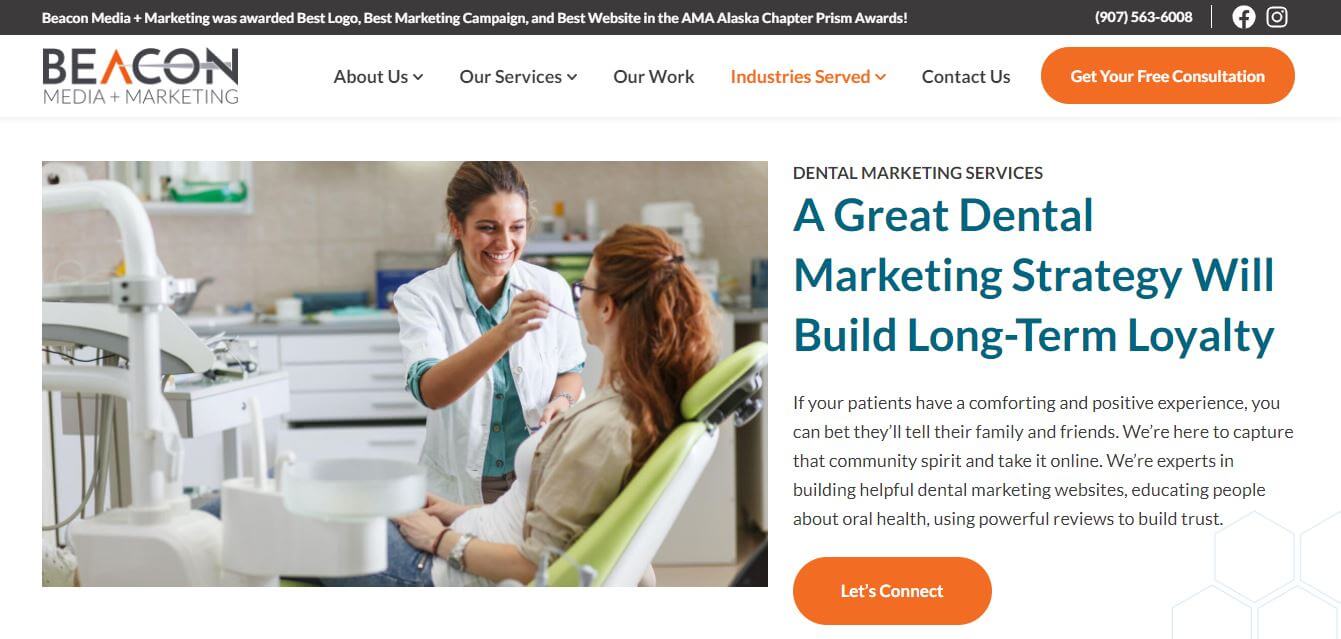
Screenshot of Beacon Media + Marketing's Dental Marketing Services page.

The secret to writing great website content is simple: make it helpful. Put yourself in your customer’s or client’s shoes for a minute. What’s the most important thing they’ll need to know in order to make a decision to choose you over your competitors? In most cases, it will boil down to what your products or services are, who you are and why they should care, and how they can contact you.

Once you’ve gathered that information, you’ll need to make sure it’s organized into a logical way that makes it easy for them to follow. Most websites follow a basic template that you’ll notice in the navigation bar at the top: Home, About, Products/Services, and Contact. You can add more – that’s entirely up to you – but make sure these elements are all present.

You’ll also need to give some thought to your subheadings, because this makes sure content is easily scannable so people can quickly find the information they need. Take our Dental Marketing page, for example. First, we use an emotive heading to capture your attention. Then we tell you why we specialize in this area. Then we tell you what you need to succeed. That’s followed by a case study, and a call to action. It’s simple, helpful, and logical. Don’t overthink the content!

Beautiful Design

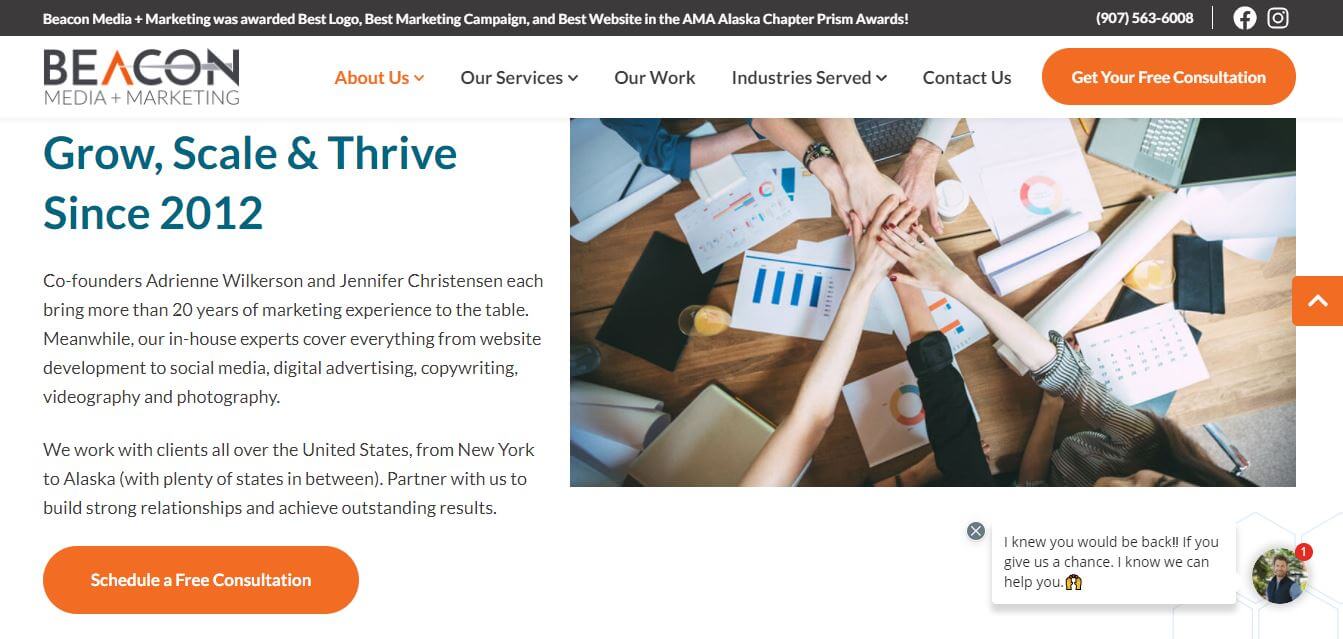
Screenshot of Beacon Media + Marketing's About page

People are incredibly visual, so design is undoubtedly the best way to make a great first impression. You can think of a website as a functional artwork. It’s beautiful, yes, but it’s also innately practical. Like we said earlier, everything is done deliberately to encourage clients or customers to take action. Brand colors will build brand recognition. Brand fonts will create a visual tone, whether that’s modern and fresh, strong and capable, creative and fun, and so on. Images will capture people’s eyes and hold their attention. Subheadings will tell them what they need to know.

Our About page is a great example of this. The main thing we want you to know is that we’ve been, “Helping Businesses Grow, Scale & Thrive Since 2012.” That’s why it’s the first thing you see. The image creates a collaborative feeling right from the start. We’re not here to tell you what to do; we’re here to partner with you on your journey to success. Immediately below that is a blue content block that lists our key statistics – for example, that we have a 98% client retention rate. Below that, you can see all our smiling faces and learn about our team. And you can always take action by clicking that big orange “Get Your Free Consultation” button in the top right corner.

Awesome Functionality

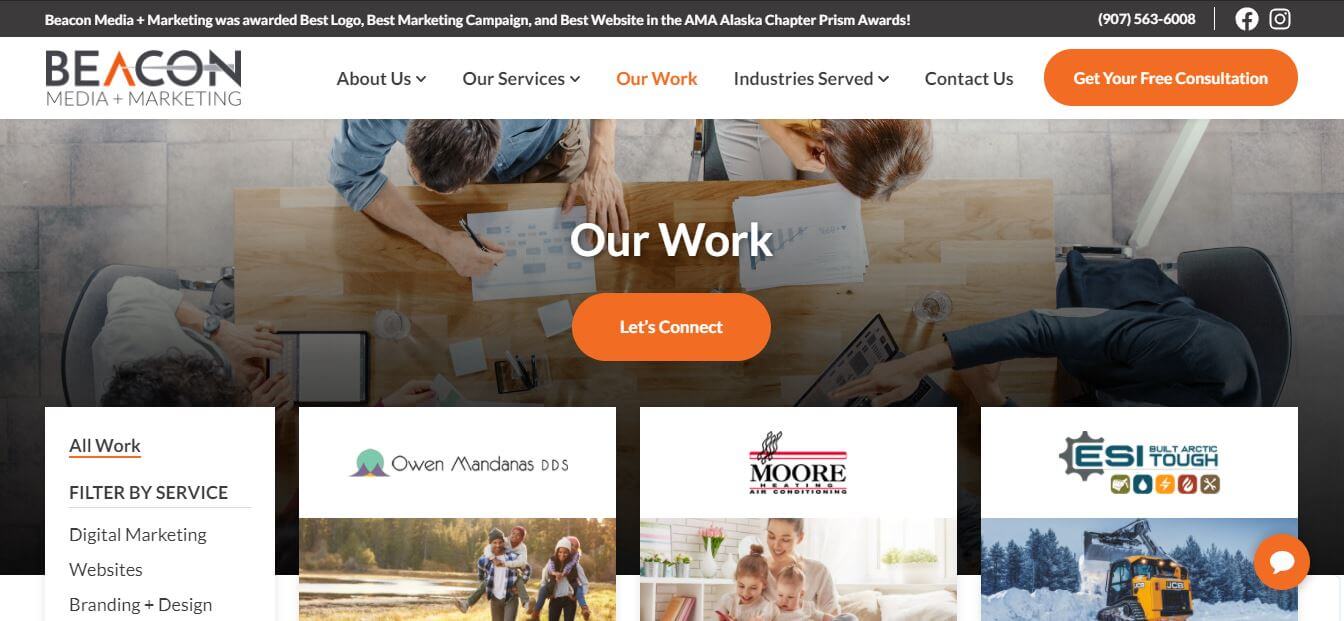
Screenshot of Beacon Media + Marketing's work portfolio.

This is the part where most people get stuck. There are many, many, many different platforms out there that will allow you to build a website for free, or a very minimal price. Many business owners go down this route only to realize a few things: it takes a long time to build a website if you have no coding experience; it’s incredibly frustrating to try and fix your website when things go wrong; and it’s hard to get hold of people when your security is breached and your website gets hacked. That’s why good developers are worth their weight in gold. They genuinely LOVE this stuff. They’ll make sure your site is always protected, functional, and up to date so you can get back to business.

They can also create really cool functionality that makes your site easy to use. Take the Our Work page on our website. This is where we’ve collected our favorite case studies for prospective clients to check out, so you can get an idea of the type of work we produce. Two interesting things happen as you scroll: the navigation bar at the top is frozen to ensure that big orange button is always accessible, as is the filter option on the left-hand side. This means you can easily filter by service or industry to find out if we’ve done any jobs like yours. The page loads quickly, even though there are a lot of images, and each case study has two well-spaced statistics and the option to learn more by clicking the “View Case Study” button. It makes your user experience as smooth as silk.

Calls to Action

Screenshot of Beacon Media + Marketing's new website.

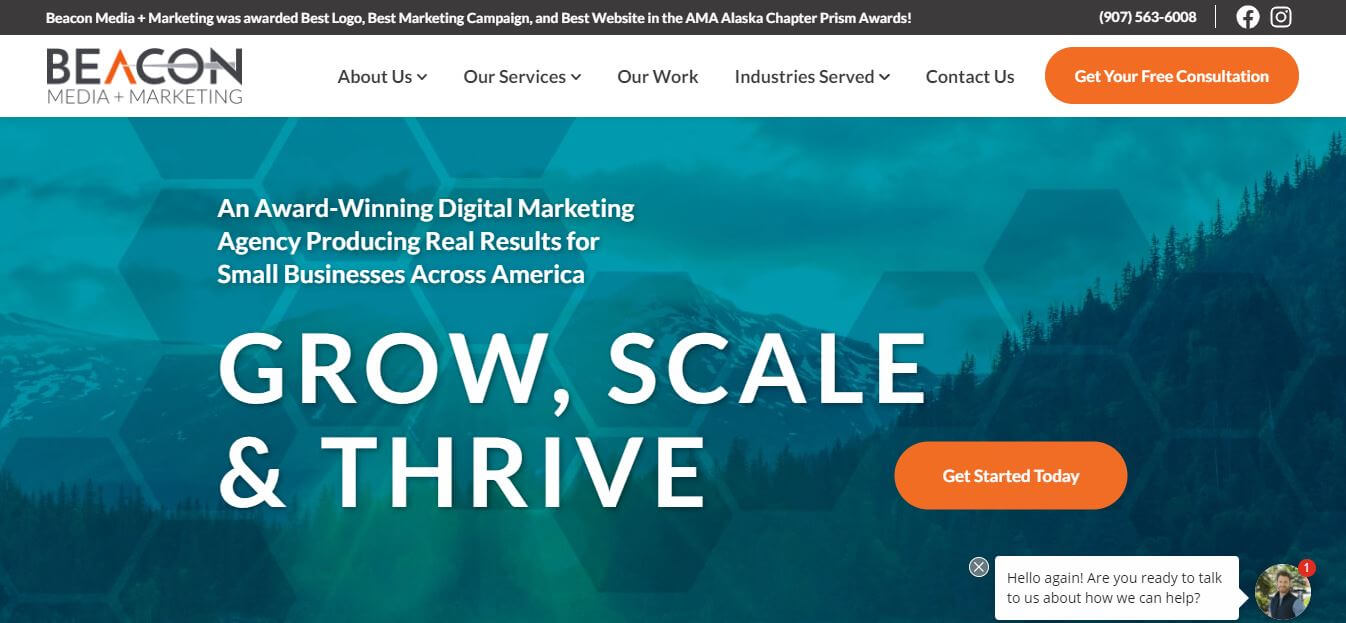
Did we mention CTAs? Truthfully, none of the rest of the list matters unless your prospective customer or client knows exactly what step to take next. You need to make it as easy for them as possible. If you take a look at our Homepage, you’ll quickly notice that they’re all marked in bright orange. You can tell right away that we want you to “Get Your Free Consultation” and “Get Started Today”. Both links open our live scheduler so you can go ahead and book and appointment. We also have a custom chatbot that will connect you with our sales team in case you have questions.

And that’s before you scroll even once. Simple. Clear. Convenient. Keep that in mind when you’re developing a brief for your own website. As you scroll down our homepage, you’ll see there are clear CTAs after every block of new content. We apply the same strategy to every other page on our site. That way, if a prospective client sees something they like, they can take action straight away. Our goal is to make it as easy as possible for people to connect with us and talk business.

Next Steps in Getting a New Website

Speaking of CTAs, I’m going to switch back to first person and finish this blog with one. I hope you found it to be interesting and informative. Make sure you check out our new website here and remember you can get in touch with us anytime. We’re total marketing nerds and we’d love to help you with your web project, whether it’s brand new or a redesign. There’s no better feeling than creating a site that helps a client’s business “Grow, Scale & Thrive” (see what we did there?).

Ready to get started on your new website? Get your free consultation.

When 2010 rolled around, it felt like every other person had a blog. CEOs? Check. Amateur chefs? Check. Avid travellers? Check. Moms? Check. Businesses? Hmm. Not so much. But why not? After all, people come to your website to see what products and services you offer, and what kind of company you are, right?

The first question we hear you asking is whether blogs are even still relevant in 2020? It’s a fair question. After all, there’s only so much time in the day, so why would you invest your time in writing a business blog? The answer is simple: traffic.

A blog offers you the opportunity to potentially get a lot more eyes on your website, educating potential clients, and generating leads. Unless people are already acquainted with your business, they won’t Google you specifically. They’ll Google similar products and services. It makes sense, then, to dominate those keywords online and ensure your business ranks right at the very top of the list. By creating a business blog, you dramatically improve your chances of ranking… and who knows, it may convert new visitors into customers.

Creating a blog can be quite daunting, as there is a lot to learn – especially around search engine optimization (SEO). This refers to the techniques used to get your posts ranking at the top of Google’s results page, and can feel like opening a can of worms. If you don’t have time to figure it all out yourself, remember you can always outsource. But if you’re ready to learn all there is to know, then keep on reading!

Want help with your website? Call our helpful team today.

What is a business blog?

We all know that having a website is important. It’s your own little piece of digital real estate, and one of few things on the internet you’ll ever fully control. Blogs are essentially signposts that increase virtual foot traffic into your business to that you can make sales. While Google is known to change its algorithms, affecting your rankings, blogs are not nearly as volatile as social media results that can spike or plummet overnight.

Blogs have come a long way since the weblogs, or diary updates, that first started in the mid-90s. Nowadays, a “blog” simply refers to the section of your website that gets updated on a regular basis. It’s designed to keep your website fresh and relevant, and keep the Google algorithm happy, so it keeps ranking your articles as high as possible. This means it works very differently to regular webpages, which generally focus on sales.

Content marketers believe in the creation of blogs as a marketing strategy because they have seen the results. On average, companies that have a blog section on their website produce 67% more leads monthly compared to companies that don’t. Alongside the additional leads, blogs also increase brand loyalty by bringing in new readers and interacting with them in a meaningful way… which can boost revenue.

Let’s talk about SEO

The best way to grow traffic to your website is by creating the kinds of content people are actively looking for in search engines like Google. Once they click through to your website and see that you know what you’re talking about, it will be much easier to convert them into a paying customer. The best way to do this is to take a look your website analytics, so you can see the kinds of pages people are most interested in reading about.

However, creating a lead generating content strategy is not as simple as writing something that you think your audience might like and throwing it up on the internet. These days, it’s important to have an SEO strategy in place that will allow you to build up content and keywords on your website that are relevant to your audience and to your product or service. This means that you should be thinking about what your consumer might be looking for and using the available SEO tools to see whether they actually are. This way, you’re letting the customers come to you on their own than paying for their clicks.

How do I write a blog?

There are many types of blogs that you can create for your business. Truthfully, you can turn almost anything into a blog post, as long as it’s something your target audience will find valuable. This can include handy how-to guides, news items relevant to your industry or business, think pieces, infographics, listicles, cheat sheets, interviews, guest blogs, commentary on current news items, key terms explained, and much more.

Whichever type of content you decide to write, make sure you start your blog strategy with a clear goal in mind and a realistic path to reach that goal. Know who you want to reach, what they’re looking for, where they hang out online, and most importantly, what action you want them to take when they click through to your website.

An essential part of a successful blog strategy is keyword research. To put this simply, you need to pick the best combination of words that describe your business and DOMINATE. The researching phase is critical, so you might want to consider engaging a SEO professional to ensure you’re on the right track. This will help you work as efficiently and effectively as possible, by finding words that are well-trafficked but not too competitive.

Once you’re confident about your selection, create a content calendar so that you know how your target keywords are going to work together in real-time. This way, you and your team will know what’s coming up, so you can plan ahead to create high-quality content whilst building up authority in those essential keywords.

Should I start a blog in 2020?

Yes! A thousand times yes. Blogs are a powerful tool to drive traffic to your website, and a well-executed content strategy has proven to be one of the most efficient ways to grow your business by boosting your online traffic. With every blog post, you are adding relevant keywords to your website. This, in turn, signals to Google that you have a highly-relevant business within your industry, so the algorithm sends more traffic your way.

A business blog allows you to provide your target audience with value that they cannot get from a sales or landing page. Modern consumers research the brands that they’re planning to purchase from, which means education and transparency are more important than ever. Consumers want companies to be helpful and provide them with value before they are willing to invest. Having a blog allows you to provide that information, to educate your customer about your service or product, to capture their attention, to build trust, and to create a positive connection. If the end-goal is to drive the sales of your business, this is a fantastic way to get started!

Need a little help getting started? Outsource to the professionals! 

“I hate marketing.”

I was recently talking to the owner of a tutoring business, and she was shaking her head in despair. She offers lessons in person and online for K-12 students, and she’s been trying to get more students registered. Every time she signs up a few more, a few others move on. It happens over and over again. It’s one step forward, one step back, over and over.

Since I work with a marketing agency (hello, by the way! I’m Kirrily, a copywriter), I asked about her marketing strategy. She groaned and put her head in her hands.

“I’m just not a sales person,” she said. “I’m no good at it. I don’t like it at all.”

It got me thinking. Marketing can be intimidating when you’re first getting started, but it’s nowhere near as scary as you think. On top of that, it’s essential for every small business! I’m going to tell you exactly what I told this business owner, because there are some really common marketing myths floating around that we can bust wide open.

Want to get your marketing back on track? Call our team today.

Myth 1: Marketing is sales

First things first, marketing is not the same things as sales! Marketing for your business doesn’t have to mean dressing in a suit, shining your shoes, and putting on your best travelling-door-salesman smile. You don’t even have to offer a free set of steak knives (although, of course, you can if you’d like). Marketing is essentially opening the door. Then, when the customer walks in, sales is there to seal the deal.

Marketing is all about education. In order to choose your products or services, people need to know they exist. Further to that, in order to choose your products or services over a competitor, they need to know why you’re the best choice. And when they do go ahead and choose you, they need to have a great customer experience, so they go ahead and tell their friends (word or mouth is, after all, the oldest and most effective form of marketing there is). As you can see, information is the key.

There are lots of ways you can do this. The most obvious way is to create a great website that has all this information readily available, presented in a clear and engaging way. It’s really important that your website follows a logical structure and that all the information is well-organized, because it’s essentially your digital shopfront. You wouldn’t leave a pile of packing boxes, old milk bottles, and empty flour packets at the front of your café, would you? Keep your website clutter-free.

The next thing we recommend to all our clients is to set up a Facebook page for your business. This is a friendly and casual way to deliver your messaging right into the pockets of your community, whether that’s existing customers, people living in your area, or demographics you’d like to target. Start by inviting your family and friends to like your page, then encourage all your current customers to like your page, and make sure you share content they’ll find interesting and relevant.

Myth 2: Marketing is pushy

Good marketing won’t feel like marketing at all. Yes, that statement sounds a bit silly, but let us explain. Put simply, “marketing” really just means making information available in a way that people find interesting and helpful. It doesn’t mean you’re shouting for their attention.

Here’s an example. Say your furnace breaks down on the coldest night of the year. What’s the first thing you’re going to do? Modern consumers are most likely to whip out their phone, and Google something like “emergency furnace repair” or “furnace repair near me.”

Google is then going to generate a map showing you all the businesses in your area that have the words “furnace” and “repair” on their websites, which will mean you can quickly see all your local HVAC companies, check out their location and service hours, scan through their reviews, and start making phone calls. Have they shouted at you? No. Have they given helpful information? Yes.

This, dear friends, is modern marketing at its finest.

When we explain this concept to our clients, we like to use an analogy of a cat. If you try to make a cat eat, it’s most likely going to stick its nose in the air, run away, and hide under your bed for a few hours. If you leave some food out, however, the cat will come and find it when it’s ready.

There are a couple of really simple techniques you can use to put this into practice:

  • Google My Business is an easy-to-find profile that helps people quickly identify who you are and how you can help them. It will make sure you pop up on local Google Maps searches.
  • Google Search Ads are the ads that appear at the very top of the Google Results page. These are targeted to specific combinations of keywords and function on a pay-per-click model.
  • Google Display Ads are visual ads that appear on websites all over the internet. These are targeted, so you can optimize them for a specific demographic, and also

Myth 3: Marketing is really hard

It’s true, there are a lot of facets to modern marketing, and learning them all is a considerable investment of time. However, it doesn’t have to be hard work. In fact, you can have a lot of fun along the way (okay yes, we’re total marketing nerds).

However, if you’re slaving away in front of the computer for hours, and you’re finding the content you’re creating to be boring and uninteresting, there’s a fair chance your audience will find it boring and uninteresting too. That means it’s time to think outside the box.

One way to do this is video! Video has exploded in recent years. It can be as cheap and cheerful, or as polished and proper, as you like. Either way, people find it super engaging! All you have to do decide what you want to talk about, plan out maybe three key points you’d like to discuss, and go for it. This can be livestreamed or pre-recorded, it’s totally up to you. People like people, so this can be a great way to work smarter, not harder.

Another great idea, which we use ourselves, is to create content calendars. Planning things like social media or blogs in advance means you’re never stuck for ideas. You can wait until inspiration strikes and then knock out a whole bunch of posts in one go, keeping your brand fresh and your messaging consistent. That’s the most important thing, after all: consistency.

To be honest with you, that’s where we see most businesses come unstuck. They tackle digital marketing with tremendous enthusiasm for a few weeks, and then lose their mojo before they start converting leads. Don’t start too hard and burn out. Figure out what’s reasonable, and stick to it for the long-term. Ultimately, this will create much better brand recognition, consumer loyalty, and growth.

Remember, you can also outsource! Contact our team today.

Marketing and sales go together like peanut butter and jelly. Sure, each one is great on its own, but when you put them together, you get something even better. It may sound a little strange, but it’s a helpful analogy to help you conceptualize your new digital marketing strategy.

Great websites are key to great customer experience. It lets a prospective customer know immediately who you are, what you’re about, and how you can help them. They’ll figure out a glance if you’re fun and fresh, professional and experienced, helpful and informative… or if you’re just a little shady. It’s not just about the design, or the copy, but the overall impression you make on each new visitor. In that sense, we like to think of websites as a digital storefront. It lets people know straight away if they want to walk through the door and learn more, or walk away and go somewhere else.

However, new websites can be expensive. We get it. Website design and development is a huge process that requires a considerable investment of time and money to be done well. The good news is there are lots of different ways you can create a great digital customer experience. In fact, we’re going to let you in on a secret that marketers have been using for years to boost sales without creating an all-new website. Okay, are you ready? We do it by using something called a landing page.

Time-poor and looking for a quick solution? Call our team today.

What is a landing page?

A “landing page” is just a marketing term for the first page a prospective customer visits (or “lands on”) when they click through to your website. Once you have a digital marketing strategy in place, there are a few different ways people can find you – and it might surprise you how:

  • A blog post. This typically occurs if they’ve done a Google search and your post contains lots of search-friendly keywords that has made it rank on the results page. Alternatively, this can occur if you’ve shared the post to social media and people have clicked to read it in full.
  • A product or service page. Again, this can occur as the result of a Google search, but it’s more likely that people will enter your site this way via Google Ads or Facebook Ads.
  • The home page. This is actually not the most common way people will visit you. Generally, this occurs through a direct search or through a referral mechanism like Google My Business.

It’s easy to find out the most common port of entry for new people visiting your website. All you have to do is install Google Analytics on your site. There will be a menu on the left-hand side, so click on Behavior, and then Behavior Flow, which will generate a flow-chart illustrating the way people move through your website. The first column will show you the top landing pages, the next few columns will show you what people typically click on next, and the final column will show you where they left.

A great website should walk them through the process as quickly as possible, until they either go ahead and buy something from your digital store, or schedule a service. The goal is to give customers what they want straight away, so they don’t have to choose their own adventure on your site.

Make it easy for them to find what they need so they have a great experience.

Landing pages can qualify your leads. Find out how.

Key elements of a landing page

Here’s where it gets interesting. A landing page can be a pre-existing page, like a product or services page. It can be a blog that addresses a specific topic, such as a common pain point your customers experience or a frequently-asked question. It can be a custom page, like a special offer.

However, there’s one thing every landing page needs: a call to action.

A “call to action” is another marketing term you’ll hear a lot. It’s used to describe the next step you want a customer to take when they land on your website. This blog post is actually a great example. Right at the start, we asked you to call us. Since we like you, here’s a heads up that we’ll ask you to call us again at the end. (And hey, we’ll do it again now just for good measure – if you want to talk landing page strategy, give us a call. We genuinely love helping people with this stuff.)

Yes, content is important. You need to tell people how you can help them. Yes, design is important. Your page needs to be eye-catching and easy to navigate. However, unless you have a strong call to action that invites a prospective customer to engage with you and take the next step on the path to purchase (we’ll come back to this in a second), the page won’t serve you as well as it could.

Again, make it easy for people! Tell your customers what you need them to do next.

Learn how to create a high-converting landing page.

Landing pages are key to sales

Remember how we said that marketing and sales go together like peanut butter and jelly? The eCommerce boom closed the gap between marketing and sales together, because now it’s possible for customers to float along the journey from hearing about a brand for the first time to buying an item, or scheduling a service, all on their own. This process can happen in as little as five minutes!

In marketing terms, this is called the “path to purchase.” It goes something like this:

  1. Exposure: This occurs when a prospective customer becomes aware of your products or services for the first time. Maybe they saw an online advertisement; maybe they’re actively searching for businesses like yours. Either way, they found you.
  2. Discovery: This phase starts when the customer decides they want to learn more about you. Hello, landing page! They will click on a link and end up on your website. Put your best foot forward and make sure they land on the page that’s going to be most helpful to them. This means promoting products and services pages, or a custom page with a special deal.
  3. Consideration: If they’re still here, it means they’re now a “qualified lead,” which means they’re the type of person who is likely to go ahead and complete a sale. This is where content comes into play, because you need to anticipate any issues that may arise and address them proactively. Answer frequently-asked questions. Remind customers how your product or service will help them. Add video to build trust, so they can see that you’re a real person doing real business. Anything that provides useful information in a digestible way is good.
  4. Conversion: They complete a sale and officially become a customer! Whether they stepped straight through the path to purchase in one go, or they came to your website, left to think about it, and came back again, this is what it’s all about. Congratulations on the sale!
  5. Retention: They have a good experience and either come back again or refer you to others. All you have to do now is rinse and repeat.

If you were going to divide this into marketing and sales, you could say that steps 1-3 fall into the former category, while steps 4-5 fall into the latter. However, as you can see, the digital sales funnel blurs them both into one smooth funnel and gives customers exactly what they need at each step.

Best of all, by focusing on landing pages and the path each customer will take through your website, you can make targeted upgrades without shelling out for an entirely new website. It’s an efficient, effective, and economical way to improve customer experience and boost your bottom line.

It’s time to start making some sandwiches.

Remember how we said we’d ask you to call again? Yup, we’re doing it! Talk to our team about a landing page strategy.

Originally published on December 1, 2015. Updated on June 29, 2020.

The term “landing pages” is one you will hear fairly often in discussions about websites and marketing techniques. There’s a very good reason for that: landing pages can be one of the most valuable assets in your digital toolkit. So what exactly are they? And why do you need them?

Landing pages are web pages that visitors land on when they follow an offer and click through to your website. Designed to convert visitors to your website into leads for sales, landing pages will gather information about potential customers using a simple form.

There are two key ways that landing pages will help you.

  • Landing pages can gather information like email addresses as well as lead demographics, interests, and concerns. With this information your sales team can build strong relationships with leads and keep their focus on the most qualified contacts.
  • They can lead to higher conversion rates, which means more customers for you and more profit potential for your business. Landing pages are your digital representative twenty-four hours a day, seven days a week, helping your work as efficiently as possible.

Want to talk landing pages? Schedule a free consultation.
What are landing pages used for?

Landing pages
For more great landing page examples, check out this blog from Hubspot.


A perfect landing page is not a sales pitch asking for information that the visitor doesn’t want to give up. A well-designed landing page will convert at least 20% of its visitors into leads by guiding them and warming them up. Here are eight jobs landing pages can accomplish for you.

  1. Landing pages are an opportunity to persuade visitors that what you’re offering them has value equal to, or greater than, the information you’re asking from them.
  2. Landing pages offer grounded, real benefits. Not abstract features. When you have a problem, you need the solution and the features don’t really matter as much.
  3. Landing pages help your visitors feel like they’re understood. It can show them that you know about their problem, you understand their frustration, and you can help them. Understanding leads to empathy. Empathy leads to connections.
  4. Landing pages will give your lead something of value in exchange for personal information. But it won’t take a lot of their time. They can get a solution or learn something new and move on with their busy schedule.
  5. Landing pages provide social proof of your value. Your leads will feel safer knowing that other people have done what they’re thinking of doing and benefitted from it.
  6. Landing pages will trigger one of the six psychological principles that influence people – scarcity. Scarcity will encourage them to act sooner rather than later.
  7. Landing pages point out a gap in the visitor’s knowledge and then provide a way to fill it. Curiosity can be piqued and your visitors will develop a need to know more.
  8. Landing pages make your leads feel important. By showing them that what you offer is important information or a valuable solution you are telling them that by association they are important and valuable as well.

Read more: How to create a high-converting landing page.

How to design landing pages

Landing pages come in every different shape, size, and structure imaginable. There are no rules when it comes to design, but the best landing pages have a few important elements in common:

  • Strong keywords to ensure the page is as searchable as possible.
  • A simple layout that ensures visitors can find what they need in seconds.
  • Educational and persuasive content that answers questions they may have.
  • An engaging design with helpful headings and images that looks sharp.
  • Clear calls to action that make it easy for visitors to take next steps.

If you’re new to the idea of landing pages, there are a couple of ways you can proceed.

If you plan to build the landing pages yourself, we strongly recommend A/B testing to see what design elements are most persuasive. Play around with the layout, color, and images. Try a couple of variations in the headings and text to see what resonates best with your readers. Be prepared to make a few adjustments here and there to ensure your pages are working as effectively as possible.

It’s important to remember that one size doesn’t always fit all. Running a variety of different offers, targeted to a variety of different demographics, will broaden your reach exponentially. Studies have shown that having more than thirty landing pages on your website will generate 7x the number of leads than websites with less than ten. Different people like different things, and keeping this in mind will ensure you target all the different elements people will find persuasive. The results can be huge.

You may also want to consider bringing a marketing agency on board. Marketing agencies design custom landing pages all day, every day, and they’ll have a pretty good idea of the types of things that work best in your industry. Outsourcing the design and development of your landing pages also means they can run things like A/B testing for you and make all the necessary adjustments, which means you can invest your time and energy into other parts of your business.

Read more: 5 website design trends you need to watch.

Why landing pages are important

As we said right at the start of this blog post, a landing page is essentially your digital marketing representative. It can help you convert leads every day of the year, even while you’re doing other things. Done right, they’ll become a key component of your digital sales funnel.

Within seconds of viewing a landing page, a visitor should have enough information to decide if they want to accept your offer and continue through the buyer’s journey with you. This split-second decision can mean more leads and conversions or it can mean more bounced visitors to your site.

If you don’t have enough landing pages, then you’re missing out on a plethora of opportunities to gather valuable information on potential leads. So what are you waiting for?

Ready to get started? Schedule a free consultation.
Originally published on December 11, 2015. Updated April 3, 2017, and June 25, 2020.

Digital marketing has a lot of jargon, and when you first hire a marketing agency, you’ll probably hear them mention something called a landing page. Rather than making you sit there, scratching your head, let’s quickly run you through the basics of how to create a high-converting landing page.

What is a landing page?

At its most basic, a landing page is any page where you send your website visitors so that you can offer them something in return for information. Generally, it’s designed to rank high in Google results for a targeted keyword search – for example, if you’re trying to get students to sign-up for a course, you’re trying to get homeowners to sign-up for a special deal, you’re trying to get investors to sign-up for a real estate seminar, you’re trying to get local residents to sign-up for a competition, or you’re trying to get customers to sign-up for something like a free consultation or free download. You can also share it on your social media posts so people go straight to the page that has the information they need.

They keyword here, in case you haven’t noticed, is sign-up. 

A landing page is a sales page. It needs to contain all the details of whatever product or service you’re trying to sell, presented in a persuasive way that will make people want to sign-up and learn more. When they sign-up, they become a lead. They’re passing along some personal information, including their name and contact details, and inviting you to begin a conversation with them. This practice is called inbound marketing, because instead of chasing a customer, you’ve provided the information they need and they’ve come to you. This makes them much more receptive to your message.

Still with us? Basically, a landing page is a standalone sales page that will create a positive impression of your company, build trust between you and the visitor, and increase your conversion rates.

Ready to get started? Schedule a free consultation.

How do landing pages convert sales?

Another term you’ll hear marketers casually throwing around is conversation rate. A conversion rate is the percentage of people that are converted from visitors to your site into qualified leads. This is what we talked about before, when they sign-up and invite you to begin a conversation.

How to create a landing page?A landing page can achieve high conversion rates at any stage in the buyer’s journey. But in order to do that, you’ll need to identify which stage your target is at, create an offer that will help them, and write your page using content and context that is appropriate to their position.
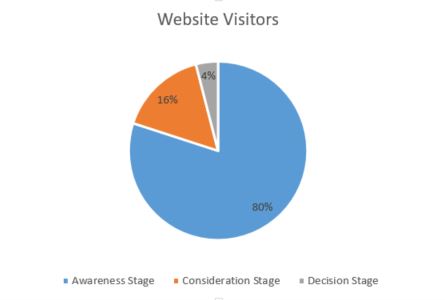
Since the vast majority of website visitors are in the awareness stage of the journey when they visit your page, more of the landing pages you create will focus on them. You’re inviting them to take the next step and engage with you. Once they engage with you, you can educate them about why they need you. Once you educate them, you can work toward driving the sale. This process is known as the sales funnel, which is another term you’ll get used to hearing.

Learn more: Is marketing the new sales?

How do I create a landing page?

Landing pages come in all different sizes and shapes, but when it comes to creating a high-converting landing page, you’ll start to notice a few basic elements that are consistent across the board. Stay with us, because we’re about to run you through a few real-life examples so you can see what we mean.

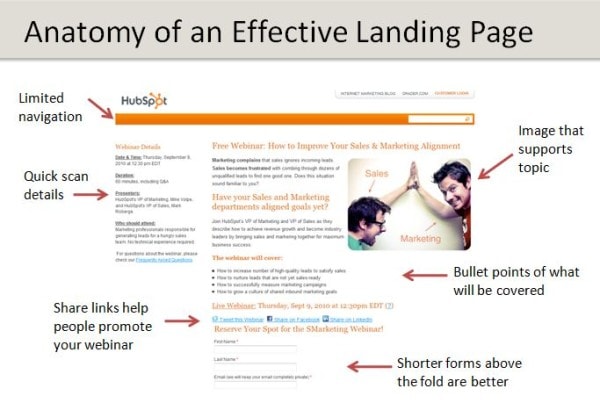
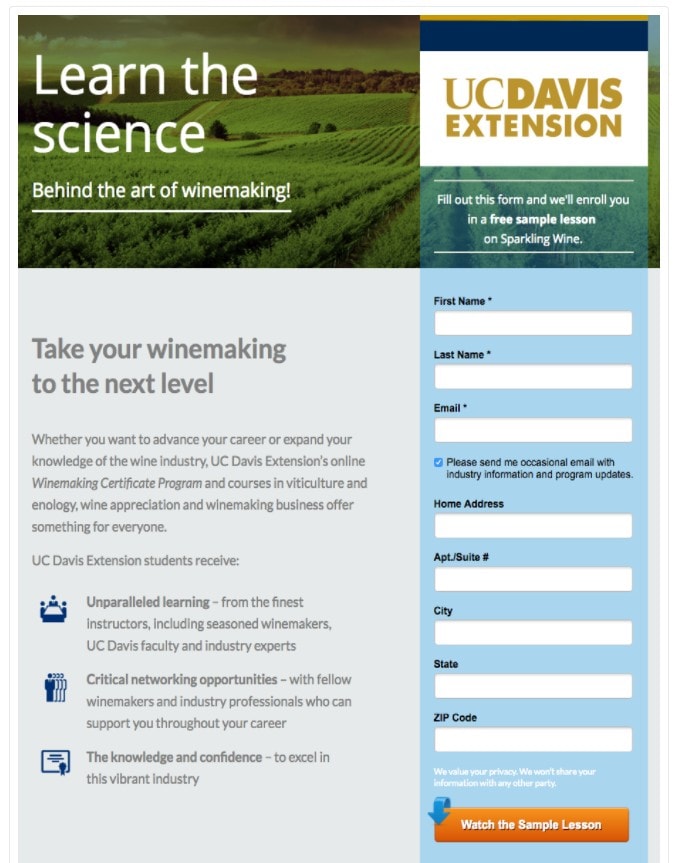
  • Unique offer: Your landing page should have an attractive and unique offer, designed to solve a problem, answer a question, or give knowledge. Your headline should be clear and precise. If you feel that you need to add more information you can always add a sub-header. Example: Here’s a fun and unique offer from the University of California, DavisHow to create a landing page?
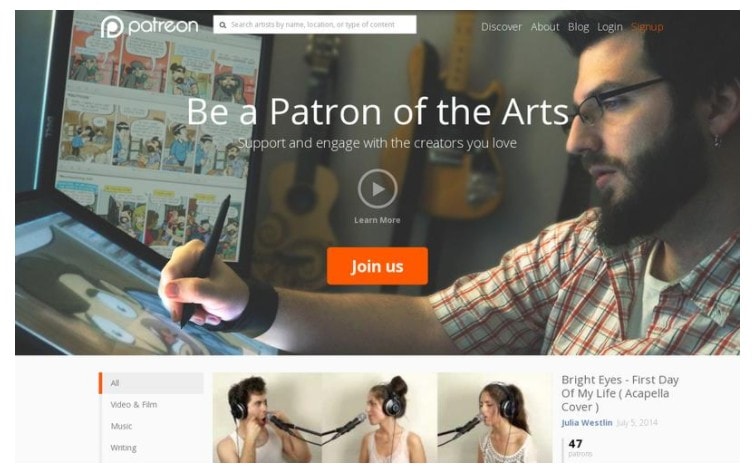
  • Related image or video: The image you choose for your landing page should clearly relate to your offer. A short video is a great chance to show your product or offer a sample of your expertise and knowledge. Example: Check out this powerful landing page from Patreon.How to create a landing page?
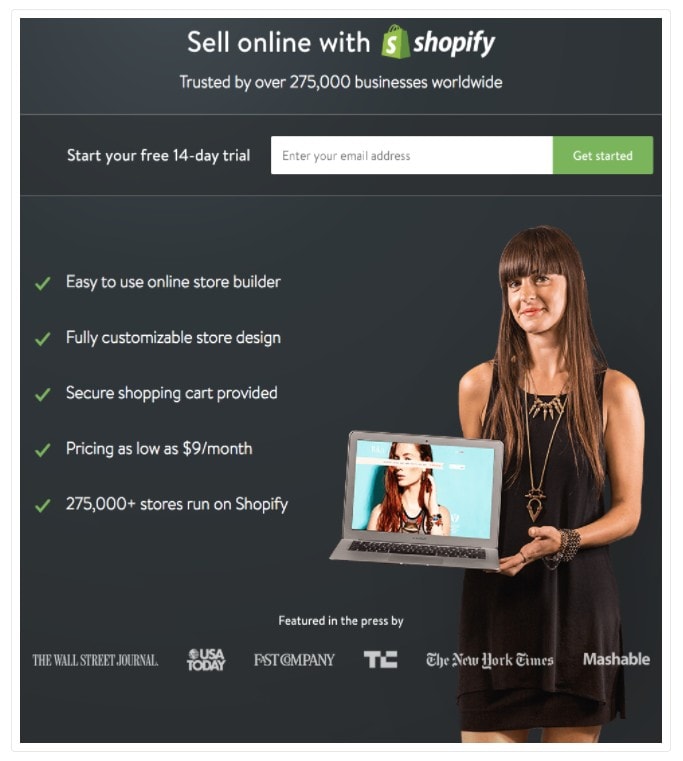
  • Benefits and value proposition: Make sure your landing page include a short explanation of how this offer can make your target audience’s life easier, solve their problem, or answer their question. Try to avoid the features of your offer and focus on how the features will benefit your customer. Example: This example from Shopify does a great job establishing value. How to create a landing page?
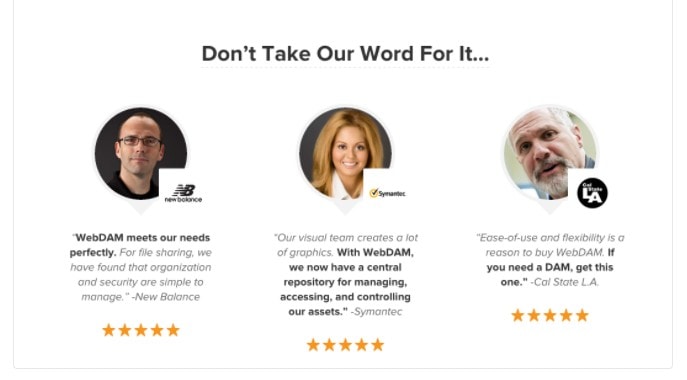
  • Trust elements and social proof: If you want someone to give you their personal information, or their hard-earned money, then they need to trust you. Your landing page should show visitors that you are qualified, trustworthy, and in demand. Example: Add aestimonials, awards, or press coverage. Check out this great example from WebDAM.How to create a landing page?
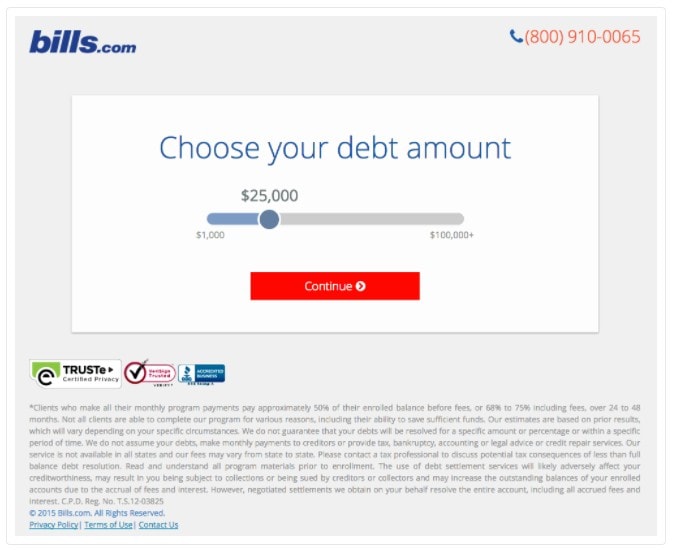
  • Simple structure: Your landing page should be able to answer a vital question within the first few seconds that it’s viewed. Your potential customer should be able to see what the offer is, how it can benefit them, why the need it now, and how they can get it. To make this easier you want to avoid clutter on the landing page. Example: Bills.com.  How to create a landing page?
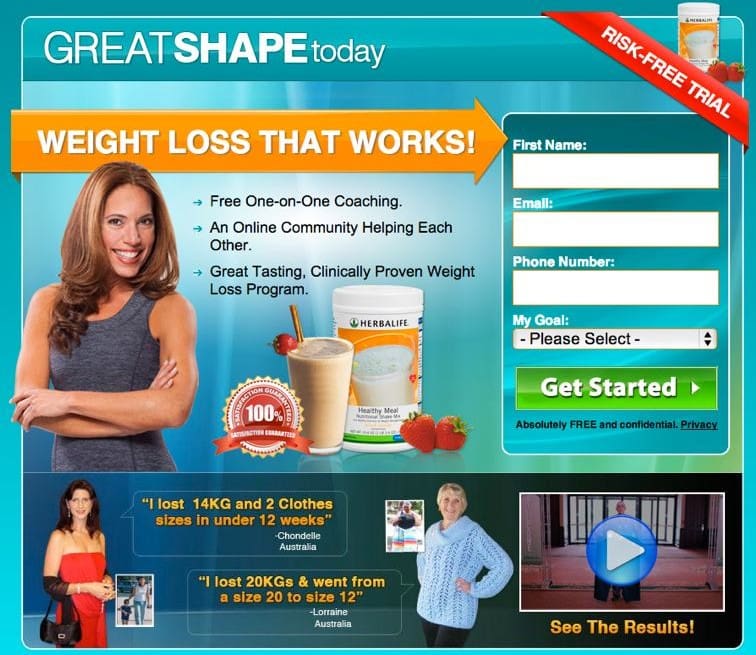
  • Opt-in form: Make sure that you’re customizing the the title and submit button on your landing page to match your offer. Limit your form fields and only ask questions that will help you learn about your lead and what they want. Remember that the information that you ask for should be equivalent to the value of what you’re offering. Recent studies have shown us that a two-step opt-in has a higher conversion rate than the traditional single page. A single page opt-in is one in which your landing page also contains the opt-in form. With a two-step opt-in the first step is to click on a link to show interest and the second step is to opt-in and provide information. Example: This great opt-in page keeps it simple and clear!

How to create a landing page?

  • Sharing options: Make sure that your landing page is easy to share. Add buttons from your favorite social media sites! It’s highly likely that if your visitor finds your offer helpful then there is someone else within their social circle that will also benefit from it.

How to create a landing page?

What are landing pages used for?

There you have it! Landing pages are a simple and powerful tool to invite people to start a conversation with you about your product or service. Deciding on a strategy and structure can be a little tricky, so you may want to consider hiring a professional marketing company. They’ll refine your sales funnel in no time, so you can increase your conversion rate in no time.

Have questions? Give us a call and let’s get started.

Exceptional customer service should be at the heart of specialty construction marketing.

We’re often asked if inbound marketing works for specialty construction companies, including builders, roofers, painters, landscapers and more. The short answer is yes, because customers use the internet as their primary tool to research services before making decisions.

The secret to making it work is to think of it as a customer service tool more than a sales tool. More often than not, customers will come to you with a problem. For example, they may need to make space for their growing family, update a kitchen or bathroom to increase functionality, or repair a leaking roof or damaged wall. Your digital presence should be dedicated to helping them.

We get it – marketing is probably the last thing on your never-ending to-do list, but it’s a really important thing to consider when you’re planning to scale your business.

Stay tuned and we’ll run you through the basics of construction marketing strategy.

Want to talk to a real person? Schedule a free consultation.

Step 1: Refresh your website

If you have a website, great! We recommend overhauling it every 2-3 years to ensure all the information is up-to-date, that the look and feel is fresh and accessible, and that all the technology is working properly. A great website will form the foundation to your entire marketing strategy, because it provides prospective customers with the chance to make sure you’re the real deal.

If you don’t have a website, no problem! It’s entirely possible to build a website yourself, but it’s a pretty big undertaking and you’ll need to get up to scratch with the technical side of things pretty quickly. We recommend hiring a professional marketing company, because they’ll be able to get you up and running much quicker, while optimizing the content for readability and SEO.

(Don’t worry, we’ll explain SEO in a minute.)

They’ll expect to see an informative home page, an about page that explains who you are and what you’re about, and a service page that explains exactly how your business can help them. You’ll need to have a clear and simple contact page, to make it easy for people to reach out to you, and we recommend listing your phone number on every page so they don’t have to search for it. Basically, it’s a digital store front, and you want to create the best first impression possible. Focus on creating an exceptional experience right from the start.

Green-lighting a job in the construction industry, whether B2B or B2C, usually requires a sizeable investment, so customers will want to know who you are and why they should trust you. To that end, we recommend including some photography – people are much more likely to trust a website with photographs, because it’s easier to confirm that they’ll be dealing with a real person.

Read more: 5 website design trends you need to watch this year

Step 2: Register for Google My Business

You may not have heard of Google My Business, but it’s an absolute essential. It’s a free tool for businesses to manage their online presence across Google, which includes both its Search and Maps functionality. This is really important when it comes to local leads.

For example, if someone Googles “general contractors near me,” the search result will include a map of your local area with pins on all the relevant businesses in the area who have Google My Business. They’re generally listed in order of SEO-friendliness (there’s that word again, we promise we’ll get to it soon!), with an option to click through to the website or get directions.

According to BrightLocal, 64% of consumers use Google My Business to find addresses and phone numbers of local businesses. It’s the modern version of a telephone book, and an absolute no-brainer in terms of generating new leads. Google says that businesses with complete profiles are likely to get seven times as many clicks as those without.

Aside from appearing in search, Google My Business is also a great way to let people know what hours you work, when you’re closed for holidays, updates that affect your business (the COVID-19 outbreak is a great example), as well as photographs of your work to increase your credibility. Communication is the key to good service.

Importantly, it also has a reviews function. Asking happy customers to write a quick review is also a great way to improve your credibility, and may boost leads.

Remember, this is about serving the customer, so you need to make it easy for them.

Read more: 10 tips to improve your website’s ranking on Google

3. Boost your SEO

A-ha! Here’s that paragraph we promised at the start. SEO means “search engine optimization,” and it refers to a group of strategies designed to make sure people can find you when they need you. The easiest way to do this is to ensure your website ranks on Google for related searches.

So how do you do that? You need to find out all the keywords people are likely to type into Google to find businesses like yours – for example, general contractor, plumbing services, electrical services, tiling services, and so on. One great way to do this is by typing a few different options into the search bar and seeing what Google Autocomplete returns. You can also use tools like Google Trends to see what topics are ranking in your area and compare different words to see what’s stronger.

Once you’ve identified the keywords, you need to make sure you include them on your web pages. Again, they’re like signs at the front of a store. What’s inside? What do you offer?

Another strategy that can significantly boost your SEO is to start a blog that answers commonly-searched questions. For example, how to fix a leaking tap? How to fix a hole in the wall? How do I select the right contractor? How much do contracting services cost? These serve two purposes: first, they include searchable phrases that might help your website rank higher on Google’s results page. Second, they immediately position you as being an expert and your business as being helpful.

This shows prospective customers that your customer service is top-notch, right from your very first interaction with them. Don’t worry about giving information away for free, the truth is that talking people through common problems step-by-step simply helps them understand what’s required before they go ahead and engage your services. Transparency is the key to trust.

Read more: How to write a blog that will help grow your business

Digital customer service

Nothing replaces a personal connection and a beautiful construction job. However, with more customers searching for local services online than ever before, it’s a digital marketing strategy is just as important when it comes to growing your construction business. A credible website, a current Google My Business listing, and a helpful blog will give prospective customers a taste of the service on offer and encourage them to take the next step toward engaging your services.

And who knows? It might start with patching a hole in a wall, then turn into a new deck, a kitchen renovation, and a whole new build. The possibilities are limitless.

Ready to scale your business? Schedule a free consultation.

Trust is the cornerstone of the financial industry, which means customers want to be sure of a few things before they engage your services. At the top of the list are expertise, transparency, and accountability. They want to know who you are and what motivates you.

That’s why referrals have always been, and will continue to be, the most powerful form of marketing in this sector. They’re a huge source of new business because they prove that your company can be trusted to deliver services that will meet the customer’s expectations.

Essentially, someone else has done the hard work and taken the leap of faith for you.

However, the next generation of consumers are a little bit different. They’re digitally native, having grown up with a wealth of information at their fingertips. They’re confident and capable at doing their own research online, which presents exciting new marketing opportunities.

Here, we’re going to run you through three effective finance marketing strategies you can use to build trust in your community, boost your reputation, and grow your customer base.

Prefer to chat in person? No problem, please schedule a free consultation.

1. Capitalize on word of mouth

As we already know, referrals are incredibly powerful in finance marketing. There are a few different ways you can utilize them to enhance your marketing strategy.

For starters, why not offer a referral incentive? American Express is a great example of this. The company offers two types of frequent flyer deals: a sign-up bonus for new customers, and a referral bonus for existing customers who recommend and convert new customers. All they have to do is share a link generated through their account, and boom. Referral. It’s a genius idea, and a great way to expand the circle of trust around each customer.

It’s also important to make sure you get written referrals, in the form of testimonials and reviews. These are incredibly value to modern consumers, who will inevitably scope out your website before reaching out to you directly. There are a few ways you can incorporate them into your strategy:

  • Add a testimonials page to your website and include comments from customers.
  • Ensure your Google My Business page is up-to-date and check the comments frequently.
  • Share snippets of testimonials/positive customer feedback on your social channels.

Make it part of your standard business practice to ask for customer feedback at the end of every project. Positive feedback is great to share, while negative feedback is a helpful tool to improve the way you do business in future. It’s a win-win situation and a powerful way to build credibility.

Read more: Start building trust with your community through finance marketing

2. Automate your sales process

Automation may seem like a strange recommendation. How can that help boost your business? The truth is that it’s possible to make your website make money for you while you sleep. Automating your processes means it will act as a 24/7 sales representative, constantly generating new leads.

The best place to start is by auditing your website. Is it up-to-date? Engaging? Is the information helpful? Does it look modern? Does it accurately reflect your brand story? Is there a strong call to action? How hard is it for a customer to take the next step to doing business with you?

Generally, a customer will enter your sales funnel in one of two ways:

  1. They’ll be recommended your services either directly through word-of-mouth, or indirectly if someone in their circle engages with your online content and causes it to enter their feed. In this case, they’ll enter your digital ecosystem through Facebook or your homepage.
  2. They’ll be actively looking for help with a problem, in which case they’ll likely use a social media platform or a search engine to find financial services in their area. In this case, they’ll enter your sales funnel through a search result, e.g. Google My Business or a blog post.

Once they’re on your website, the ball is in your court. The most important thing is to provide helpful information that helps answer their question or address their problem. That will immediately create a positive impression, and encourage them to take the next step toward fixing it.

Every page on your website should invite them to take action. It doesn’t matter what this is – for example, they can schedule a free consultation, sign-up for a newsletter, enter their contact details into a form and receive a free PDF, and so on. They key is to build enough trust that they’re willing to part with some personal information, such as an email address, and invite you to respond.

You can also take steps such as installing chatbots to answer frequently asked questions on the spot, without having to be constantly logged into your website, and create dedicated landing pages (complete with video) for specific search terms to create a personalized experience.

Automating this process means every customer’s journey is smooth from the start.

Read more: Anatomy of a high-converting landing page

3. Content, content, content

Content marketing is a great way to convert searchers into new clients, which is why we recommend it as part of every comprehensive finance marketing strategy. There are a few reasons for this.

First and foremost, it helps your website attract the attention of search engines, because it uses many combinations of keywords that help answer common search terms. This is an excellent way to connect with people who are avidly searching for the services of businesses like yours.

Second, it helps establish your credibility as a thought-leader in your field. Show prospective customers how knowledgeable you are by answering frequently asked questions, offering your thoughts on industry developments, letting them know about new opportunities, and so on.

Third, it keeps your website fresh and bolsters your efforts on other platforms, such as social media. Facebook and LinkedIn are always hungry for new fodder, so if you provide information that is interesting and helpful, it will generate engagement from your community and help build awareness of your brand. This will ensure you’re top-of-mind when they’re looking for financial advice.

Fourth, it gives you great advertising content. If you’ve written a stellar blog that answers a trending question, boost it with Facebook or Google Ads. Both work on a PPC model, which means they can be very budget-friendly, and will put your content in front of many sets of fresh eyes.

Content can be done in many different forms, but for financial services marketing, we recommend informative blog posts of 1200+ words as well as interesting explainer-style videos around 3-5 minutes in length. That way, your content will be long enough to be authoritative, but short enough to be easily consumable. Ensure you write catchy headlines to capture people’s attention.

Read more: How to write a blog post that will help grow your business

Finance marketing strategy in a nutshell

As we said at the beginning, successful finance marketing campaigns focus on building trust with prospective customers. That means you need to take every opportunity to project your authority in the field and make sure people understand that you can answer their questions.

Each one of these strategies will help you generate new digital leads; however, used together, they provide a comprehensive roadmap that will take your next marketing campaign to a new level.

Ready to get started? Schedule a free consultation.

There are lots of different factors that Google’s algorithm takes into consideration when deciding whether or not to rank your webpages and blog posts on its results page. Things like keywords, backlinks, headings and sub-headings, metadata and alt-text all play a part in helping the algorithm understand whether or not a page provides a high-quality answer to a search query.

One thing you might not have considered before is mobile friendliness.

Recently, Google’s developers rolled out a handy mobile-friendly test. It allows you to drop in your website’s URL or code so Google. It takes a few minutes to run, and hey presto! It spits out a results page that will let you know whether or not your website is up to scratch.

Here’s an example, using the Beacon Media + Marketing site:

Google Mobile Friendliness Test

As you can see, the page works. However, it also spits out a list of errors – for example, things like images – that could be replaced, edited or optimized to ensure results are optimal.

Want to talk to a real person? Schedule a free consultation.

Why is mobile-friendliness important for SEO?

Google’s developers actually want to help you create content that ranks. Why? Google distinguished itself from its competitors early in the search engine race by ranking high-quality results for every search query. It has a vested interest in ensuring internet users quickly find the answers they’re looking for, which is why the algorithm has been programmed to look for webpages that are informative, well-written, and fast-loading. It’s designed to give people what they want.

Mobile-friendliness is a key part of this. According to the description on the mobile-friendly test tool page, Google notes that smartphone traffic has exceeded desktop traffic in many countries:

“In the USA, 94% of people with smartphones search for local information on their phones. Interestingly, 77% of mobile searches occur at home or at work, places where desktop computers are likely to be present.”

That’s why it’s important to optimize design so it can be viewed seamlessly across a variety of devices. If text is too small, or the website uses Flash software (which isn’t supported by most devices), the user is likely to have a bad experience, which means they’ll click away and look elsewhere.

This isn’t good for you, because you’ll lose potential leads, but it’s also not good for Google, because its business model depends on giving people the best information as quickly as possible.

Read more: 6 expert ways to add SEO to your website

Errors that will affect mobile-friendliness

Lots of little things can have a detrimental impact on the way your website ranks for mobile friendliness. Here are some of the common ones Google identifies:

  • Incompatible plugins. We recommend redesigning your website every two or three years to ensure it’s up-to-date with the latest technologies and best practice. Old plugins can cause all sorts of problems, ranging from technical glitches to bad SEO rankings. A web developer will be able to help you clear all those things up and optimize your code.
  • Viewport not set. Modern websites need to specify a “viewport property,” which basically tells the browser how to adjust the page to fit onto each device. It’s important because different elements like text, images, video and links may need to shuffle into different spots to be accessible on screens of different sizes.
  • Content wider than screen. If this sounds familiar, you’ve got a big problem. In the early days of mobile phones, people were happy to zoom in and out on different parts of a website to find the information they need. Modern consumers, however, want answers five minutes ago. The internet is a fiercely competitive place, so if consumers can’t find what they need, they’ll simply look to your competitors. Make it easy for them.
  • Text too small to read. Again, consumers won’t work harder than they need to, so make your website as friendly and inviting as possible.
  • Clickable elements too close together. This is a really important one now that mobile devices have grown in popularity. When you’re using a desktop computer, it’s easy to use the mouse to deftly click on any elements that you please, but people’s fingers aren’t so precise. Spacing clickable elements out will make it much easier to access information on the move.

Read more: 9 telltale signs it’s time to re-design your website

Cost of building a mobile-friendly website

How much is one customer worth to you? Chances are, that’s already made a new website worthwhile. The cost of developing a new website can vary widely, depending how many webpages you’ll need, how customized it needs to be, and what interactive features you need to include. However, all modern web developers will ensure your site is mobile-friendly.

At lower price points, many web development companies offer templates you can choose from. These templates will be optimized for things like online stores, hospitality businesses with booking systems, portfolios, and so on. They’re great for small businesses, because they’ll get you up and running and will allow you to overhaul your site with a fresh design and optimized SEO strategy.

At higher price points, you may be looking at a custom build. This is the best choice if you’re looking to create something unique, incorporate lots of interactivity, and potentially win awards. These websites will be built with your needs in mind from the ground up, which means they will be a better choice for medium-large companies looking to optimize a lot of information.

Either way, a web development company will meet with you to talk about your needs, analyze your competitors, identify your likes and dislikes, define your goals and ensure your vision comes to life. Over the past few years, mobile-friendliness has become a key part of this process.

Read more: Website design and development services

Making a mobile-friendly website

Mobile friendliness serves two purposes: it increases the likelihood that Google will rank your website on its results page, and it increases the likelihood that internet users will stick around long enough to actually read your content, engage with your site, and potentially become a lead.

The best way to make your website mobile-friendly is to ensure the back-end is sparkling (i.e. that the digital nuts and bolts are all working) and that the design is simple. Fortunately, modern website design favors trends like oversized fonts, slabs of color, visible grids and videos. These elements are all quite blocky, which means it’s easy to arrange them in different ways to suit different devices.

Google is estimated to process about 40,000 queries every second, or about 3.5 billion searches per year, so it’s important to do everything you can to stand out from your competitors. A functional website forms the core of every successful digital marketing strategy, so once your website is working as it should, you’ll be able to develop social media and content strategies that make a splash.

Ready to get started? Schedule a free consultation.

Website design for tourism businesses is really fun.

It’s an opportunity to showcase the best of your local area, explain why it’s unique, and educate visitors (i.e. your potential customers) about the types of experiences that you have to offer.

The best part is that because tourism is an innately visual industry, you can play around with photographs, videos, color and styling to make your website as gorgeous as the scenery.

In this article, we’re going to run you through the basics of website design, including how to design a website, website design cost, website hosting and website ranking – basically, how to make your business appear on Google. This is essential so that visitors to your area will find you.

We’re going to use one of our clients, Kodiak Sportsman’s Lodge, as a case study.

Want to skip ahead? Schedule a free consultation.

Principles of good website design

How to design a website?

A business website should serve two purposes: educate customers about your service and convert sales. It doesn’t matter if you’re designing a website for a gear rental company, offering boutique tours or advertising boutique experiences – the website will always serve the same function.

To maximize its effectiveness, there are a few things you should know.

  1. Images! Images, images, images. Have we mentioned images yet? Pictures really do tell a thousand words, especially where tourism is concerned, because if you’re selling an experience, you’re selling a feeling. You need to capture that feeling with images in order to capture the imaginations of your prospective customers and make them want to learn more.
  2. People read from left to right and from top to bottom. That makes the top left corner of your page prime real estate. Make an impact! Figure out what makes your business unique and lead with that so that people immediately get a sense of what you’re about.
  3. Less is more. Your page needs to be simple and easy to understand to that prospective customers can find what they’re looking for quickly. You only get a few seconds to make an impression so it’s important that you use your website visitor’s time wisely.
  4. Your website needs to work. We live in a digital age where people have no patience for videos that won’t load or websites that are packed with technical glitches. It’s worth investing in a professional build to make sure your site functions as it should.
  5. Stay active. In order to reflect your business correctly and to make sure your page ranks on Google and maintains its authority, your need to keep adding content to your website. Most businesses do this in the form of a blog (more on that later), so keep this in mind.

Want to read more? We wrote another blog that talks specifically about building a strong website for an Arctic tourism brand. Click here to check it out.

Website design ideas

Every time a new person visits your website, you have the opportunity to convert a sale. However, as we mentioned before, you only get a few seconds to make an impact and draft them in.

In a minute, we’re going to show you an example of a website done right.

It was designed and built by the team at Beacon Media + Marketing for Kodiak Sportsman’s Lodge, a boutique fishing and hunting lodge located in Alaska. It offers some of the best salmon and halibut fishing in the world as well as unique opportunities to hunt the local Sitka Black Tail deer.

As you can imagine, these are once-in-a-lifetime experiences.

Here is the homepage:

Tourism website design

As you can see, you immediately get an idea of what experiences are on offer. A beautiful landscape image sets the scene and the short, simple text lets readers find exactly what they’re looking for.

As a reader, you can feel your eye flow through the page from the logo, through the picture, to the “Book Your Trip” button. The subheadings and synopses make the choice of adventure simple.

Here is the fishing page:

Tourism Website Design

Again, images are essential to set the scene and capture the imaginations of your visitors. The use of bullet points keeps the text simple and easy to understand, and again there is a call to action in the form of a “Book Your Stay” button to ensure the process of converting a sale is straightforward.

The next logical question is whether or not it works.

Here are the facts. This page was developed in June 2019 and we began providing regular marketing support from January 2020. The difference is enormous – in December 2019, it had an average of 57 views per day, but in February 2020, that number has grown to 251. We helped generate 23 leads.

Read more: 5 website design trends you need to watch this year

Website design cost

Websites can be as cheap or as expensive as you like, depending on the result you want. There are lots of tools available to help you build your own websites on a budget, for example:

  • Build a website with WordPress: WordPress is an online, open-source website creation tool written in PHP. It’s one of the easiest and most powerful website content management tools available today and can be very cheap to create.
  • Build a website with Squarespace: Squarespace is an all-in-one solution for anyone looking to create a website or online shop. It has a very intuitive interface, making it very quick and easy to get started, but it’s more expensive than WordPress.
  • Build a website with Wix: Wix is another simple and easy website builder that can get you off the ground in no time. Like Squarespace, you start by choosing a template and adding your own words and images, but this platform is slightly cheaper.

However, it’s definitely worth enlisting the help of a professional marketing company.

Marketing companies don’t just build the website. They help you choose the right keywords, refine your copy to ensure it creates a good user experience and makes your website an authoritative source of information, optimize the design to lead people through the page to your call to action and make sure the technical parts of the website are running smoothly.

This is essential to getting your website ranking on Google so customers can find you.

The price varies depending on the company you choose and the size of the website, but they will know exactly how to help you start generating leads from prospective customers.

We build websites! You can contact Beacon Media + Marketing today for a free consultation or click to read about our website design and development service.

Website hosting for tourism businesses

Hosting a website

Website hosting refers to the place where all the files that make up your website actually live. Often, people pay for this when they buy their domain name. Once you have hosting, you can start building your website, because you’ll have a location where you can save things like images and text.

All websites on the internet need hosting and it’s worth paying for a quality hosting service so that you can be sure your files are backed up and you’ll have access to help if something breaks.

We typically build websites using a program called WordPress because it’s industry-standard technology and fully customizable. WordPress has a number of recommended hosting providers, including Bluehost, SiteGround, HostGator, DreamHost and GreenGeeks. However, it’s definitely worth making some enquiries with a professional marketing agency, because good hosting will make a big difference when it comes to editing your site, working on the back-end, and making sure it’s as fast as possible.

Read more: 9 telltale signs it’s time to re-design your website

Choosing a website domain

A website domain is the address of your website. The internet is basically a giant jumble of computers and servers and cables and a domain provides an address that people can type into the URL bar at the top of their browser to find you.

Ideally, your website domain will be the same name as your business – if we refer to Kodiak Sportsman’s Lodge again, then the ideal domain is kodiaksportsmanslodge.com. In most cases, you should be able to buy it without a problem. If that name is already taken, you might be able to buy it from the owner, or you can create a variation like kodiakfishinglodge.com, kodiakhuntinglodge.com or even kodiaksporsmanslodgeak.com. As long as it’s simple, it will work.

Website ranking

Making your website show up on Google is critically important to your online success.

The first step is setting up your free business profile on Google My Business. You will be familiar with this already – this allows your business to pop up with details of your opening hours, contact details and website as soon as prospective customers search for you.

The second step is content. The first and most important is to make sure the text on your website is filled with the types of keywords people will likely be searching to find you. In the case of Kodiak Sportsman’s Lodge, for example, words like “Alaska”, “Fishing”, “Hunting” and “Lodge” are all easy wins. The second way is through blogging, which we referenced earlier in this article.

Publishing frequent blog posts (again, laden with key words) will tell Google that you’re an authority in your subject matter. That means any time people search for relevant keywords, your website will rank higher. As more people click on it, it will make its way to the coveted position at #1. If you think about it, 1.7 billion people use Google every day, and 31.7% of them click on whatever result comes up in the #1 spot. Again, it’s an easy win. As of March 2020, Kodiak Sportsman’s Lodge is #1 in terms of organic search traffic for and #2 in terms of organic keywords for its subject matter.

Finally, consider running Google Ads. Google offers paid advertisements which appear in Google search results. These are targeted to appear when users search particular keywords, or combinations of keywords, and can be buttoned down to particular demographics. For example, if you know your ideal customer is a man in his 50s, you can allocate your advertising spend to people who fit that mold. The results speak for themselves – again, to use Kodiak Sportsman’s Lodge, in March 2020 it’s performing at #1 in terms of paid keywords and #2 in terms of paid search traffic.

Want to learn more? We are experts in using Google Ads to boost your business. Here’s a blog we wrote about using them to help your outdoor clothing and equipment shop.

Website design company

If you’re looking for a company to help design a website for your tourism business, you’re in the right place. Beacon Media + Marketing can assist with everything from branding to website design and development, as well as digital marketing, social media and video services.

Ready to get started? Schedule your free consultation today.