Websites

See Our Blogs

Explore insights on SEO, AI, and digital marketing strategies designed to help your business grow, stay visible, and adapt in a constantly evolving online landscape.

Beacon_Icon_resouse

Originally published on February 21, 2017. Updated on May 11, 2020.

Websites are the digital version of a storefront. Often, they’re the first impression you make on a prospective customer, so it’s important to make the right one. We recommend re-designing your website every 2-3 years to ensure you’re up-to-date with the latest styles and trends to maximize your chances of attracting attention.

Think of it this way: back in the 70s, home decor featured a lot of bright orange kitchens, bright green bathrooms, geometric patterns and shag carpet. Fast-forward to 2020, and technicolor highlights have been replaced with natural wood grain, minimalist design and neutral color palettes. Don’t commit a digital fashion faux pas.

Here are some of the top five web design trends for this year:

Want to skip ahead and talk about a new website? Schedule a free consultation.

1. Oversized fonts

One way to attract attention and immediately convey essential information is to incorporate large fonts and oversized elements. This is a great way to use creativity to express your brand’s personality. For example, do you want to be known as creative and fun? Calm and relaxing? Professional and trustworthy? It’s amazing how much of an impact typography has in conveying this, even before prospective customers actually read the words.

This is also a powerful way to ensure you’re connecting with the right audience. If you run a holistic health business, audiences might expect to see a more organic and free-flowing script. If you run a professional services business, customers will expect to see something clear-cut and businesslike. If you run an HVAC business, you could choose a bold typeface that conveys strength and capability. A font actually says quite a lot.

Beautiful, big type is also a really practical design tool, because it formats nicely on every device. That goes a long way when it comes to creating a seamless transition for customers across phone, tablet and computer.

Read more: 9 telltale signs it’s time to re-design your website

2. Vivid colors

Minimalist design has been popular since at least 2017, featuring eye-catching color blocks as well as plenty of white space that make images and text jump off the page. Simple and clean-cut designs are here to stay, but vivid colors will return, slowly easing out the neutral and pastel palettes that have been popular in recent years.

Bold colors are great for a few reasons. The biggest and most important one is the fact that they help you stand out from your competitors – hey, there’s a reason we at Beacon Media + Marketing use bright orange, balanced with gray. Even if your branding hasn’t featured bright colors in the past, it’s worth experimenting with a more vibrant version of your current branding and waiting to see what impact it has on your website traffic.

Color is also a great way to ensure the details you want to capture attention pop on the page. For example, even if you use a neutral palette throughout your website, you could add color to your headings or calls to action.

Read more: How do I choose the right logo colors?

3. Grids and windows

Humans are visual creatures, and we love organizing things. Design aids like grids and windows help your audience categorize content and get a sense of what your website is about really quickly, which means they’ll find the answers they’re looking for and have a positive first interaction with your business.

In the past, structural elements like grids and tables have been hidden, but they’re becoming increasingly common. Modern websites share a lot of information in a short amount of time, so anything you can do to structure it, help it flow and make it easy to read at a glance will increase your changes of generating leads. They’re a great way to break up elements like text, images and videos.

Read more: Is your website generating leads?

4. Videos

Oversized text is a great way to capture attention, but what about video? The human eye simply can’t resist movement, so capitalize on this by including an auto-playing video element at the top of your homepage. It could be scenic shots of your tourism business, shots of your team members at work, or a portfolio.

The only thing to keep in mind with any kind of motion is that less is more. You don’t want to overwhelm your customers, so use it strategically to capture interest – one element per page is plenty. Where possible, try to make sure the colors used in your video reflect the colors used on your page to create a cohesive reader experience.

Read more: Here’s why video marketing is so important

5. Custom illustrations

One way to make your website stand out from your competitors is to incorporate custom illustrations into your website design. Because these images are unique, they’re a great way to capture the essence of your business in visual form – especially if your business has a playful or inspirational element. They make strong use of colour and shape, which is an exciting change from corporate photography (although we always recommend that too!), and will provide you with fun and friendly elements to share on social media as well.

Read more: How much does a website cost?

Website Design Essentials

When you’re designing a website, there are a few essential things to keep in mind to ensure you create a great first impression and maximize the chances of converting new customers.

The first one is quality content. People typically click through to websites from search engines and social media because they’re looking to answer a question, solve a problem or find inspiration. The faster you can connect them with the information they want, they better the impression you’ll make. The better the impression you make, the more likely they’ll enter the sales funnel. Happy days! You’ve just generated a lead.

The second one is structure. It sounds obvious, but people like things to be organized. That’s why our cities are built around neighborhoods and our homes are lined up neatly along our streets. We operate best in a structured environment, so it’s important to make sure your website is as organized and uncluttered as your storefront. This will ensure the path to purchase is smooth, to maximize your chances of converting a lead.

The third one us follow-through. Once a new person enters your digital ecosystem, you need to do everything you can to support them on their journey. It doesn’t matter what they need: a new HVAC system? A vacation to Lake Tahoe? A dental check-up? You’re here to help them, so make sure you direct traffic to landing pages that specifically address their problem and utilize strong calls to action that explain how you can solve it.

A great website forms the foundation of every successful digital marketing agency. As long as you keep these three things front-and-center, your website will be a powerful asset in generating and converting new leads.

Want to get started on a website re-design? Schedule a free consultation today.

Originally published on June 5, 2018. Updated on May 8, 2020.

Technology is constantly evolving, which means digital marketing is constantly evolving. Every update brings a new way of connecting with prospective customers. It could be a new tool, like a website plug-in that will make it significantly easier to follow-up leads, or a new technique like, SEO. Either way, it’s important to stay up-to-date with best practice to ensure you’re maximizing the impact of your time and money.

One of the foundational principles of digital marketing is that your website is your strongest marketing tool. Think of it as your digital storefront; a storefront that has now become as important as your physical one when it comes to making the right impression. If you don’t have a physical storefront, then your digital one really must be on its “A” game! Websites need to be updated regularly to ensure they deliver what customers expect.

Here are nine telltale signs that you need to redesign (or at least update) your website.

Already know you need help? Schedule a free consultation.

1. It’s been a while

When was the last time you updated or looked at your website? If it’s been a while, that’s pretty much a guarantee that it’s time for a facelift. Trends and styles change all the time, which means you can’t just “set and forget” your website. Just like peeling paint or cracked tiles, an old website will make your business seem dated.

You need to make sure the interface is attractive, the products and services are up-to-date, the tone is contemporary and fresh and it’s fast-loading. Customers won’t sit and wait, they’ll go somewhere else, so you need to make your website as enticing as possible so they choose to stay. Remember, this is your first impression.

Here’s a checklist of things you should consider updating:

  • New location
  • New contact details
  • New services or products
  • New team members
  • New awards and certifications
  • New photos of your building, team, products, etc.
  • Update your project portfolio and add any news
  • Ensure all information is still correct

Read more: Is marketing the new sales?

2. You have a branding disconnect

It isn’t uncommon for a company’s branding or mission to evolve over time. Perhaps you’ve decided to go in a new direction, you have a new opportunity, you have a new investor or your team has decided to shake things up. It’s likely that your target audience has changed along with some of their services or products.

Whatever the reason, it’s important that your website reflects the story your business is trying to tell and that the story is consistent across all your platforms so customers can get to know you and start to trust you. If you’re run a successful campaign on Facebook or you’ve seen great results with a neighborhood letter-drop, update your website to match. Brand recognition is an underrated, but incredibly important aspect of inbound marketing.

Read more: Why is corporate branding important? (VIDEO)

3. Adding new content is difficult

Can you feel your blood start to simmer at the prospect of adding new content? It’s OK, you can breathe easy, because we’ve got you. Website technologies are changing all the time. There are new platforms, new updates and new plug-ins being launched every other week, and the best thing is they’re all designed to make your life easier.

If your website was designed even just a few years ago, it’s probable that some updates could dramatically simplify your marketing life. Truly, there’s no need to wrestle for hours with a page that isn’t formatting properly. You also shouldn’t have to engage in battle with a hosting company or developer who built it for you.

A modern, up-to-date website will be easy to run, allowing you to make edits instantly. If this is something you struggle with, it’s worth asking for professional help. A digital marketing company will be able to help you sort out the rights to your domain (or buy a new one) and set up a user-friendly website that will be running in no time.

Read more: Essential website design and development services

4. Your site has a high bounce rate

The term “bounce rate” basically refers to the amount of time people spend on your website – if a high percentage of people click onto your website and bounce off almost immediately, that’s the bounce rate.

This could happen for a number of reasons – for example, perhaps they clicked on the wrong site, perhaps it looks clunky and old so they assume your business isn’t operating or the information isn’t credible, or perhaps they can’t find the information they’re looking for quickly. Again, websites need to make things as easy as possible.

The cold, hard truth is that you only have about four seconds to capture a visitor. That’s the average person’s attention span when it comes to clicking on, loading and viewing a new website. It’s critical it loads at lightning speed and that your layout, color and text are all designed to capture attention immediately.

Read more: How much does a website cost?

5. Your site isn’t mobile-friendly

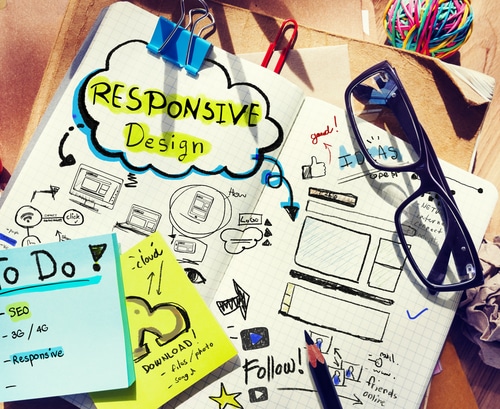
You know how some websites automatically adjust so they look great on both desktop computers and mobile devices? That’s called “responsive design.” This isn’t a new concept; it became essential when smartphones became mainstream. The idea is to give customers a seamless experience across their devices.

The main reason why this is important is legibility. A full-size website simply becomes too small when displayed on a mobile device, which means it’s too hard to use because readers will constantly have to zoom in an out to navigate the page. You’ll lose them in seconds (unless they really, really want your product or service). The second reason why this is crucial is because Google actively penalizes websites that don’t have responsive designs. This makes it significantly harder for your business to rank on Google when people search associated keywords.

The good news is that most modern website platforms, such as WordPress, Squarespace and Wix all automatically adjust to suit the device the customer is using. Ask a web developer to help make sure you get this right.

Seeing any red flags? Contact us today and let’s start problem-solving.

6. Your SEO is non-existent

What’s SEO? This acronym stands for “Search Engine Optimization,” which is critical to the success of any digital marketing campaign. Put simply, this is the practice of ensuring your content ranks on Google.

If your website is not ranking well on Google (or other search engines), and people are having a hard time finding it, that is a serious sign that you need to redesign it or revamp it right away. Done right, this is an easy win; done wrong, and you’re wasting a great resource. Again, this isn’t something you can set and forget, because search engine algorithms change constantly. Staying up-to-date will pay big dividends.

How do you start? First, decide what keywords best represent your business and make sure you use them consistently. Second, claim your listing on Google My Business. Third, start creating content based around the things people are most likely to search – for example, explain a new product or answer some FAQs. It’s also worth updating your back catalog as Google will consider date stamps when generating results.

Read more: Google My Business is perfect for small business marketing

7. You’re not converting customers

Getting visitors to your site is a great first step. Congratulations, you’ve got a lead! However, if those people aren’t turning into customers at some point, then something is wrong with your site. You need to ensure it’s easy to get from A to B and that every visitor follows a logical path through to a purchase decision.

For example, can people click on your phone number on your site from their phone and call you? At the bottom of a page full of information, is there an option for them to learn more by filling out a contact form or scheduling an appointment? These are simple enough things to add, but they make a big difference to people wanting to use your products or services. If they can’t do it easily, they are more likely to move on to a competitor.

Read more: Which website development company should I hire?

8. You’re still using Flash

Flash sites were a big fad for a while, and they did lend themselves to some beautiful designs, but they went the way of the dodo after iPhones were invented. Flash and Apple apparently decided not to play nice, because no-one using an iPhone will be able to view content on a Flash website. According to Statista, iPhone owners accounted for about 45.2% of all smartphone users in 2019, which means this cuts out about half of your customer base.

To save your website from being buried under a pile of other content on Google, you’ll need to build a new website. It’s definitely possible to do this yourself, but if you want to save time on the re-design while developing a killer digital marketing strategy to accompany it, it’s worth engaging a professional agency.

Read more: Why is WordPress so popular for new website? (VIDEO)

9. Your website is confusing

Remember our four-second rule? No matter what, it is vital that your visitors understand know what you do very quickly. You need to make a great impression and give them a reason to stay on your site and keep reading or watching your content. Most importantly, they need to find answers to their questions immediately.

If your website isn’t user-friendly, it’s not easy to navigate, it doesn’t adhere to current user experience principles, or your content is clunky and disorganized, you’ll need to update or redesign your site. It doesn’t matter if your visitors are coming from Anchorage, Alaska, Reno, Nevada or the moon. They’re much likely to stay on your site, and become a customer, if you make their life easy and create a great first impression.

Read more: How much does it cost to hire a marketing agency?

Summary

That’s a lot to take in, isn’t it? If your website ticks any of the boxes above, it’s time for an overhaul. A fresh, functioning website will create a good foundation for future digital marketing campaign, which will pay big dividends when you start directing traffic to your new website through social media, SEO and content.

Here’s a checklist of everything that’s essential to a new website:

  • Your site has been updated recently
  • Your site is consistent with your branding and product or service offerings
  • You have updated the content recently (because it is easy to do so)
  • You captured their attention in the first 4-seconds, and they didn’t bounce
  • Your site is mobile friendly
  • You have good SEO rankings, so they found your site quickly
  • You made it easy for them to convert
  • Your site is NOT Flash
  • Your visitors can easily and quickly understand what you do

The best way to ensure you hit all of those goals is to hire a professional digital marketing agency. They’ll take care of the research, design, copywriting and development and build you a tip-top website in no time. Marketers will also be able to advise you about current best practice to ensure you’re maximizing the impact of every dollar.

Have questions? Schedule a free consultation.

Originally published on July 20, 2016. Updated on 7 May, 2020.

There are lots of different types of websites, but we can generally break them into two categories: the old online brochure, and the new lead generation tool. The truth is, however, that your website should work for you. It should capture people’s interest, make them want to follow up, and ultimately contribute to your bottom line.

To be honest with you, the days of a static online brochure are long gone. Websites aren’t something you can simply “set and forget,” because trends change all the time, so this model won’t serve you. We recommend updating your website every 2-3 years to ensure it’s optimized, working well, and driving new business.

Here, we’ll run you through six common roadblocks that could prevent your website from working well, and then we’ll share four easy tips to help optimize your website to reach as many people as possible.

Want help generating leads? Schedule a free consultation.

Common website roadblocks

1. Bounce rates

The term “bounce rate” refers to the number of people who visit your website and immediately click away. There are lots of reasons for this – for example, perhaps they clicked on the wrong link – but most often it’s because of an easily-avoidable issue. For example, if your homepage is too crowded, outdated, or poorly organized, people won’t stick around. Your home page needs to provide visitors with a great user experience and an easy way to find what they are looking for. In fact, the whole website needs to be very user-friendly, because prospective customers aren’t interested in playing a digital version of hide-and-go-seek. Make it easy for them.

Read more: 9 telltale signs it’s time to re-design your website

2. Quality content

Words matter! Content will always be king, whether it comes in the form of helpful webpages or inspiring blogs. The right kind of content marketing is essential if you want your website to generate leads. First, you have to ensure the content (e.g. words, photos, videos) appeals to the types of customers you hope to attract. Second, you have to ensure people can quickly find the answers they need. Content is the modern version of an attractive store front or a neighborhood flyer drop. Often, it’s the first impression you’ll make, so it’s important that it counts for all the right reasons. It should be direct, personable and helpful – just like your customer service.

Read more: What is StoryBrand marketing and how can it help?

3. Blog… a lot!

Digital customers are generally looking for information that will help them solve a problem, answer a question, or inspire them in some way. The best way to give them what they need is to deliver a fresh and consistent stream of content, which will attract their attention and direct them to your website. Blogging is a new concept for many businesses. The best way to start is generally to answer frequently asked questions, because these are the types of things people are most likely to search. Don’t be afraid to inject a bit of personality, because this helps them understand what makes your business unique and may entice them to click through and learn more.

Read more: 6 expert ways to optimize your blogs for SEO

4. Landing pages

As we’ve explained, the best websites give people what they need quickly. With that in mind, it’s generally more effective to direct people to specific landing pages rather than just your homepage. This is a great opportunity to answer their question, explain a bit about yourself, and explain how you’ll solve their problem with a call to action. It could be something simple like downloading a free factsheet, scheduling a free consultation, or making the most of a special offer. It essentially invites them to begin the path to purchase with you.

Read more: Anatomy of a high-converting landing page

5. Calls to action

A strong call to action (CTA) is an essential part of every webpage, but it’s especially important on landing pages. Once people have found the answers they need, you need to make it easy for them to engage with you. An effective CTA has a few basic elements: it’s easy, it’s clear, and it’s known. What do we mean by that?

  • First of all, it should be easy to use – for example, a single click should take them from the page they’re on to the page where they can buy your product or sign-up for your service.
  • Second, it needs to be explicitly clear what prospective customers will get from clicking on the button. It might say something like “Schedule a free consultation” or “RSVP now,” so inspire them to take action.
  • Finally, customers need to know exactly what they’re going to get out of it and what’s required if them. If they click on the CTA, they want to engage with you now. Guide them through the process so they know exactly what to expect at each step of the way (and don’t ask for personal information too early!).

Read more: The evolution of digital marketing

6. Phone numbers

This may seem obvious, but don’t forget to give customers your phone number! It needs to be clearly displayed on every page of your website to make it easy for people to call you with questions. It creates a feeling of transparency and stability that goes a long way in building trust. Don’t play hard to get and make customers work for it!

Need help addressing your roadblocks? Schedule a free consultation.

Increasing your reach

Once you’ve addressed the common roadblocks, it’s time to start increasing your reach. After all, people need to know you exist before they can do business with you. Here are the four best ways to start:

1. Social media

Social media is a powerful way to connect with new people. When it’s done correctly, it will also help qualify the leads you generate, because prospective customers will have followed links, ads and offers that interest them. Your strategy can extend across multiple platforms – for example, Facebook, Instagram and LinkedIn – to attract and engage new people. This can also bring new customers along the path to purchase so by the time they actually reach your website, they’re ready to do business. Create quality content, share it regularly, engage with your followers, drive traffic to landing pages, and you’ll be in a good position.

Read more: 10 tips for optimizing your social media presence

2. Digital advertising

Advertising through search engines and social media is a great way to generate qualified leads, because they have the capacity to pinpoint different demographics and ensure the right people are discovering your landing pages. The best ones to start with are Facebook Ads and Google Ads, because these have the biggest audiences.

3. Search engine optimization (SEO)

SEO is the essential if you’d like your website to rank through search engines like Google. The first page of results is incredibly valuable digital real estate, and a good strategy will ensure your content ranks as highly as possible, which will lead more people to your site and increase your chances of converting happy customers.

Read more: How to create a show-stopping SEO strategy

4. Blogs, and more blogs

We mentioned blogs before, but we’ll mention it again to emphasize their importance. Blogs are vital to driving new customers to your website and ensuring you rank as well as possible through search. Often, because they answer specific questions, they may rank higher than your homepage. For this reason, they’re a critical part of every successful digital marketing strategy.

Have a look at your website. How is it performing? Is it an online brochure, or is it actively helping you generate leads? If it falls into the first category, we’d love to help. Schedule a free consultation today.
Regularly redesigning your website is important for a successful online presence.

Why? Experts recommend a redesign every 2-3 years because things like products, staff, fashions, and best practices all change so rapidly in business and online.

We’re going to take you through the process we use, here at Beacon Media + Marketing. We have 20 years of experience in the marketing industry and a proven process for web design. Hopefully, when we’re done, you’ll feel confident trying it out for your private school.

Let’s get into our 5-step process for beautiful website design.

Step 1: Meet with your private school team

The very first thing you should do before you even start on the design, is to understand what you want to create. This includes what you want to say about your school, what your goals are, and how you want to present your private school.

We recommend gathering all the key people at your school into one room and asking yourselves questions so that you can understand what you want your website to achieve. We recommend looking at competitors’ websites to determine what aspects of their website you like, and what you don’t.

Here are some sample questions we ask our clients when looking for what they want to create:

  • What are the primary and secondary purposes of your website? What do you expect your website to accomplish?
  • What information do you want potential students to find quickly on your website? What are the most important things?
  • Of the website designs that you like the look and feel of, which features do you like most and why?

Step 2: Map-out your private school website design

Now that you have an idea of what you want your website to look like, and you have some concrete features you’ll need, you can create an outline.

At Beacon, we produce two documents for our clients which provide a guide for the website: a site map and a wireframe.

A site map is really simple. It is just a fancy name for a flowchart or bullet list of all the pages on your website and the order in which they link to one another.

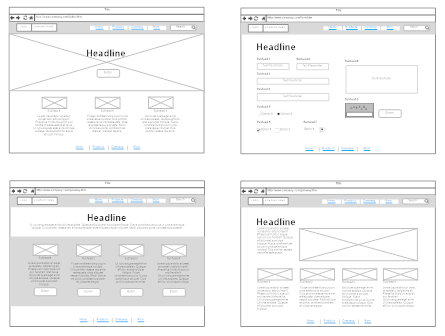
The site map then provides the basis for the wireframe. The wireframe for your private school’s website is a set of images in which you show the elements you want on each page.

Despite the technical name, a wireframe is just a rough sketch of what you want your website to look like and where you want the elements to be.

Beautiful Website Design Can Boost Your Private School
Source: SmartDraw

A good wireframe includes the location of each image, header, content paragraph, buttons, or form field on each page. There are great tools available such as MockFlow which you can use to create your own professional looking wireframe.

Step 3: Write the content for your school’s new website

Once you’ve created your wireframe, and determined where you want your written content to go, now you need to start writing. We recommend three best practices for content writing, which will allow you to produce attention-grabbing and engaging content.

1. Keywords

The design of your website is important, but if no one actually sees it, it’s all wasted effort. So, how to make sure people see it?

The best way to be seen is to rank at the top of people’s search results on Google. This is because most search engine users use Google, and almost nobody ever looks at the second page.

Here at Beacon Media + Marketing, we’re experts on SEO optimization. We’re going to let you in on a secret: keywords. This is essential to helping all our clients to rank on Google.

Every time you search something online, search engines trawl the internet for matching keywords. Using the right keywords for private schools in your local area will help people find you. Importantly, you should also make sure you use keywords in your headings and sub-headings.

2. Headings

Writing your headings is also an important part of the content writing phase for your private school’s website. It’s common for people to skim over text and read only the headings, looking for content they’re interested in. Catchy headings are critical if you want people to slow down and read all the great content you’ve been publishing.

As you may have noticed in this blog (hey, we practice what we preach!), it’s really useful to put your keywords in the headings as well. This helps Google to identify what your webpages are about and helps your website to rank on Google.

3. Quality

Obviously, users will appreciate good content, but you may be surprised at how much Google likes quality content too. The reason for Google’s insistence on well-written content is that they want to remain the most popular search engine in the world, and they can do this by keeping up their reputation.

People will continue reading and pay attention to what you’re saying about your private school when your content is well written, and this helps your website to rank on Google. Google will reduce the ranking of pages with a high bounce rate, i.e. people who click on your website and quickly leave again.

As you can tell from reading this post, it’s effective to address the reader in the second person, as “you!” It’s also useful to put yourself in the reader’s shoes so you can write in a way that makes it clear why your private school will be a good fit for their child.

In marketing, we always say the best sell is to make it clear how your products add value to someone’s life. It is no different when you’re trying to recruit new students to your private school, show how you can provide a valuable education to prospective students.

We recommend that at the end of each web page, you include a “call-to-action.” This is a request for the user to take action on what they have just read, for example: “Call (123) 456-7890 now for a free inquiry!”

Step 4: Develop your private school website

The final step in designing a new website for your private school is development. This is the culmination of all your hard work, where the site map, wireframe, and content are all tied together.

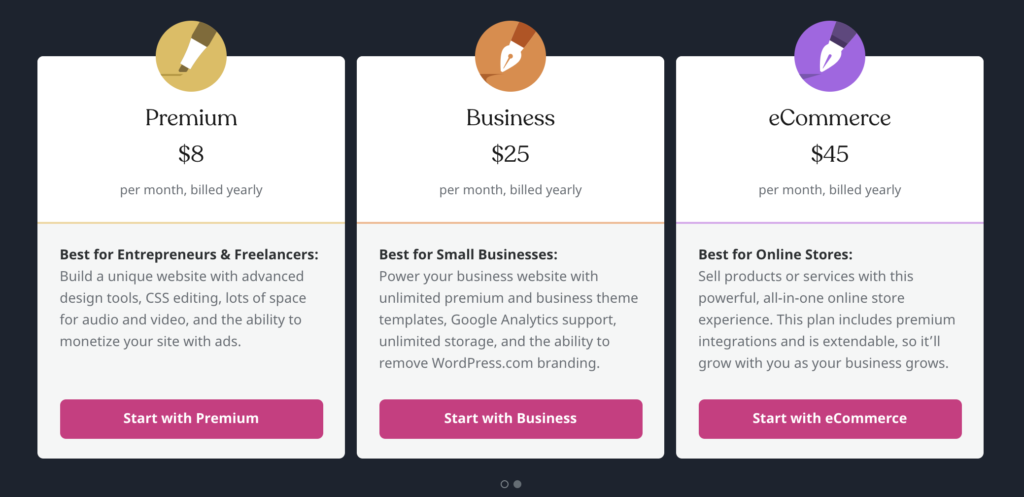
The first step in developing your website is deciding which software to use to build it. At Beacon, we use WordPress for all of our education provider clients. WordPress has packages at multiple tiers that you can choose from, so you can purchase a cheap package when you start, and add functionality as necessary. (You can read why we recommend it here.)

You should choose a package that best fits your needs, taking into consideration your site map, wireframe, content, and the list of concrete features and specifications that you came up with during your initial meeting. WordPress has really intuitive software so you should easily be able to build your site once you’ve chosen your package and created your account.

When building your website, be sure to stick to your brand guidelines! A well-managed, and cohesive brand is vital for a good-looking website. You can learn more about branding here.

Step 5: Go live!

When you’ve finished developing your website, it’s time to set it live.

But first, you need to make sure you’re ready. We have a checklist we go through with all our private school clients, here are some examples from that list:

  • Page-by-page, go through the entire website clicking all links to make sure they send users to the correct locations.
  • If you have a contact form, submit a “test” entry to make sure it sends to the correct email address.
  • Enter the URL for your website in all the popular browsers including Chrome, Firefox, and Safari to make sure it looks good.
  • Visit your website on mobile to make sure it is properly mobile optimized.

With WordPress, you can point the domain name from your old website to your brand new one. At that point, your private school’s new website is ready for visitors!

Is your private school ready for a new website?

We hope that you’ve found this glimpse into our work helpful, but if you feel like you want to hire us to take care of the whole process for you, you can book a free consultation. Alternatively, you can read more of our blogs, in which we discuss all aspects of digital marketing, here.

Whether you’re shivering through an Alaskan winter or sweating through a Nevada summer, HVAC businesses offer essential services right around the United States.

When a customer’s system breaks down on the coldest night or the hottest day of the year, there’s no-one they’ll be happier to see than YOU.

After all, no-one else can offer heating, cooling and ducting services quite like you. No-one else is as hungry for new business as you and no-one else will give them such great service that they become a loyal, life-long customer. The only question is how they will actually find you.

The answer is a killer digital marketing strategy.

In this article, we’re going to help you understand what a digital marketing strategy is. We’re also going to run you through the basics, including how to create a website for an HVAC business, how to optimize your content so customers can find your products and services, and how to run Google and Facebook Ads so that you will be the #1 choice in your local area.

Oh hey! We’re experts at that! If you’re looking to develop a digital marketing strategy to generate leads for your HVAC business, why not contact us?

Okay, So What Is A Digital Marketing Strategy?

Marketing is the process by which a business promotes its products and services to a customer. Sounds simple, right? Right. Digital marketing is simply the process of doing this on the internet.

With that in mind, a digital marketing strategy needs to make you stand out online. It’s designed to target the computers, tablets and smartphones of your customers and make sure it’s easy for them to find you in their time of need… whether they’re looking to organize an urgent repair or simply clean the gunk out of their heating and cooling ducts. In order to do this, digital marketing strategies typically focus on websites, social media, search engines and ads.

Before you create a marketing plan, there are a few things you need to think about:

  • Who is your ideal customer?
  • What’s your flagship service?
  • What are your best value products?
  • What makes you different from the other HVAC specialists in your area?

Many companies choose to employ a marketing agency to help with this. Agencies can conduct a review of your current online presence, analyze the strategies of your competitors, help you develop marketing goals and recommend specific actions you can take to achieve them.

However, it’s also entirely possible to do this yourself. If you’re feeling ready, read on.

Want to know more about marketing? Here’s a handy blog post we prepared earlier: What Is Marketing? A Look Through The Eyes Of A Marketer.

First Things First, You’re Going To Need A Website

The first step to finding new customers online is to create a website.

A website provides a platform for customers to get to know you. It’s an opportunity to let them know about your HVAC repair, maintenance and installation services and show off the furnaces, boilers, heaters and filters in your product range. Meanwhile, active social media channels will help you connect directly with customers and let them know about special offers.

So how do you make a website? It’s actually never been easier to build your own website, with a multitude of handy tools available online that can help you get up and running in minutes.

Here are some of the common ones we see a lot:

  • Build a website with WordPress: WordPress is an online, open-source website creation tool written in PHP. It’s one of the easiest and most powerful website content management tools available today and can be very cheap to create.
  • Build a website with Squarespace: Squarespace is an all-in-one solution for anyone looking to create a website or online shop. It has a very intuitive interface, making it very quick and easy to get started, but it’s more expensive than WordPress.
  • Build a website with Wix: Wix is another simple and easy website builder that can get you off the ground in no time. Like Squarespace, you start by choosing a template and adding your own words and images, but this platform is slightly cheaper.

 See? Building a website is easy. Of course, if you would prefer to ring in the experts, we’re here to help. Simply reach out via our website and we’ll be happy to help with your website needs.

Which website is best for my business? We at Beacon Media + Marketing recommend WordPress. Find out Why WordPress Is So Popular For New Websites.

Second, Learn About Search Engine Optimization (SEO)

Once your website is up and running, you need to add content. Content is very helpful when customers are trying to find you via search engines, like Google.

It works like this: customers using search engines tend to use the same key words over and over again. If you start using the same key words on your website, Google will assume you’re an expert on that topic and it will start ranking you higher and higher on the search results page. It’s valuable digital real estate, because the #1 result immediately gets 31.7% of all clicks.

That’s 31.7% of all potential customers who could be looking to you first.

This process is called search engine optimization, but it’s usually referred to simply as “SEO”. The best way to put it into practice is to create frequent blog posts that answer common questions customers ask about your products and services, explain why you recommend the brands you do, and even discuss some of the newest trends in the HVAC industry.

Here are five simple examples of key words and phrases you could try:

  1. Best HVAC repair in (insert name of your area)
  2. Get the most out of your heating and cooling this winter/summer
  3. Best air conditioning repair in (insert name of your area)
  4. How to tell if my furnace filters need replacing
  5. Best baseboard heater to use in (insert name of your area)

The more posts you can get to rank on the search results, the better.

SEO is a complex and constantly changing field. Here are six expert ways to optimize your website using SEO so you can Drive More Traffic to Your Website.

Third, Let’s Talk About Digital Advertising

Once your website is up and running and you’ve got lots of strong content, you can think about creating some advertisements that will target (and keep targeting) potential customers.

As far as digital marketing strategies go, one of the best ways to drive traffic to your website is to run Google Ads. Google Ads allows you to target people who are searching for keywords associated with your product and services. In theory, this means you can get more bang for your buck because you won’t waste money on people who aren’t interested.

You’ve undoubtedly seen this type of advertising already. It usually appears in the top 1-5 slots on the results page of your Google search, marked “Ad”. You’ve probably also noticed that once you click on an advertisement for a particular brand, product or service, it will start following you all around the internet: every article you read, every video you watch, even social media.

Google Ads represents 77.8% of all search-related ad revenue in the United States. It’s big business, and there’s a good reason why: it can be very effective. However, it’s not as easy as handing over your hard-earned money and waiting for people to find you.

They come with pros and cons. The pros are that campaigns are highly targeted, measurable, and can lead to rapid results regarding sales generation. The cons are that they require an ongoing investment and that you be charged for every single impression and click.

With that in mind, you have to be smart and you need to have a strategy in place. You need to know who your potential customers are, where they spend their time online, and what tone and style of language will resonate with them.

You also need to come up with a specific goal for each campaign – in other words, don’t just refer people to your homepage. They’ve searched for something specific, so make sure you link them to a page where you can answer their questions. For example, link them to a product page for your new boiler or your duct-cleaning service.

This is not the right platform to increase brand awareness. The more specific you can be about who you want to target and what you want them to know, the more effective your ads will be.

If you’re not sure how to start, and you can afford to spend the money, trial and error is a great way to get a feel for how the platform works and what your customers are looking for. However, if you want to maximize your ROI, ask the experts at Beacon Media + Marketing.

How can you tell if your Google Ads are effective? We’ve created a handy guide. Facebook and Google Ads: What Analytics Should I Track?

Breathe. Okay. That’s a lot of information to consume in a very short amount of time. The good news is that we are here to answer all of your digital marketing questions. For us, navigating the wild world of SEO strategy is just as natural as replacing a boiler is to you.

So why not schedule a consultation?

Let’s fire up your HVAC business’s web traffic together (sorry about the pun).

Originally published on September 11, 2015. Updated on February 13, 2020.

There are many factors that go into choosing a website development company. To be perfectly honest with you, we hear a lot of horror stories from businesses about website builds, whether they’ve tried to build a website themselves or they’ve hired a company to help. We figured we would just call it out and pass on some tips to help you choose the right website developer/firm for your website.

Website Development And Design

First off, there are several types of website projects. You might be looking for your first ever website, you might be looking for help with a website redesign or you might be looking to refresh your website content. The scope of work will also depend on your budget and the size of your website.

Here, we’ll run you thorough the basic website development process for each:

Building A Website From Scratch

First-time web projects are often the hardest, because it means building everything from the ground up. These websites are usually around 7-10 pages and require like purchasing a domain, setting up the hosting, and making sure the design is optimized for different devices, including mobile.

One of the hardest parts about first-time website builds is putting together all of the content. That means creating a homepage, writing your about page, defining your products or services and collecting all of the necessary right photos, text and contact information.

More often than not, most websites get bogged down with one element: writing the text. We recommend that every website has text that is professionally written for several reasons:

  1. SEO: Search Engine Optimization (SEO) is an ever-evolving science, which basically revolves around predicting which combination of keywords are most likely to be searched on sites like Google so that your website appears near the top. This is really important when it comes to helping potential customers find your website. This is one area where professional copywriters will make a big difference, because they’re up-to-date with all the latest trends.
  2. Tone: The language you use on your website is just as important as the design in establishing a “look and feel” that correctly represents your brand. Communication styles evolve quickly, but the past few years have seen a consistent and strengthening trend towards more conversational and approachable wording. Sometimes that can be a challenge for business owners when we want to get specific and “talk shop” about what it is we do, which is why professionals can help.
  3. Time: You have a business to run and more often than not, there isn’t time to write the content yourself. You are investing money into your website and the last thing you want is to have the whole process held up waiting on text. A professional will make sure it’s finished on time.

Starting from scratch? Find out why we recommend building your site with WordPress.

Website Redesign Services

Sometimes, your website might simply be outdated. It’s important to remember that a website design isn’t a one-stop project. In fact, experts recommend they’re updated every 2-3 years so that it stays on top of all the latest trend. Usually this means undertaking a complete redesign, including new photos and updated text, though some elements may move over from one site to the other.

In our experience, these sites are often a bit larger and more developed because you’ll be much more in tune with what’s working and what’s not within your business. The website development process for redesigns usually includes:

  1. Updating for new technology
  2. New design to meet emerging trends
  3. Updated content for better user experience and Goggle rankings
  4. New security measures
  5. Taking advantage of new options in SEO and content marketing

Want to learn more? Here are 10 signs it’s time to redesign your website.

Copywriting Services

If the time has come to refresh the content on your website, you’ll need to engage a copywriter. A copywriter will be able to help you refine your messaging, update the language used to make sure your content comes across as being modern, define your products and services and make sure every page is optimized for SEO. They may also be able to help you create a social media strategy.

Website Development Costs

Regardless of whether you need a brand-new website, a website redesign or just a refresh, making sure you hire the right company is absolutely crucial. There are a variety of options available, including doing it yourself, hiring a solo developer, an offshore team or a professional agency.

Both the solo developer and the offshore team often charge by the hour to complete a project and that rate is based on their overhead. An offshore web company may charge anywhere from $10 – $40/hr while a solo web developer in the US is typically charging between $25 – $100/hr.

Especially if you are just getting your company started, these prices may look very, very good to you, but there are some challenges involved with both the sole developer and the offshore team.

There are several different things you will need to consider in making the right choice:

  1. Marketing
  2. User Experience Design
  3. Visual Design
  4. Programming
  5. Project Management
  6. Photography
  7. Quality Content (text) Creation

It can be difficult to find all of these things in one place. For example, doing it yourself means spending hours upon hours researching and wrestling with unfamiliar website development tools. Hiring an offshore team might lead to problems with language barriers and time differences. A solo developer will be an expert in a few things from that list, but probably not them all.

Okay, we admit we’re a little bit biased, but we do genuinely believe that a professional agency will give you the best bang for your buck. Take Beacon Media + Marketing, for example: we have a team of professionals who specialize in design, content creation, coding, SEO, even photography. We will also give you an account manager, who will walk you through the process from start to finish.

Looking to convert leads? Here is the anatomy of a high-converting landing page.

Website Development Process

Regardless of which route you take, we highly recommend putting together a document that sets out exactly what you want on your website. It doesn’t have to be long – usually about 1-2 pages is enough. It should cover what style of website you want (modern, traditional, colorful, classic, etc.), which pages are crucial to the site (About Us, Services, Portfolio, Staff, Contact Us, etc.), and any goals for the site (inform, collect leads, educate, connect with clients, e-commerce, etc.).

It’s also very helpful to include links to examples of other websites you like and explain what you like about them. For instance, is it the way the colors are combined, the layout, or maybe the navigation that appeals to you? Using this document when you start approaching web developers will make sure you both start on the same page – literally. It’s a great tool to help you get more consistent estimates from company to company, and a company worth hiring should be asking these questions and more.

We would be happy to sit down and discuss these questions and more. If you are interested in seeing our work, please check out our portfolio, then give us a call at 907-563-6008 or drop us an email.

Experts recommend that you redesign your website every 2-3 years.

Why?

Because product changes, staff changes, fashion, and best practices all change rapidly in business and online.

It’s also a perfect time for a new website for your arctic tourism agency because tourism is one of the few growing industries in Alaska! This means now is the perfect time for an overhaul, so you can take advantage of that growth.

However, we appreciate that this can be a daunting task.

We at Beacon have 20 years of experience in the marketing industry, and a proven process for website design.

In this blog, we’ll show you some of the processes we use for all our clients, so you can feel confident trying it out for your arctic tourism agency.

Meet with your arctic tourism team

Before you get started on your website design, it’s vital to get a handle on what exactly you want to create, what you want to say about your arctic tourism business, and what your goals are.

We recommend gathering all the key people in your business into one room and asking yourselves questions to determine this. A good thing to do is look at some competitors and determine what aspects of their website you like, and what you don’t like. Consider looking at companies in Iceland, Iceland has really grown its arctic tourism sector so these companies must know what they’re doing!

Here are some sample questions we ask our clients when looking for what they want to create:

  • What are the primary and secondary purposes of your website? What do you expect it to accomplish?
  • What information do you want your customers to find quickly on your website? 
  • Of the website designs that you like the look and feel of, what features do you like?

Map-out your arctic tourism website design

Now that you have an idea of what your website should look like, and you have some concrete features you’ll need, you can create an outline.

For our clients, we create two documents to provide a guide for the website: a site map, and a wireframe.

The site map is simply a flowchart or bullet list of all the pages on your website and the order in which they will derive from one another.

This then provides the foundation for the wireframe, which is a set of images in which you show the elements you want on each page and how they relate to each other.

Despite the technical name, a wireframe is just a rough sketch of what you want your website to look like and where you want the elements to be.

Beautiful Website Design Can Boost Your Arctic Tourism Company
Source: SmartDraw

A good wireframe will include the location of each image, header, content paragraph, buttons, or form field on each page.

There are great tools available such as MockFlow which will help you create your own!

Write the Content

Having created the wireframe and left spaces for paragraphs, it is now time to write the content that goes into those boxes!

We recommend three best practices for content writing, which will allow you to produce attention-grabbing and engaging content.

1. Keywords

The design of your website is important, but it’s wasted effort if no one sees it.

The best way to be seen is to rank at the top of people’s search results on Google.

Here at Beacon we’re experts on SEO optimization and help all our clients to rank on Google through the use of keywords.

Keywords tell google what each page of your website is about so they can show it to searchers. Importantly, keywords should not just be in your text but also in your headers.

2. Headers

Speaking of headers, you should put a lot of care into creating these as well.

Many people just skim over the text of a website and read the headers, looking for what they’re interested in.

That’s why it’s important to create catchy headers that communicate what the various sections of your website are about.

By putting keywords in them, you also help Google know what your page is about.

3. Quality content

Both users and Google appreciate good quality content.

People will continue reading and pay attention to what you’re saying (and selling!) when your content is well written, and this helps to rank on Google as they drop pages with a high bounce rate, i.e. people who click on your website and quickly leave again.

You don’t need to be a perfect writer, you just need to write from your own unique perspective, providing value to the user that they can’t get elsewhere.

It’s effective to address the reader in the second person, as “you”. It’s also useful to put yourself in the user’s shoes so you can write in a way that makes it clear why your product is so good for them.

The best sell is to make it clear how your products add value to someone’s life.

At the end of each web page, you should include a call-to-action. This is a request for the user to take action on what they have just read, such as: “Call (123) 456-7890 now for a free inquiry!”.

Develop your arctic tourism website

The site map, wireframe, and content are all going to come together in the final web design.

The first step in developing your website is deciding which software to use to build it.

At Beacon, we use WordPress for all of our arctic tourism clients.

This has many tiers of package to choose from, so you can purchase a cheap package to begin with, and add functionality if necessary.

You should choose a package that best fits your needs, taking into consideration your site map, wireframe, content, and list of concrete features and specifications that you came up with in your initial meeting.

After you have chosen your package and created an account with WordPress, the intuitive software will help you build your site.

When building your website, be sure to stick to your brand guidelines! A well managed, and cohesive brand is vital for a good-looking website. Learn more about branding for arctic tourism businesses, here!

Go live!

Once your website is ready to go, its time to publish and set it live!

Prior to this, you should make sure you’re ready. We have a checklist we go through with all our arctic tourism clients, here some examples from that list:

  • Go page-by-page throughout the website and click on all the links to make sure they will send users where they are supposed to.
  • Try out your contact form if you have one, submitting a “test” entry to make sure it delivers to the appropriate email address.
  • Enter the URL for your website in all the popular browsers including Chrome, Firefox, and Safari to make sure it looks good.
  • Visit your website on mobile as well to make sure it is properly mobile optimized.

With WordPress, you can point the domain name from your old website to your brand new one.

At that point, your new website is fully functioning and ready for visitors!

—

Is your arctic tourism business ready for a new website?

We hope that you’ve found this glimpse into our work helpful, but if you feel like you want to hire us to take care of the whole process for you, you can book a free consultation, here!

You’ve probably heard a lot about WordPress, but did you know that it is the most popular content management system in the world?

Here are a few facts to confirm that statement:

Like many businesses, non-profit organizations, medical practices, and even media outlets, at Beacon Media + Marketing, we choose to use WordPress for our websites.

While there are several competitive options out there, WordPress offers several unique advantages that set it apart.

Are you interested in upgrading your website to a WordPress site? Chat with us to see how we can help.

1. WordPress is Free and Open to Everyone

WordPress software has been and always will be free.

By visiting wordpress.org and clicking the “Get WordPress” button, you could download your very own copy of WordPress right here, right now!

If you are web-savvy and know how to set up and host your own website, you might want to do just that.

However, most people need a little extra help.

Although the content management software is free, setup and hosting services are not.

That said, one of the many reasons why WordPress is the preferred option is the extremely low ($0) price point.

Please note: There is a difference between wordpress.org, which offers a free download of the WordPress software but requires separate hosting, and wordpress.com, which offers paid packages that include hosting. While wordpress.com packages are great for beginners, they do not allow for much expansion and growth with your business. Other CMS (such as Wix, Weebly, and Shopify) only offer such packages which is why they are not preferred.

2. You Can Build Any Kind of Website You Want on WordPress

Looking to launch a blog, create your first company website, or set up and online store?

WordPress can do it all through themes and plugins.

Theme – In the context of websites, a design structure that can be customized to your needs.

Plugin – A software that can be added to the primary software for additional features and benefits.

You can find thousands of themes and over 50,000 plugins through WordPress and third-party developers.

All you must do is choose the theme that supports the type of website you would like (e-commerce, portfolio, forum, etc.), then, install the plugins that add any custom features you desire that are not included with the theme.

Many themes and plugins are free, however, some more robust features cost money.

Other CMS only offer certain kinds of themes with their packages and have limited app stores (again, limiting your options and expansion opportunities).

3. WordPress Is Easy to Use

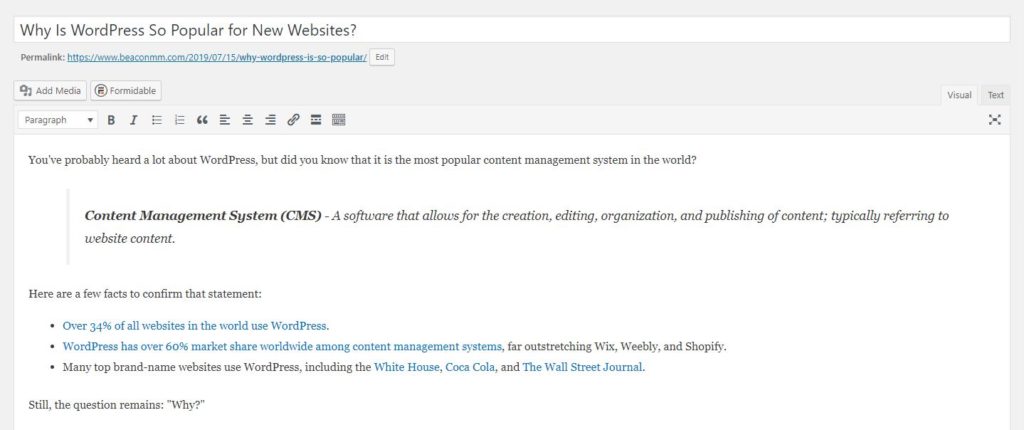
WordPress is a WYSIWYG editor, which means “what you see is what you get.”

WYSIWYG – “What you see is what you get.”

The changes you make through the WordPress dashboard look the same as they do on the live website, so you don’t have to make guesses about how things will turn out while you are editing.

Additionally, the WordPress editor is as easy as Microsoft Word.

You can bold text, italicize it–whatever you want to do–all without ever touching the HTML.

That said, if you want to touch the HTML, you can always switch from the visual editor to the text editor using the tabs on the right.

4. You Don’t Have to Learn to Code to Use WordPress

As mentioned, you don’t have to touch the HTML to edit text with WordPress.

You also don’t have to touch the CSS, PHP, or JavaScript (the other three languages WordPress runs on).

Any basic styling that you want to do–whether it’s changing a theme color or font or updating your logo–can be handled through the “Appearance” tab on the dashboard.

This is also where you can change your theme, add widgets, and update your navigation menu.

The entire WordPress system is a gorgeous interface that is made to be intuitive for anyone.

5. You Can Get WordPress Support Just About Anywhere

WordPress has an extensive support database, and WPBeginner is a great resource for newbies.

In addition, because WordPress is so popular, you can find the answers to your most burning questions all over the internet.

Everyone wants to be a WordPress expert, so a simple Google search on your dilemma should do the trick for delivering a myriad of helpful results.

6. WordPress Is Scalable and Can Handle Business Growth

Say you have a company website and you would like to add an online store.

That’s easy–simply install the most popular e-commerce plugin (that’s WooCommerce) and make sure you have a theme that supports it!

Changing themes and adding plugins are not difficult tasks, just be aware that changing your theme means you may need to go through the customization process again.

The best practice is to plan ahead and choose a theme that supports future growth–if you know you want to add an online store in the future, pick the right theme!

You can plan for adding anything down the road with the right theme.

7. WordPress Integrates with Most Business Software

Want to allow visitors to subscribe to your company newsletter directly from your website?

Whatever software you are using to run the sales and marketing side of your business, you can bet there is a WordPress plugin out there to facilitate integration.

8. With WordPress, You Own Your Business Website – Not so with the “Other Guys!”

What happens when you forget to pay or can’t pay your monthly bill for your Wix, Weebly, or Shopify website?

Well, you don’t own your website or its content–you are merely renting the internet space–so your information is at best held or at worst lost when your website inevitably goes down.

When you host your own website because its WordPress, you are in charge of the backups so if you have been faithful, you will have a copy of your website if it goes down.

If you work with an agency who hosts your WordPress website for you, make sure they:

  1. Perform regular backups to multiple locations
  2. Say that you own your website and its contents in their contract

We have had many, many clients who have been burned by other website providers and agencies because they got themselves roped into contracts that were not written in their favor.

Please be careful and get a WordPress website with an ethical agency!

9. WordPress Is the Best Blogging Platform in the World

WordPress was originally built to be a blogging platform exclusively!

Over the years, they have adapted to offer all kinds of websites, but they are still the best blogging platform on the planet.

Every WordPress website you create comes with a blog that you can either turn on or off.

If you choose to turn it on, you can count on the fact that your WordPress blog will be top-of-the-line–a classy writing experience for your writers and editors and a clean reading experience for your visitors.

WordPress allows for scheduling blog posts in advance, setting roles for everyone from administrators to contributors, and much more.

So whether you want a small blog for company updates or a full publication, you can do it through WordPress.

10. WordPress Is SEO-Friendly

The WordPress framework was designed with SEO in mind.

SEO (Search Engine Optimization) – The process of making your website as friendly for a search engine (such as Google) as possible so that it ranks higher on the results page.

Whenever you create a new blog post or web page on your WordPress website, WordPress automatically generates a title and description.

This information is very important for SEO–it’s the information that shows up in the search results for that page:

With an SEO plugin, you can also customize the title and description–we use SEOPress.

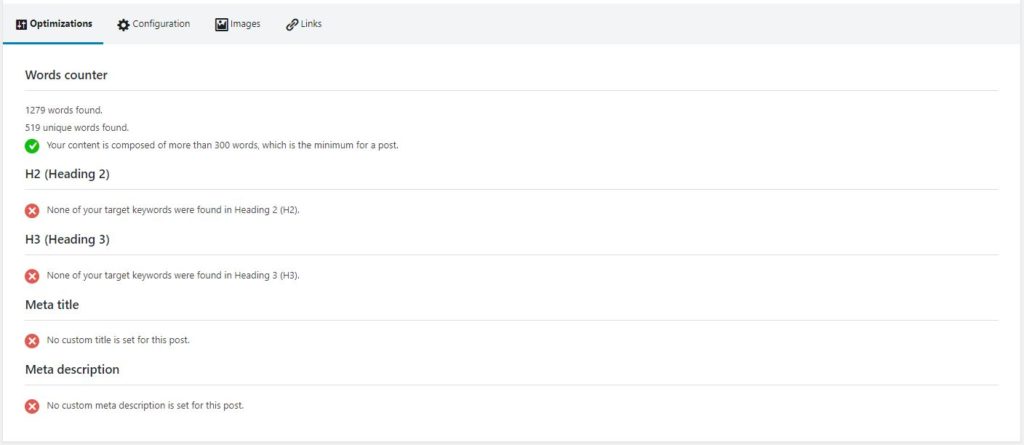
Some SEO plugins like SEOPress will also rank your content by other important factors for SEO so you know how to improve your page or post:

11. You Can Upload Photos, Videos, & Documents

WordPress supports all of the most common file types including .jpeg, .png, .pdf, and more.

Unfortunately, some of the other guys do not support as many file types as WordPress.

So if you are planning a media-rich site, WordPress is the way to go!

12. WordPress Is Mobile-Friendly

In 2015, Google released an update that rewards mobile-friendly websites, placing them higher on the results page (marketers lovingly called it “mobilegeddon”).

Consequently, non-mobile-friendly websites are penalized.

Mobile-Friendly a.k.a. Responsive – A mobile-friendly website is a website that is easy to view, read, and navigate on a smaller screen; it adapts to the screen size it is being viewed on.

Many WordPress themes are built to be responsive to all screen sizes including smartphones and tablets.

With WordPress, you know that your website is being rewarded rather than penalized in the search results!

13. WordPress Is Safe & Secure

The WordPress team is constantly releasing new updates to make WordPress software safer and better at keeping threats at bay.

As the most popular CMS out there, you can count on this being a priority.

WordPress provides security for over 30% of the internet!

14. It’s Just Popular!

Finally, the popularity of WordPress itself means that you can count on it sticking around and getting a lot of tender loving care.

~

We have used WordPress for all our new client websites and we thoroughly enjoy it.

Are you ready to join the 30% of the internet that uses the best CMS out there?

If you are interested in learning more about launching a WordPress website with us, we would love to geek-out with you in a free consultation!

Wherever you go, we hope that you can find the perfect website tool to meet your needs.

Happy marketing!

https://youtu.be/CkAwZJb8A4M

“Your website is potential customers’ first impression of your business.” – #TeamBeacon

If you are like most busy business owners or marketing professionals in Reno, you probably have an outdated website that has been floating in the internet abyss for years now, just waiting for some tender loving care.

Although website experts recommend a redesign every 2-3 years, a lot of folks struggle to keep up with this pace.

Every time a significant industry trend changes, a new product or service is added to your business, or new staff are hired or fired, you face another website update.

Sometimes you simply need to start from scratch.

Never fear, our proven process is here!

~

Cheesiness aside, we truly have an excellent website design process that has been 20 years in the making.

It is this process that we are going to share with you today!

Our desire is that, as you read this article, a concrete path forward begins to clarify in your mind. Enjoy!

1. Schedule a Meeting with Your Reno Team

Your first step is a meeting of the minds.

It is likely that everyone on your Reno team has a different idea about why you are designing a new website, what your goals are, and what a strong website looks like.

Use the power of collaboration to refine your collective vision!

Ask your Reno team some key questions to discern a path forward–we have outlined some of the questions we ask our clients below.

Request that the team comes prepared having looked at some websites they like as well as some that they dislike.

  • What are your overall business goals? Is there any area of your business that you would like to grow?
  • Why do you want a new website design? List two goals that you would like a new website to achieve.
  • Of all the information on your website, which is the most important for customers to find quickly? What are your primary products or services?
  • What features stand out to you on websites that you like the look and feel of?
  • Is there any imagery that you want on the website? Any that you don’t? Do you have a brand guide?

The goal of this meeting is to discovery concrete features and specifications for your new website design.

For example, do you want Reno customers to schedule appointments directly online? In the design phase, you will need to be sure you have a plugin that allows for this.

Also discuss your current marketing strategy–differentiators and target audiences–to ensure your new website design aligns with your marketing efforts.

2. Create a Site Map and Wireframe for Your Website Design

Industry terms like “site map” and “wireframe” may sound daunting, but they are actually fairly simple when stripped away to the basics.

A site map is simply a flowchart of the information you want on your website and how it should be organized.

The simplest site map takes the form of a bulleted list, for example:

  • Home Page
  • About Us
  • Services
    • Service A
    • Service B
    • Service C
  • Blog
  • Contact Us

This is the most basic site map format that we recommend to our Reno clients.

Of course, your new website design may be a bit more complicated with multiple service pages, an “Events” tab, or perhaps a place for published deals, but you get the gist.

Your site map is the foundation for your website wireframe, which is why we have included these two elements in the same step.

What is a wireframe?

According to Google, a wireframe is:

“…An image or a set of images which displays the functional elements of a website or page, typically used for planning a site’s structure and functionality.”

At its core, a wireframe is a sketch–a mock-up–a drawing of your website pages and how you want them to be laid out.

A wireframe is not as detailed as a fully developed site; it is simply lines, boxes, and perhaps a few images if you have them at this point.

Taking your site map in hand, create a wireframe for each of the pages listed, portraying where you want all headlines, images, written content, and buttons to go:

Source: SmartDraw

Wireframing can be a bit harder than creating a site map at first.

If you would like to practice before you wireframe your own original website design, a great way to learn is to look at the elements on a page of a strong Reno website and try to imitate the layout in wireframe form.

~

At Beacon, we love our free online tools!

Although we use paid software called Adobe XD for our wireframes, there are a lot of free options available online.

Take a look around and find something that you are comfortable with using.

We recommend a software that offers templates and drag-and-drop features for beginners.

MockFlow is popular and offers a basic package for new users.

~

In your wireframe, it is okay to use filler text such as “lorem ipsum,” but you will want to be thinking about your final content as early in the process as possible!

3. Write the Website Content with Your Reno Team

Once again taking up your site map, write content for each of the pages you are planning for your new website!

Keep the following best practices for website content in mind as you go.

A. Reno Relevant Keywords

Keywords are the words and phrases customers are searching to find you and the products and services you offer, for example, “website design in Reno.”

In order to rank on the first page of Google for these searches, you must tell Google that you are relevant to those keywords in its own terms.

Google likes to see relevant keywords incorporated throughout website content–this is called search engine optimization (SEO).

Focus on 1-2 relevant keywords per page of your website and place them naturally throughout the content.

Write 400-600 words on each page for the best results, but watch yourself!

Do not overuse your keywords of choice.

This is something called “keyword stuffing” and it is not acceptable to Google or to the customers who read stuffed content.

B. Eye-Catching Headers

Fashion is just as important as function when it comes to website content.

In some aspects you are writing for Google, in others, you are writing for your Reno customers.

To keep customers engaged and to satisfy Google’s requirements, use strong formatting practices such as short paragraphs, pull quotes, bullet points, imagery, and eye-catching headers.

Headers indicate to users the end of one thought and the start of another.

They are also important for SEO!

Place the relevant keywords you have chosen in your headers to boost your rankings.

Once you place the content on your website in the development phase, specify that the headers are either “H2” or “H3” in the content management system you are using, whether that be WordPress or something else, for best results.

C. Quality Website Content

Another important metric considered by Google is the quality of your content.

This is measured by parameters like “unique words” and “bounce rate,” or, the rate at which users visit your website and leave.

To encourage people to stay, write unique, compelling content that is from your distinct point-of-view!

Speak directly to customers in second-person using the word “you.”

Empathize with their challenges in Reno and present your product or service as a tool they can use to overcome them!

~

Something that must be a part of every website page is a call-to-action (CTA) at the very end of your content.

This is a proposed step that the reader can take to act on what they have just read!

For example, at Beacon we would say, “schedule a free consultation to learn more about our website design services,” linking to our scheduler where appropriate.

4. Implement Your New Website Design

The content you write, the wireframe you create, and the site map you plan all form the groundwork of your new website design.

Once these pieces are in place, it’s time to get started!

At Beacon, we use an advanced WordPress plan that allows us to custom develop all our Reno clients’ websites.

WordPress also offers several packages for beginners that do not require the skills of a web developer.

These packages allow you to select pre-developed themes and customize them according to your brand!

Source: WordPress

Select the package that best fits the needs of your website and create an account with WordPress.

You will be ushered into a guided set up process that allows you to pick a theme and begin customization.

Be sure to choose a theme that can be customized to match your site map, wireframe, and content!

After you are in, upload your logo, colors, and fonts where indicated.

Add your images and upload your written content according to your wireframe.

~

WordPress can be tough to navigate for the first time.

Use a resource like WPBeginner to see you through to the end if you ever get stuck!

5. Set Your Website Live!

If you are happy with your website design, it’s almost ready to go!

We have a go-live checklist that we follow with all of our Reno clients.

Here are just some of the items that you will want to cover:

  • Check all links on all pages of the website and make sure they go where they say they do.
  • Test the contact form by submitting an entry and seeing if it arrives in the correct email inbox.
  • Visit the website in all major browsers–Chrome, Firefox, and Safari–as well as on mobile to ensure it looks great everywhere.

If you are operating on a basic WordPress package, your website should already be “live.”

That said, the domain name for your old website is not yet pointing to your new one.

Visit the account you made when you first purchased your domain and set it to point to your new website.

Now your website is truly “live” and operating at the correct address!

Congratulations!

~

If your Reno team is busy with other aspects of your business and would like an agency to take care of their website design, please reach out!

We would be happy to set you up with one of the free consultations we mentioned.

Otherwise, we hope you enjoy learning from this process that we have developed after 20 years in website design!

Do you know how many people visit your website in a year, month or even a day? We’ve been tracking many of the websites that we’ve created over the last year and have some interesting results from Alaskan as well as global users. First, some general usage facts: 12% of the world’s population that lives in North American and Western Europe can account for 60% of the world’s private spending (www.worldwatch.org). As of 2015, internet usage has penetration the population of the US by 87.9%. For perspective, the average internet usage penetration worldwide is only 46.1% (internetworldstats.com). On the local sites we tracked, visitors came from 15 countries and 16 states.

One question that we ask is where are our visitors spending most of their time and how do they navigate the website? On average, our Alaskan visitors spend about a minute longer than the average user on each site. Home pages still rank very high on visits, but with limited time spent there. Consistently, the most visited pages of the sites we track are About Us and Contact Us. Most of our visitors are spending one to three minutes on the About Us page; this is quite a long time given that the overall average time a person spends on one page is under a minute.

Users’ attention span is shortening so your website needs to be a space where your visitors want to stay, — rather than move on to your competitor’s site. Creating a positive brand experience through a website can result in new connections and, in turn, business.
When creating new websites, we use a grid system, which is a framework for a dynamic and engaging design that isn’t too busy. Whether users know it or not, the grid is a key factor in creating that positive experience, or “aesthetic-usability effect.” Rob Szumski’s blog says it best: “the Aesthetic-Usability effect is the perception that more aesthetically pleasing interfaces are easier to use than less aesthetically pleasing ones.”

By tracking our visitors’ locations, time spent on a site and specific pages, and by creating captivating website designs, we ensure that our users are finding more valuable sources online, so we’re all getting results!

What is a landing page and how can it benefit your medical practice’s website?

You may have a beautifully crafted website that contains valuable content and educational blogs; however, it is easy for visitors to get lost in all the noise. Creating landing pages is the best way to avoid visitors bouncing off of your website. You want to keep visitors’ on your site, exploring the services your clinic offers.

There are two main types of landing pages:

1) Click Through Landing Pages: The purpose of this page is to encourage visitors to click through to another page. A common example is a product or service page that provides information to the visitor that can lead them to towards making a purchase. The next page would be a shopping cart or registration page. Having the landing page, a step before the shopping cart, increases conversions by providing information that helps the visitor make an informed decision.

Screen Shot 2015-12-02 at 1.28.36 PM

2) Lead Generation Landing Pages: These pages are used to capture useful visitor information. The form can be as simple as asking for their name and email address. From there you can create a connection via email to continue future marketing. The forms are strategically tailored to gain personal data without damaging the conversion rates.

Screen Shot 2015-12-02 at 1.35.46 PM


What are the benefits?

The visitors can find the landing pages through a Pay Per Click ad on Google, a Facebook ad, or a sponsored/promoted post, leaning them to your site. The addition of these product/service pages will not only create a better user experience for your visitors but will also increase the conversion rates for your products or services, nothing but a “win-win” for both parties.

At Beacon we work with a variety of medical clinics to develop landing pages that help convert leads and increase calls to your offices. Give us a call at 907-563-6008 or email us at [email protected] and we’ll chat.

Nowadays there are a number of automatic website builders out there, where you can login and make your own website. They tout things like: “Get an automatically optimized version of your website for mobile in just one click” or “Everything is customizable”. And some of them will do it for free!

So why hire a professional web developer for your business instead of using one of these services?

1) SEO (Search Engine Optimization)

Most of these websites are barely optimized at all for a search engine like Google. This means that if you want visitors to hit your site, you’re going to be fighting an uphill battle. Google has a bot that hits each site it visits and reads through all the data to see what your site is about. And if it finds content that is relevant to what someone has searched for, it returns a link to your site for that person. But the coding behind many of these site builders is not kept up-to-date. They are focused on making it easy to use, not easy for Google to see.

A professional web developer builds your site from the ground up with the absolute current requirements of search engines like Google, Bing, or Yahoo. And there are hundreds of little tweaks that can make sure you look the best to search engines. These are all very important, and they are things you don’t get with these automatic site builders.

2) Keep your Content Safe

Have you ever written a long email to someone with lots of important details… only to have your email program crash and you lose all of it? Many times while working with these builders, you’ll find that one mis-click of a button deletes all the content of a page, or an entire section that was important for your website.

Another way this shows up, is when you’re blogging. Although some sites allow you to create new articles in a blog format, many still don’t. And you end up rewriting the same page of content over and over again in order to keep your site fresh and up-to-date (which is the #1 most important detail for search engines). This is hardly an efficient way of running things.

A professional web developer will use a content management system (CMS) that will keep all of your data backed up, with historical information (like if you change a static page), as well as have full featured archive systems for any user to find articles that you’ve written over the course of your websites life. This provides more entry points for Google and other search engines to bring new visitors to your site.

3) Your Time is Money

These automatic web site builders like to tout how fast and easy it is to do this yourself. But the facts are the same with any of these things you do yourself: they cost you time. A lot of time, that you could spend on your business instead of on Marketing, updating content your website, or researching current internet trends to stay on top.

This is another way that a professional web developer will save the day. They know all about the current trends because it’s their whole business. They can do it faster than you can, and they’ll do it more thoroughly, while you take care of what YOU are good at: your business.